Build Scrapy spiders faster, without giving up control.
Web Scraping Copilot is an AI assistant for Scrapy developers that generates parsing code, helps validate extraction results, and accelerates spider development directly inside VS Code.
AI Writes Code. Scraping Breaks.
Developers are experimenting with AI coding assistants to build spiders faster.
But scraping is different.
Generic copilots hallucinate selectors.
They don’t understand Scrapy structure.
They ignore pagination edge cases.
They don’t help you compare expected vs extracted results.
They generate code you don’t fully trust.
Scraping isn’t just writing Python. It’s building a system that survives change.

Web Scraping Copilot is purpose-built for Scrapy workflows.
Web Scraping Copilot injects Zyte’s scraping expertise into your LLM so developers can generate, test, and deploy reliable Scrapy spiders directly inside VS Code

Automatic Scrapy project setup

Structured parsing code generation

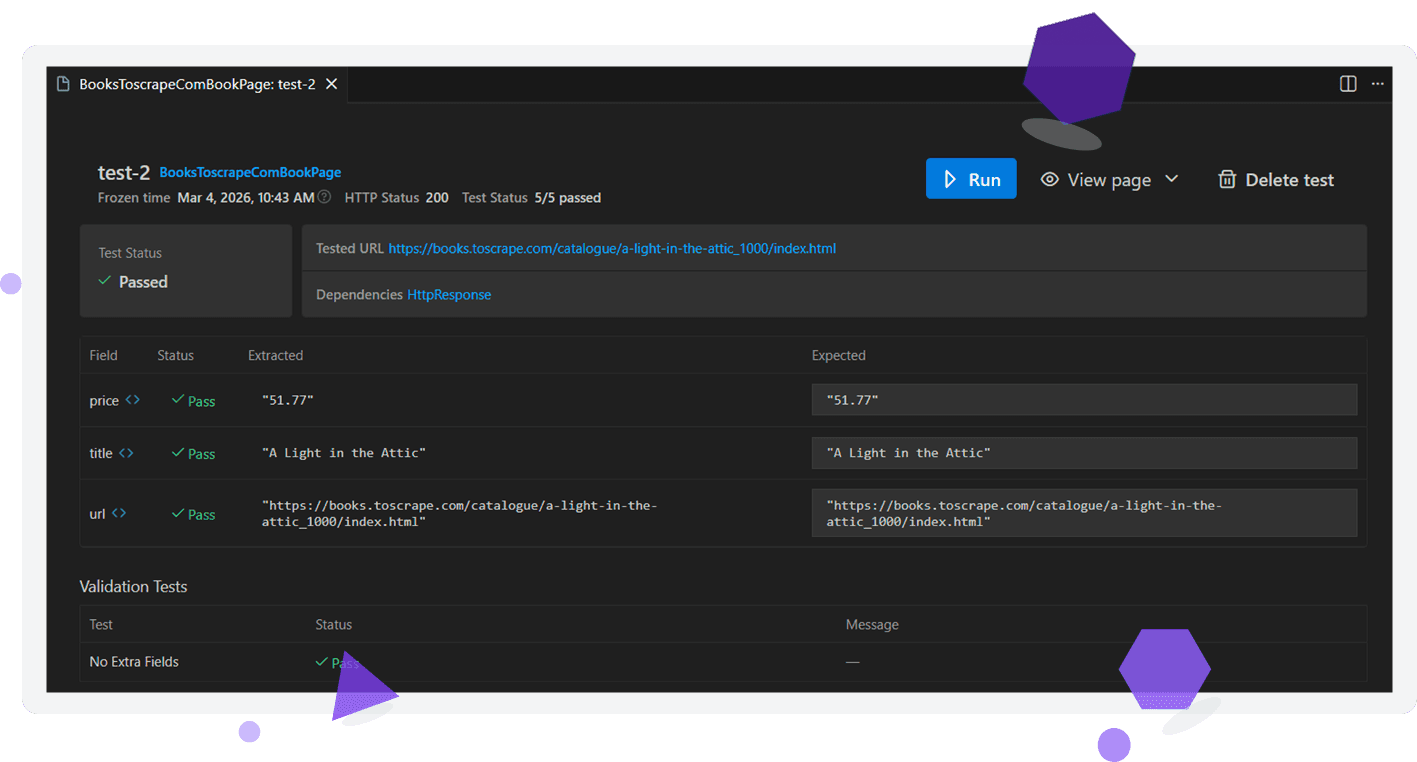
Built-in inspection & validation UI

Local, transparent AI assistance
From installation to working spider in minutes.
Web Scraping Copilot is built to reduce friction between idea and extraction. No context switching. No black boxes. No hidden automation.
Built for Scrapy developers, not generic AI users.
Web Scraping Copilot is designed for engineers who already understand scraping and want to move faster without sacrificing quality.

For Python & Scrapy engineers

For teams shipping production crawlers

Not a no-code scraping tool

Not a fully autonomous agent
What’s new in Web Scraping Copilot 1.0

Automatic Scrapy project creation

Faster time to first extraction

Built-in troubleshooting & validation UI

Cleaner, more reliable code generation

Plug into Zyte API when scraping gets harder
From local development to production scraping
Web Scraping Copilot helps you build spiders faster. When you’re ready to run them at scale, Zyte provides the infrastructure to support them.
Handle bans and anti-bot defenses
Integrate with Zyte API to bypass blocking, manage browser automation, and access difficult websites reliably.
Deploy and run spiders in production
Use Scrapy Cloud to schedule jobs, monitor runs, and manage spiders without maintaining your own infrastructure.
Scale extraction workflows
Move from local experimentation to reliable data pipelines — while keeping the Scrapy codebase you built with Copilot.
Build with the same ecosystem
Web Scraping Copilot, Zyte API, and Scrapy Cloud are designed to work together, giving teams a clear path from development to production scraping.
Install Web Scraping Copilot for VS Code
Build spiders faster with AI assistance designed specifically for Scrapy workflows.
Q&A — Web Scraping Copilot for VS Code
Is there a web scraping extension for Visual Studio Code?
Yes. Web Scraping Copilot is a VS Code extension designed specifically for building Scrapy spiders faster. It helps developers generate parsing code, inspect extracted data, and iterate on scraping logic directly within the VS Code environment.
What is Web Scraping Copilot for VS Code?
Web Scraping Copilot is an AI-assisted development extension for Scrapy workflows. It helps developers generate parsing logic, inspect page structures, and validate extracted data while maintaining full control over the code in their local Scrapy project.
How is Web Scraping Copilot different from GitHub Copilot for web scraping?
Generic AI coding assistants can generate Python code but often struggle with web scraping patterns such as selectors, pagination, and structured extraction. Web Scraping Copilot is purpose-built for Scrapy workflows and understands the structure of scraping projects.
Can Web Scraping Copilot generate Scrapy spiders automatically?
Web Scraping Copilot can generate parsing logic and help structure spiders based on the data you want to extract. Developers still review, refine, and maintain the generated code as part of their Scrapy project.
Does Web Scraping Copilot work with existing Scrapy projects?
Yes. You can open an existing Scrapy project in VS Code and use Web Scraping Copilot to generate parsing logic, inspect target pages, and refine extraction rules.
Is Web Scraping Copilot a no-code web scraping tool?
No. Web Scraping Copilot is designed for developers. It generates code inside a Scrapy project rather than hiding scraping logic behind a visual interface.
Can I use Web Scraping Copilot without using Zyte API?
Yes. Web Scraping Copilot works locally with your Scrapy project. Developers can optionally integrate Zyte API later to handle blocking, browser rendering, and anti-bot protections.
How does Web Scraping Copilot help debug web scrapers?
The extension includes a built-in interface for inspecting page objects and comparing expected vs extracted data. This helps developers quickly identify issues with selectors and parsing logic.
What programming language does Web Scraping Copilot support?
Web Scraping Copilot is designed for Python developers using the Scrapy framework for web scraping.
How do I install Web Scraping Copilot in VS Code?
You can install the extension from the Visual Studio Code Marketplace. Once installed, you can create a new Scrapy project or open an existing one and begin generating parsing code.
Can VS Code be used for web scraping development?
Yes. Many developers build and maintain web scrapers directly in Visual Studio Code using frameworks like Scrapy. Extensions like Web Scraping Copilot can accelerate this workflow by helping generate parsing code, validate extracted data, and debug spiders.
What tools do developers use to build web scrapers in Python?
Python developers often use frameworks such as Scrapy for building scalable web scrapers. Development typically happens in editors like VS Code, sometimes augmented with extensions such as Web Scraping Copilot to speed up spider creation and debugging.
Is there an AI tool that helps write web scraping code?
Yes. AI-assisted tools can help generate scraping logic and selectors. Web Scraping Copilot is designed specifically for Scrapy workflows, helping developers generate parsing code and validate extraction results directly inside VS Code.
How do developers debug web scraping code?
Developers typically debug web scrapers by inspecting HTML structure, validating selectors, and comparing extracted data with expected results. Tools like Web Scraping Copilot provide built-in interfaces to inspect page objects and iterate on parsing logic within VS Code.