
Data engineers are increasingly handing the data quality imperative to LLMs. You plug in an AI checker, let it verify your scraped data, and move on. Sure, it sounds like progress - but a recent conversation made me question whether we’re skipping a step.
I sat down with Tomasz Lesiak, a quality assurance (QA) engineer at Zyte who has spent four years verifying scraped data across hundreds of projects, and asked him a simple question: “If you had to explain the data quality (DQ) process to a developer without mentioning AI at all, how would you describe it?”
The short answer: every quality check, manual or automated, AI or not, comes down to the same three questions. Until you can write those three questions down for your own project, you don’t have data quality; you have hope.
What is data quality?
Neha: “If you had to explain data quality without mentioning AI at all, how would you describe it?”
Tomasz: “I don’t even know how to put it.”
That paradox is common to anyone who has so mastered their field to the point of automatic instinct that articulating the process feels challenging. Tomasz opens a website, compares it to the scraped data, item by item, field by field, and knows instantly when something is off. But, when I pushed him to explain further, Tomasz’s framework became clear. Data quality comes down to three questions:
1. Item coverage: ‘Did we catch every item?’
If a site has 1,450 products and your spider returned 800, something broke. Maybe pagination stopped early. Maybe a category page didn’t load. Maybe the spider hit a rate limit and gave up silently. The data looks clean, it’s just incomplete.
2. Field coverage: ‘Did we fill in every detail?’
You may have collected 1,450 items, but 40% of them have no price and 60% are missing images. The spider didn’t error out, it just delivered hollow records. This one is sneaky.
3. Field accuracy: ‘Is the information actually correct?’
You have the item, you have the field populated, but the value is wrong. The product title says “pet-friendly” when the actual title is something else. The price shows $0.00. The description contains raw HTML instead of text. This is the hardest to catch because the data looks structurally fine. It just isn’t true.
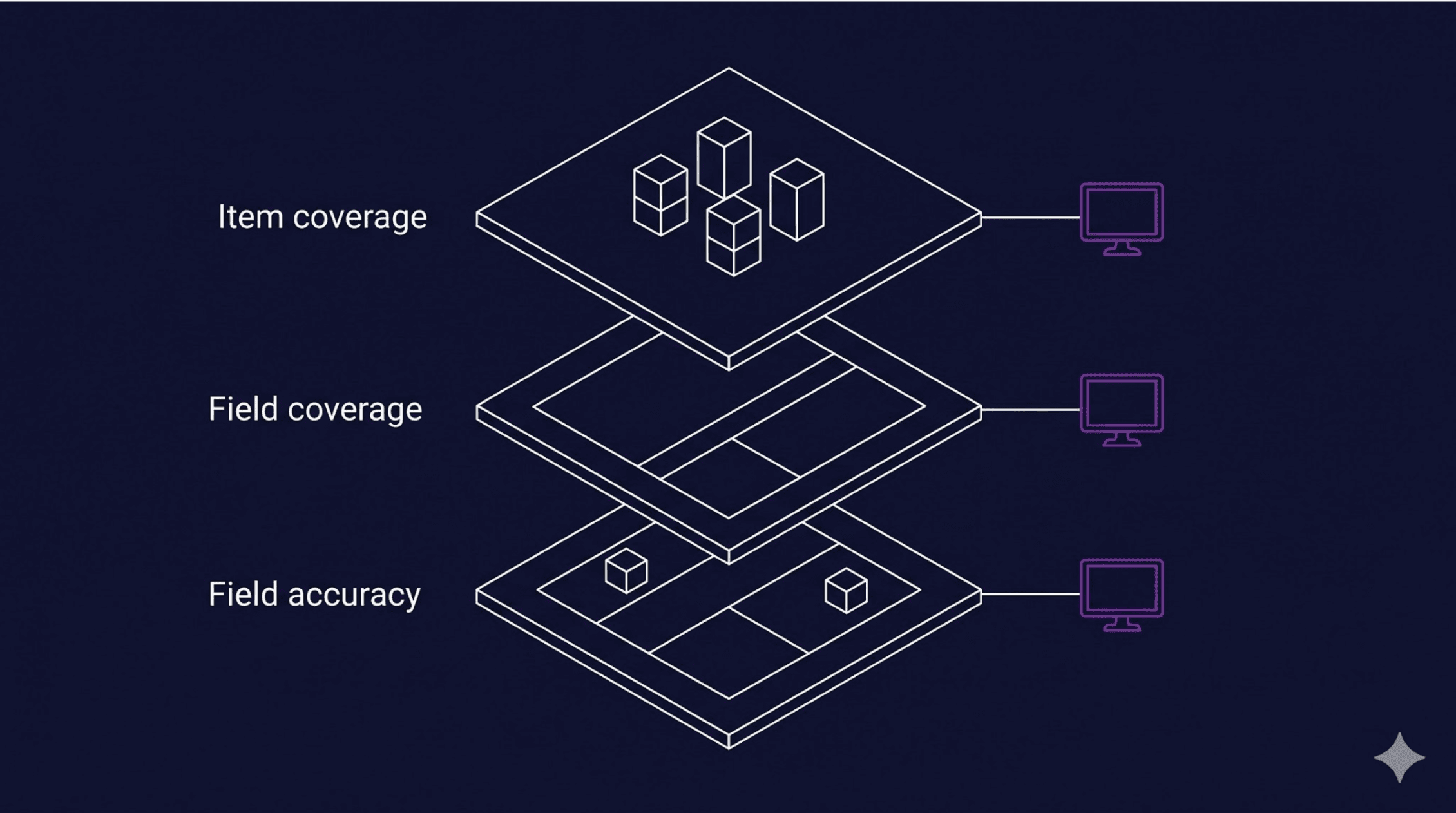
Every tool Tomasz has used, from manual side-by-side checks to schema validators to AI-powered copilots, exists to answer these three questions. The tooling changes, but the questions don’t.
That is the whole data quality thesis in three lines. Every blog post you read about AI for data quality, every vendor pitching you an LLM-powered validator, is doing some version of these three things. If you can’t articulate them for your own project, you can’t evaluate any of those tools, and you certainly can’t trust their output.
The DQ before AI
Neha: “Walk me through how Zyte’s QA team operated before LLMs entered the picture.”
Tomasz: “Three layers: JSON Schema first, then manual checks, then automated tests in notebooks.”

1. The importance of JSON Schema
The schema is the contract between the spider and the client.
Every project has one. It defines the fields, their types, their allowed values, their patterns. If the data doesn’t match the schema, it’s wrong.
2. Testing your data
Manual testing comes next. Zyte has had an internal side-by-side comparison tool, called Manual and Automated Testing Tool (MATT), for over a decade: scraped data on the left, the live website on the right. The QA engineer opens item after item.
- Product title matches? Check.
- Price correct? Check.
- Image present? Check.
- Dimensions populated? Empty, but the website shows measurements. That’s a bug. Report it.
“Checking items one by one was the worst way to do it,” Tomasz says, “but also the best way, because there was no other way.” Manual QA catches everything, but scaling it is nearly impossible.
3. Automated tests
The third layer is Jupyter notebooks with Pandas. Run automated tests for predictable issues like duplicate URLs, empty required fields, and prices that don’t match regular expression patterns.
This was our first real automation at Zyte, and it still handles anything you can express mathematically.
Quality as a process
Notice the sequence. Schema, then manual, then automation. This is the same shape Zyte’s wider extraction team uses to guarantee data quality on managed projects.
There’s a reason it’s stayed stable for years:
- People tend to want to skip straight to automation.
- But the manual step is where the rules get encoded into the QA engineer’s instinct, and automation just makes those encoded rules cheap to run at scale.
If you skip the manual step, your automation reproduces whatever you guessed instead of what you actually verified.

Discovering the value LLMs bring
Neha: “Where did large language models (LLMs) first prove genuinely useful for you?”
Tomasz: “In testing fields that resist mathematical rules.”
The example he reaches for is job postings. Job listings tend to contain salary ranges, buried somewhere in an unstructured description:
- One listing writes it as “$50,000-$70,000.”
- Another writes “50-70K annually.”
- A third puts it in a sentence: “competitive salary starting at fifty thousand.”
A regex won’t catch all three. For Tomasz, this is where LLMs became essential - not as a replacement for the QA process, but as the layer that handles fields you can’t reduce to a formula.
This is the right way to think about where AI sits in the stack. The LLM is the layer for unstructured fields and ambiguity, not the layer for “is this data good?”
Once you hand the real work to an LLM, measuring its data quality becomes its own discipline. Hand it the whole problem and you skip every step that defines what “good” actually means for your project. The LLM ends up guessing, too, just with more confidence.
Spidermon to the rescue
Neha: “How did all of this become automated, before AI got involved?”
Tomasz: “Spidermon.”
Spidermon is a Scrapy add-on for spider monitoring and validation. It’s open source, it’s been at Zyte for years, and any developer using Scrapy can set it up today.
Crucially, it’s structured around the same three questions Tomasz asks every day:
| Target | Description |
|---|---|
| Item coverage | If a spider usually collects 2,700 items and suddenly returns 500, Spidermon flags it. |
| Field coverage | If images are normally present in 60% of items and that drops to 30%, it creates a ticket. |
| Field accuracy | Monitors schema violations, unexpected nulls, and abnormal run duration. |
Developers set thresholds based on historical data. If a field’s coverage drops below the threshold, Spidermon, in Tomasz’s words, “starts yelling.”
Most of the QA tickets at Zyte come from Spidermon, not from humans spotting issues.
Here’s a basic Spidermon setup for field coverage monitoring:
For item coverage, track item count against historical averages:
For field accuracy, combine Spidermon with schema validation:
from spidermon.contrib.validation import JSONSchemaValidator
class ProductValidator(JSONSchemaValidator):
schema_url = "https://your-project.com/schema/product.json"
Three tools, three questions:
| Question | Tool | What it checks |
|---|---|---|
| Did we catch every item? | Item count monitor | Spider output vs historical average |
| Did we fill in every detail? | Field coverage monitor | % of items with each field populated |
| Is the data correct? | Schema validator | Field types, patterns, allowed values |
All of this works today, on any Scrapy project, without an LLM anywhere in the loop.
Spidermon isn’t really a monitoring tool, it’s an articulation tool. It forces you to encode “good” into a number, a rule, a threshold.
Writing those thresholds is the thing the LLM can’t do for you. Once you’ve done it, an AI layer can sit on top and do useful things.
Skip the encoding step, however, and AI is just a more confident way of being wrong.
From anxiety to autonomy
Neha: “We’re moving toward autonomous, agent-built pipelines. What worries you, and what gives you hope?”
Tomasz: “The context window problem.”
When an AI copilot checks a spider, it needs the schema, the HTML of the page, the prompt, the spider stats, Tomasz said. All of that has to fit in the large language model’s context window. Even with everything loaded in, the AI still misses things a human would catch in five seconds of visual comparison.
The hope is on the other side of that same problem. Encoded thresholds, defined schemas, established baselines: all of it is context the AI can read. The work doesn’t go away, it moves earlier in the process.
That’s where the industry is heading:
- Coding agents generate scrapers.
- AI extracts data from pages.
- Pipelines deliver datasets without a human touching them end-to-end.
We’ve written about that shift in “dDawn of the autonomous data pipeline” and “Web data for scraping developers in 2026: AI fuels the agentic future”. Autonomous maintenance requires autonomous quality checks, and right now the bottleneck isn’t the AI’s capability, it’s our ability to describe what “good” looks like clearly enough for the AI to verify it.
The thresholds you set in Spidermon, the schemas you define, the baselines you establish: that’s the context your future AI copilot will consume.
A developer’s data quality checklist
Tomasz’s data quality process can be distilled into something you can run on your next spider:
Define your schema before you deploy. Every field gets a type, a pattern, a description of what “correct” looks like. If you can’t describe it for a schema, you can’t check it, manually or with AI.
Set your baselines from real runs. Run the spider a few times. Note typical item count, typical field coverage. These become your Spidermon thresholds. Don’t guess -use real numbers from real runs.
Automate the obvious first. Schema validation catches structural issues. Field coverage monitors catch silent failures. Item count monitors catch pagination breaks. None of this requires AI; it requires knowing what your data should look like.
Check accuracy manually, at least once. Open the website and your the scraped data. Compare them side by side - examine 30 items - enough to catch patterns that automation can’t. Look for a product title that’s a valid string but incorrect, a price that’s a valid number but belongs to a different product. This is the step most developers skip, and it’s the step that catches the worst bugs.
Then, and only then, add AI. Once you have the schema, the thresholds, and a manual baseline, an LLM can help with the fields that resist rules: salary extraction from unstructured text, descriptions that look right but don’t match the product on the page. The LLM needs the same context you built in steps one through four. Without that foundation, it’s guessing.
Try it yourself
Spidermon is open source: https://github.com/scrapinghub/spidermon.
If you’re building spiders with Scrapy and you don’t have quality monitoring set up, start with the three questions, define your schema, set your thresholds, and run Spidermon on your next crawl.
If you’re already using AI for data quality, ask yourself: “Can I describe what “good” looks like without the AI?”
If you can’t, the AI can’t either.




_HFpro5d6k3.png&w=256&q=75)
_E4PyVpfAxa.png&w=256&q=75)


-(1).png&w=1920&q=75)
-(1)_VZGHqxCgXV.png&w=1920&q=75)
