The rise of AI assistants has created a fascinating challenge: how do we give LLMs access to real-time web content in a way that's clean, structured, and actually useful?
Today, I am going to show you how to do that using a protocol that lets LLMs interact with third-party tools - Model Context Protocol (MCP).
We will be building connectors you can use to effortlessly scrape clean web data directly into your LLM-enabled code editor, using only natural language.
We will be doing it using a Docker MCP toolkit which makes it really easy to host local MCP servers, handle authentication and connect multiple clients together.
By the end of this guide, you'll understand how to build your own MCP server to extend your LLM client’s capabilities in any direction you can imagine.
Let's dive in.
Understanding the Model Context Protocol
If you haven't encountered MCP yet, think of it as a standardized bridge between AI assistants and external tools.
Sure, you could fetch your city’s weather forecast using the OpenWeather API, but how can your LLM app - say, Claude or Visual Studio Code - call on that data? Instead of writing code and making API calls, the LLM can connect to a remote MCP server provided by a weather service and get it for you.
The beauty of MCP is, unlike API endpoints, MCP calls use natural language. Instead of making a cURL request, you can just send “Is it going to rain tomorrow in Ottawa?” Through MCP, your LLM can connect to the MCP server and check the forecast for tomorrow.
Hundreds of companies have created their MCP servers, allowing LLMs to interact with them. For example:
| Provider | Instruction |
|---|---|
| GitHub | “Fetch the latest commits by me in this repo.” |
| Notion | “Get me info about our revenue goals from our ‘Projects’ database.” |
| Obsidian | “Write a ‘hello-world’ C program and dump it in my ‘Pprogramming’ vault. |
My favourite is the Context7 MCP server, which has the latest docs of almost every programming language and framework, which I use to ask questions and have conversations with documentation.
LLMs can also leverage workflows combining multiple MCP servers - for example, fetching weather from a weather MCP server and then saving the forecast to a Notion database using Notion’s MCP server.
The protocol defines a clean JSON-RPC interface that any client can implement. Once you build an MCP server, it becomes instantly usable by any MCP-compatible client: Claude on desktop, GitHub Copilot, or custom applications.
Just a word of caution - not all MCP servers which are available online are necessarily built by companies. For example, the one I am building today is not an official Zyte MCP server but, rather, a demo to showcase how you can build your own. Always double-check before giving your access to any MCP server and triple-check when adding your API keys in there.
Now that we know a little bit about MCP, we are going to use it to ask a special new feature of Zyte API to scrape clean web data, right into our project.
Zyte pageContent MCP server: Modern Web Content for LLMs
Here's the reality of web scraping for AI - raw HTML is a nightmare.
If you pass it all to your LLM, you’ll end up burning a lot of tokens. That can be costly because modern websites are layered with navigation bars, advertisements, cookie banners, sidebars, footers, and countless other elements that dilute the actual content you need. Add JavaScript-rendered content to the mix, and you have a real problem.
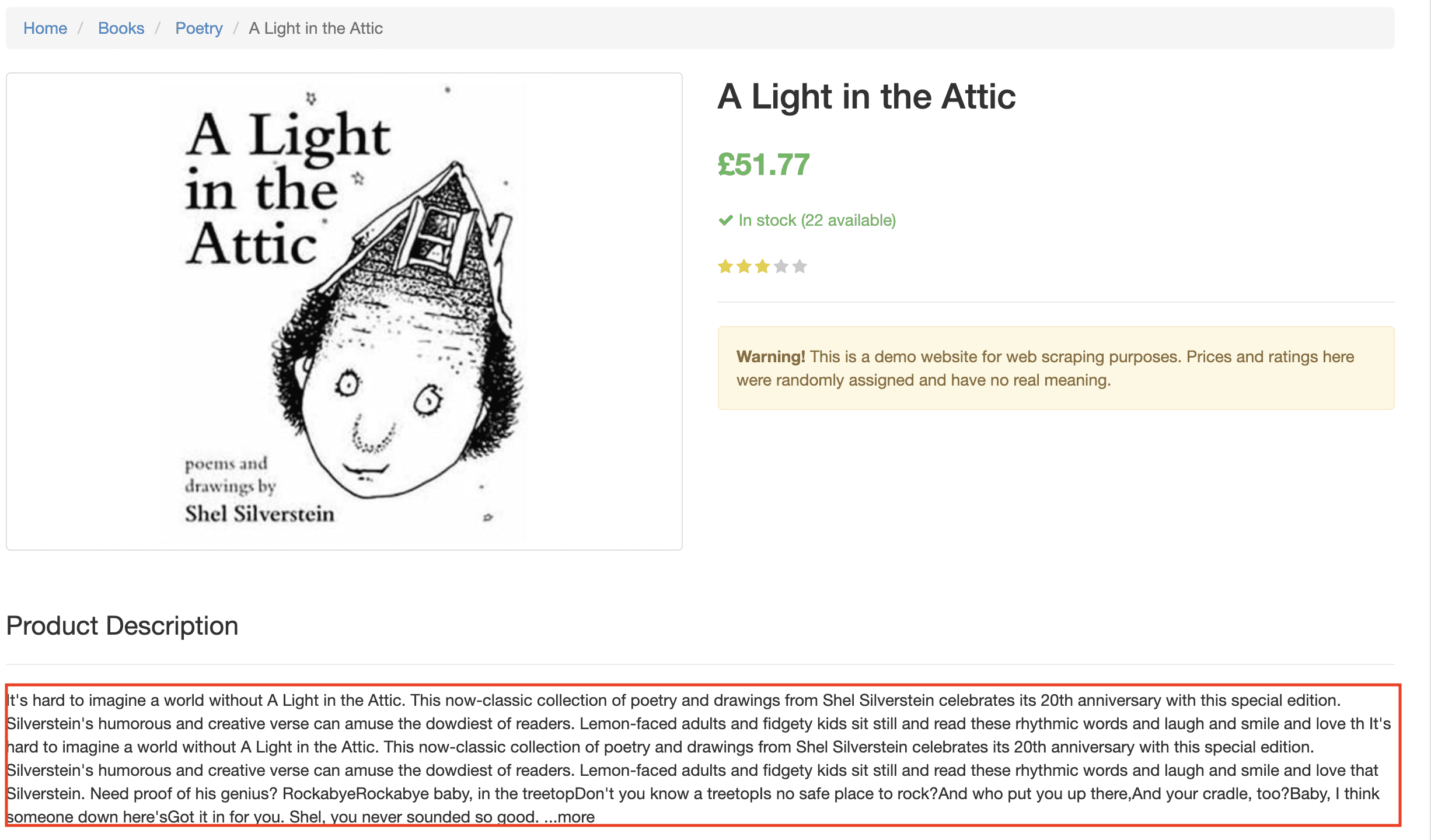
What LLMs need is:
- Clean, structured text from the main content area.
- No UI noise (navigation, ads, etc.).
- JavaScript-rendered content when necessary.
- Fast extraction to keep interactions responsive.
This is precisely where Zyte API's pageContent automatic extraction excels. It doesn't just grab the entire HTML source, it can intelligently identify and extract only the meaningful content from any web page, handling JavaScript rendering when needed.
With MCP and pageContent combined, we will be able to conjure clean data using just our words.
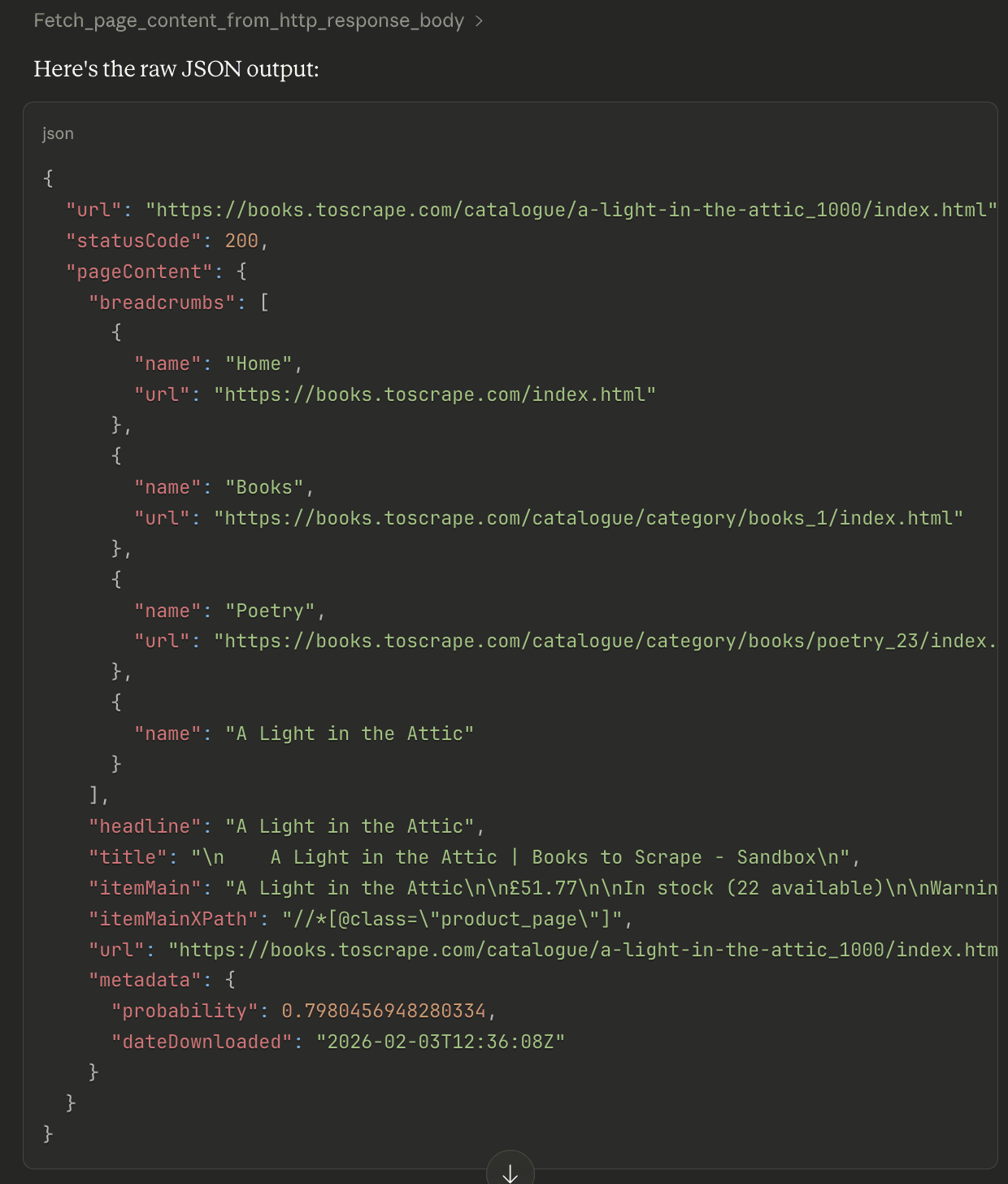
Architecture overview
Let's look at how our MCP server fits into the bigger picture:
1┌─────────────────┐
2│  LLM client			   │
3│   (ex: Claude Desktop)	   │
4└────────┬────────┘
5         │ MCP (local : stdio)
6         │
7┌────────▼────────────┐
8│ Docker MCP gateway  		    │
9│  (stdio transport)  		    │
10└────────┬────────────┘
11         │
12┌────────▼─────────────────────┐
13│  Zyte MCP server (container) 				   │
14│  - fetch_from_http           				   │
15│  - fetch_from_browser_html   			        │
16│  - fetch_from_browser_only   				   │
17└────────┬─────────────────────┘
18         │ HTTPS
19         │
20┌────────▼────────┐
21│   Zyte API      		   │
22│ api.zyte.com    		   │
23└─────────────────┘How does it all work?
To create the MCP server, I have used the FastMCP Python library, which has good documentation.
The following code example exposes two functions to wrapped inside MCP server to be used by LLM clients:
- Static sites: Uses Zyte API to get the
pageContentof the website provided fromhttpResponseBody: great for static websites. - JavaScript-heavy sites: Uses Zyte API to get
pageContentof the website usingbrowserHTML, the flag that turns on browser rendering.
1async def fetch_page_content_from_browser_html(url: str = "") -> str:
2    """Extract page content from browser HTML with visual features (default and best quality method)."""
3    if not ZYTE_API_KEY:
4        error_data = {"error": "ZYTE_API_KEY not configured", "type": "config_error"}
5        return json.dumps(error_data)
6
7    payload = {
8        "url": url,
9        "pageContent": True,
10        "browserHtml": True,
11        "pageContentOptions": {"extractFrom": "browserHtml"}
12    }
13
14    async with httpx.AsyncClient(timeout=120.0) as client:
15        response = await client.post(
16            ZYTE_API_URL,
17            auth=(ZYTE_API_KEY, ""),
18            headers={
19                "Content-Type": "application/json",
20                "Accept-Encoding": "gzip"
21            },
22            json=payload
23        )
24 return response.textThis helps set up our MCP server to make a call to Zyte API that fetches the page content and returns it to the user’s LLM client. Instead of a request library here, I have used httpx which is modern and supports async.
Why Docker MCP toolkit?
The Docker MCP gateway handles all the complexities of the server lifecycle:
Connectivity: The local MCP server works on
stdiotransport. The Docker MCP gateway makes it super-easy to manage that.Secret management: The Docker MCP gateway manages all the secrets so you don’t have to expose API keys to all your LLM clients. It can hold them centrally and use them whenever your LLM client needs it.
For example, this is how you pass the API key:
1docker mcp secret set ZYTE_API_KEY="your-zyte-api-key-here"Clean and simple!
- Multiple LLM client support: Do you want to use your MCP server with Claude, Visual Studio Code or Cursor? No problem - just connect them using the Docker desktop dashboard and everything is handled under-the-hood. There’s no need to pass API keys and setups to all your LLM clients individually.
- Spin it when you need it: You don’t have to keep your MCP server hosted and running all the time. Whenever your LLM needs to talk to your MCP server, it will make a request to Docker, which will spin up the container for your MCP server, make the connection and kill it when it is no longer required, hence saving resources.
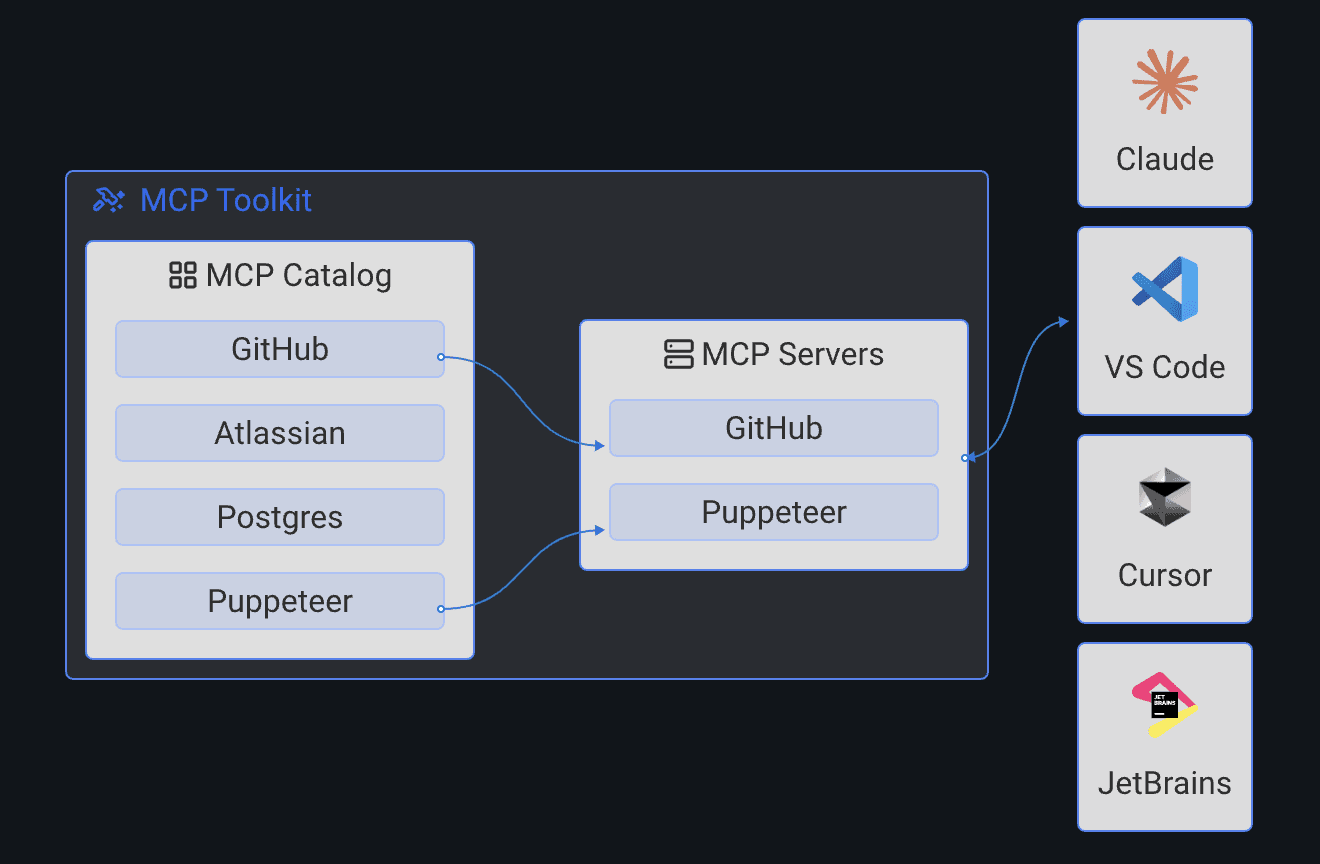
With Docker, however, you do need few extra steps:
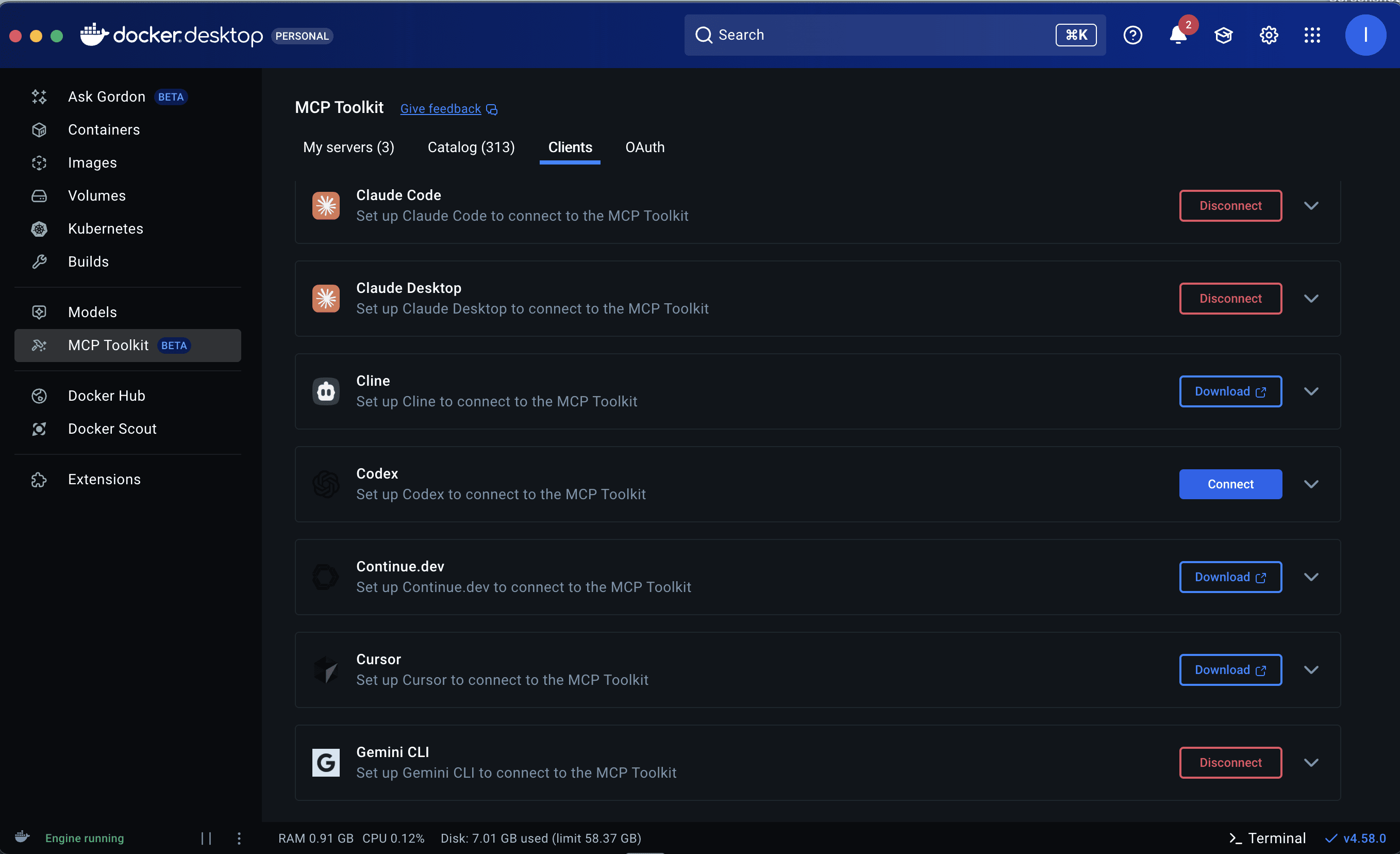
- Have Docker desktop downloaded locally and enable beta features: Yes, MCP Docker Gateway is still in beta and needs to be enabled.

- You also need to connect the clients. Docker Desktop will identify LLM clients you have locally installed - click “Connect” and restart them to use Docker MCP Gateway.
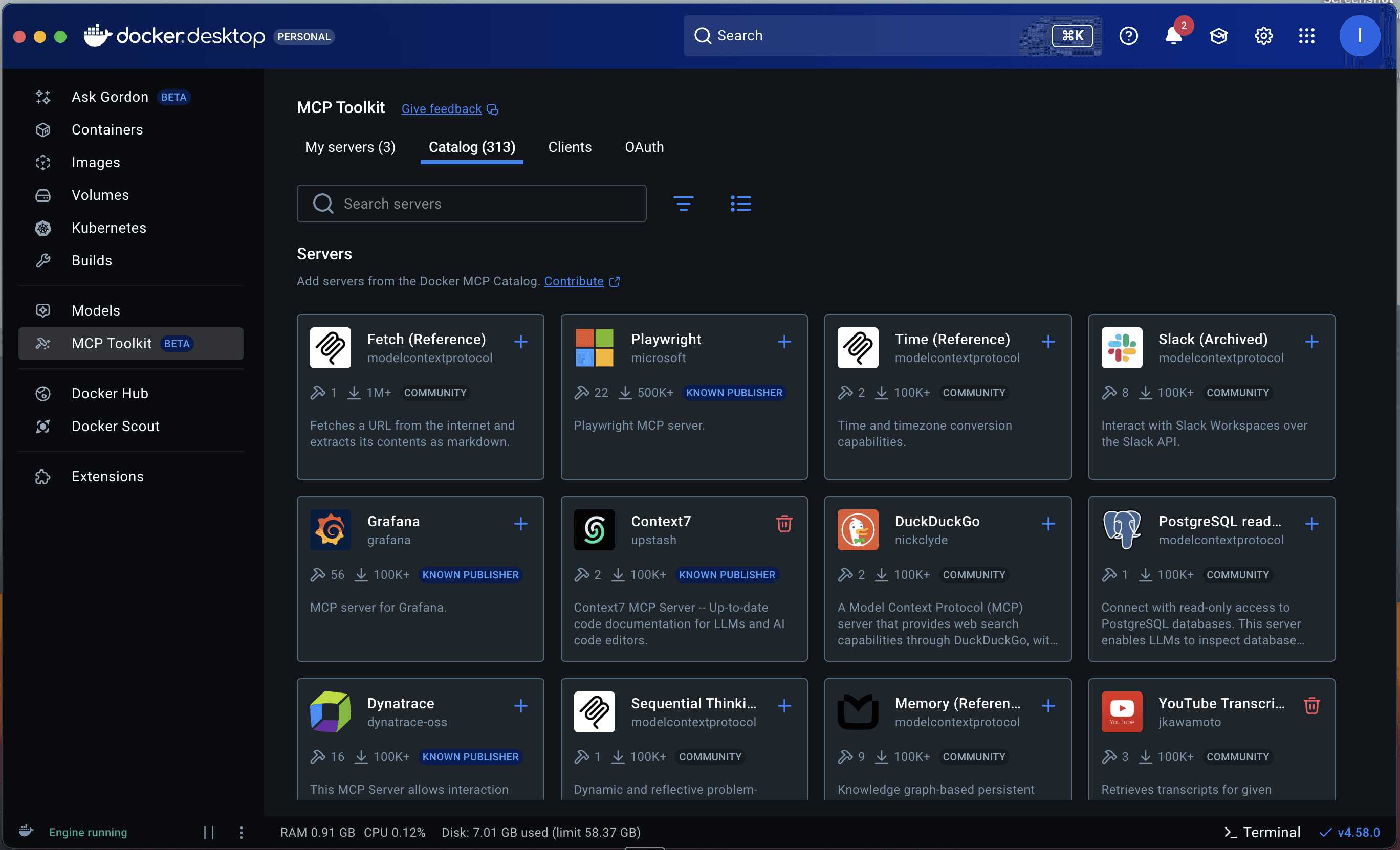
- Additionally, for custom MCP servers, you’ll need to add them to the Docker Catalog.
- You can also install other MCP servers from the Docker dashboard.
For extra help with all these setup steps, please refer to the README in my GitHub repository for this project.
Let’s see it in action
You just built an on-command, super-scraping AI personal assistant. Now you’re ready to go!
Ask your AI service to scrape. You can just use natural language. Some clients are intelligent enough to know they should use your MCP server without you needing to explicitly ask them, but you may need to explicitly give them permission to use it.
![image8][image7]![image2][image8]Making the call. Once you give the permission, the Docker container with your MCP server is spun up and gives you the result.
Go deeper. Now your AI app has pulled the main, clean content from a page, you can ask follow-up questions about the text.
![image8][image9]
Use your new content. Now things get interesting. Now that you have pulled clean web content, you can leverage your AI client’s other MCP connections to leverage it in other apps. For instance, you can store a book synopsis in a Notion database - the Notion MCP connection already knows how to do that. ![image9][image10]
Taking it further
So, this was our little MCP experiment, available to download at https://github.com/apscrapes/zyte-fetch-page-content-mcp-server
This MCP server has supercharged my LLM client (Claude Code) to fetch pageContent using Zyte API, and works even with JavaScript-heavy websites, allowing me to bring new context from the web into the conversation and ask follow up questions on such.
I encourage you to try out this system, setting up the project locally and then using this as a template to build your own MCP servers.
For instance, you could build a similar MCP server that taps Zyte API’s product automatic extraction capability, to return clean, structured details from ecommerce product pages.
Here are some more ideas:
- Database query server: Execute SQL queries and return structured results.
- Email server: Send emails, search inbox, manage contacts.
- Calendar server: Read/write calendar events, find meeting times.
- Code analysis server: Run linters, formatters, security scanners.
- Weather server: Fetch real-time weather data for any location.
- Translation server: Translate text between languages.
- File converter: PDF to text, markdown to HTML, etc.
MCP makes it possible to do all this using just natural language. I’d love to hear about what you build!
Conclusion
We've built a fully functional MCP server that brings real-time web intelligence to your LLMs. But more importantly, you now understand the pattern for building any MCP server you can imagine.
The combination of MCP protocol, FastMCP library, Docker MCP gateway, and Zyte API creates a powerful toolkit for extending LLM capabilities. You can extract clean content from any web page, handle JavaScript-heavy sites, and make this intelligence available to tools like Claude with just a few conversational prompts.
The possibilities are endless. What will you build next?
Resources
- Zyte API Documentation: https://docs.zyte.com/zyte-api/
- MCP Protocol Specification: https://modelcontextprotocol.io/
- Docker MCP Toolkit: https://docs.docker.com/desktop/features/mcp-toolkit/
- FastMCP Documentation: https://github.com/jlowin/fastmcp
- Full Source Code: GitHub Repository
Get your Zyte API Key
Ready to start building? Sign up for a free Zyte API account and get started today. The free tier includes generous credits for development and testing.