In the early 2000s, an email from Linux creator Linus Torvalds gave the software world one of its most enduring mantras: "Talk is cheap. Show me the code."
At the time, it was the ultimate arbiter of engineering credibility. According to Torvalds, you could theorize about architecture or memory management all day - but, if you could not produce the implementation, your ideas had no weight.
Code, then, was the proof of work, the evidence of understanding, and the literal manifestation of engineering skill.
I spent a significant part of my early career living by that rule. But, after spending a few hours with Zyte’s Web Scraping Copilot, I found myself thinking about it differently.
Why showing the code used to matter
For decades, the ability to write code was the primary barrier to entry in technology. If you wanted a machine to do something, you had to speak its language with precision. The code was the value because the translation from human intent to machine instruction was a manual, artisanal process.
That framing became professional shorthand. If you could write the code, you understood the problem. The act of writing it forced you to confront edge cases, data structures and constraints that abstract conversations never surface.
The code was the argument. For many years, this was the right instinct.
When writing code was the hardest part of software
I remember nights debugging memory leaks and pointer arithmetic errors in C on microcontrollers. When you are working with limited RAM, every byte matters. A single misplaced asterisk or a forgotten free call could lead to a system crash that took days to trace back to its source.
Optimization was a necessity. I would spend a week refining a single interrupt service routine to save a few clock cycles. The gap between having an idea and seeing it run correctly on hardware was filled with hours of careful, manual labor.
Because writing code was so difficult, the code itself became the most valuable artifact of the engineering process. That experience shaped how I think about software permanently. It gave me a real appreciation for what it costs to go from idea to working implementation.
Discovering Zyte Web Scraping Copilot
Web scraping has some of that same quality. The conceptual model is simple: you want to extract structured data from a page. But in practice, you need to handle selector brittleness, pagination logic, antibot measures, session handling and eventually a maintainable architecture so the whole thing does not fall apart the first time the target site changes its layout.
Zyte Web Scraping Copilot is a free Visual Studio Code extension that works alongside GitHub Copilot, specifically tailored for the Scrapy ecosystem. It is not a standalone code generator. It augments the Copilot Chat experience with domain-specific knowledge about scraping patterns, particularly scrapy-poet and the page object.
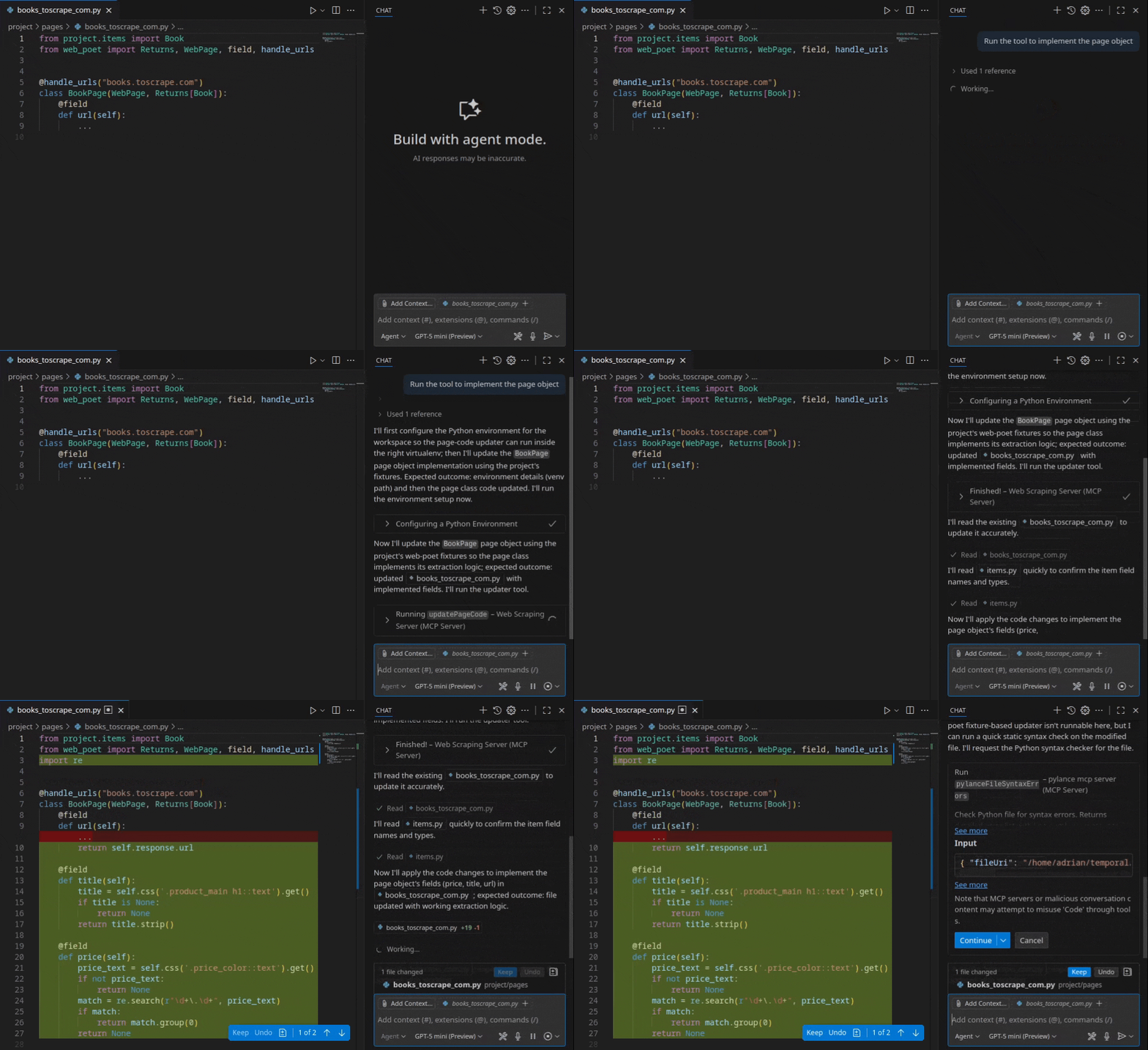
The goal is to generate scraping code quickly and also to guide developers toward stable spiders that follow good architecture and long term maintainability practices.
The extension also optionally integrates with Scrapy Cloud, which means the path from local development to a deployed, monitored job is shorter than the usual friction of setting that up manually.
Building my first scraper without writing code
I followed the official documentation and started from scratch. The setup involves installing the extension in VS Code and ensuring GitHub Copilot is active. There is no complicated configuration. You open or create a Scrapy project and the extension becomes available through the Copilot chat interface.
I pointed it at my own technical blog and described in plain language what I wanted:
“Extract the post titles, author and URLs from the listing pages.”
Once it created the page object, it asked me for three sample URLs from my blog. Instead of defining a class or importing libraries manually, the tool used MCP and analyzed the DOM structure of the target. It also enabled the scrapy-poet addon in the settings.py file, which is a requirement since it uses scrapy-poet but it is not there usually when you start a new scrapy project.
The experience was jarringly efficient. It did not produce a messy script. It generated a structured project: a page object that encapsulated the extraction logic and a spider that utilized that object. Within minutes I had a functioning scraper yielding structured data. I had not written a single line of code manually.
It even generated the unit tests and fixtures to verify the selectors and made changes itself when any of the tests failed. When I ran the spider, it extracted the data correctly without any manual adjustment to the selectors. Because it is your copilot, if you do not like something, you are always in control and your command is final.
Observations from the generated scraping code
My first instinct was to look for the catch. Usually AI-generated code is a mix of deprecated methods and brittle selectors. The output here was actually good; the selectors were specific without being fragile.
The code followed scrapy-poet patterns, separating crawling logic from parsing logic. This is not how most people I know usually write their first scraper, but it is how maintainable scrapers are written when a team cares about longevity.
Getting that structure on a first pass, for free, is genuinely useful.
How AI changes the developer workflow
This experience forced me to reflect on how the workflow is fundamentally changing. The traditional path was:
Idea → Code → Program
The heavy lifting lived in the middle. Developers spent most of their time in the syntax and the debugging.
The new path looks more like:
Idea → Prompt → Code → Program
The heavy lifting is shifting to the beginning and the end. The developer is no longer the code typist but an architect and the reviewer. The code is becoming a commodity generated by the system based on clear instructions.
One could say the value is no longer in the act of writing the code, but in the clarity of the instructions and the ability to evaluate the result.
Why this matters for web scraping developers
Scraping is a particularly strong use case for AI assistance. The patterns repeat. Most spiders share the same basic structure: request a page, parse some elements, follow some links, yield items. AI systems trained on enough Scrapy code have seen these patterns many times and can reproduce them reliably.
Websites are also volatile. They change constantly, requiring spiders to be updated frequently. In the old model, this meant a developer had to manually reinspect the site and rewrite selectors. With AI assisted tools, the cost of that change drops significantly. You describe the new structure, verify the updated selectors and move on. It reduces the friction of maintenance, which has always been one of the harder parts of keeping scraping projects alive.
Furthermore, at Zyte we are updating all of our existing scraping projects to be regenerated using the Web Scraping Copilot, which speaks to our team's confidence in the tool.
What worked well during the experiment
<< @https://docs.zyte.com/_static/copilot/ai-workflow-0.1.0.gif >>
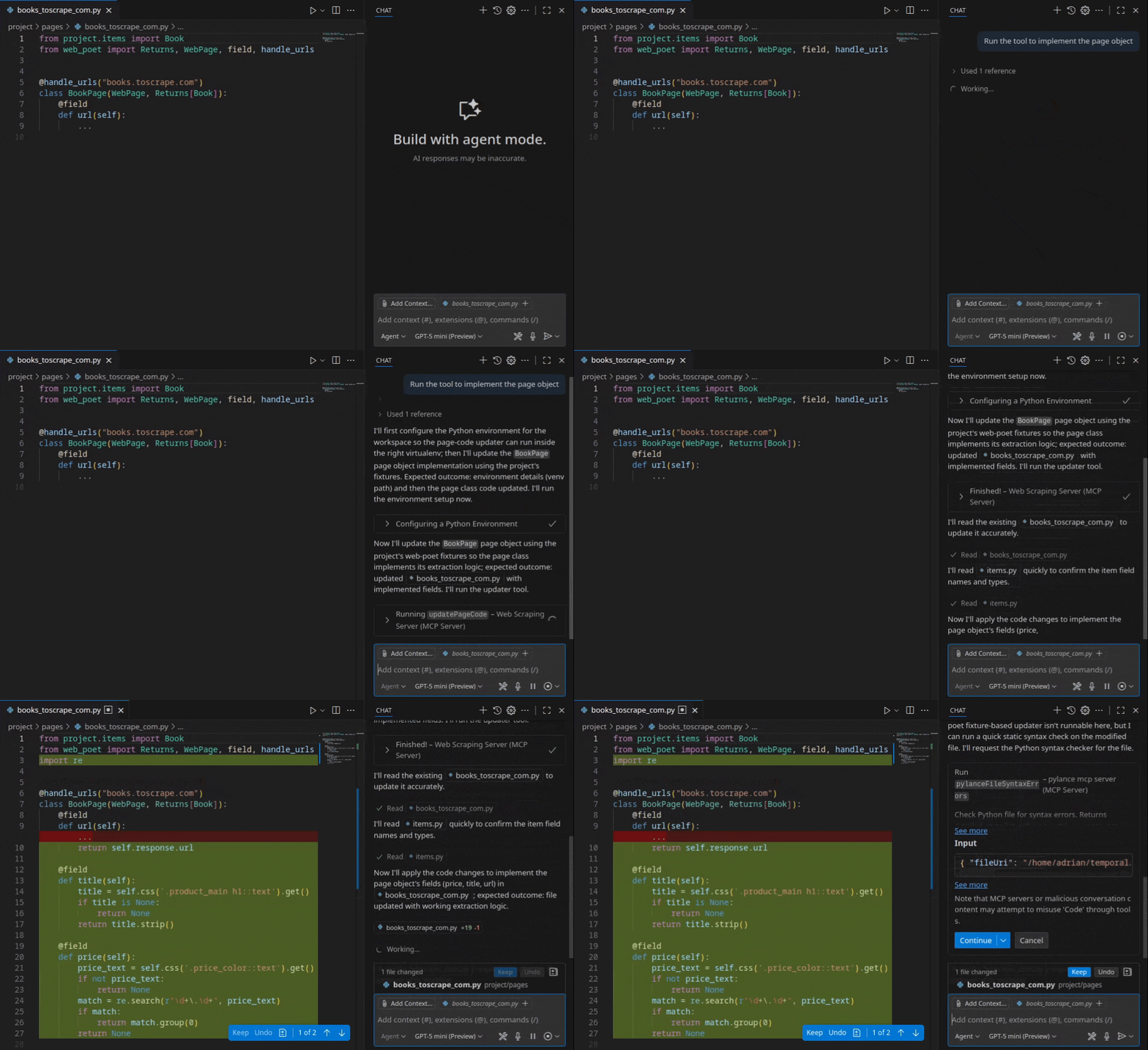
Speed was the most obvious win. Moving from zero to a working, structured dataset took less than 15 minutes, including time reading documentation.
The selectors were robust enough to extract the intended elements without modification. While not perfect for every production scenario, it is a strong starting point. I also think I could have succeeded by giving just one sample URL since the site is consistent. That would save tokens and drastically reduce time to first crawl.
The architecture was appropriate for a maintainable project rather than a throwaway script. Many scraping projects start as quick experiments and grow into something teams depend on. Starting with page objects and clean separation makes that growth easier to manage.
As already noted, the generated code served as a practical learning tool. Inspecting a well structured spider that was built for your specific target site is more instructive than any tutorial example built around a demo site.
I plan on using it a lot more in the future. I created a Scrapy project template (and shared the repo on my GitHub account that has scrapy-poet enabled from the start, which will save even more time and tokens when setting up a new project with Web Scraping Copilot.
Where developers still matter
Developers will need to align more with the business needs. Despite the efficiency, the role of an engineer has not disappeared. The problem statement has just changed from "Can we build this?" to "Is it worth building?" Developers will eventually embrace another layer of abstraction, just as we have transitioned from Assembly language to the React era.
For example, the generated spider I got initially did not include error handling for nonstandard HTTP responses. It would have needed modification before it was ready for anything beyond a controlled demo.
More fundamentally, debugging a scraper that fails at scale requires understanding Scrapy internals, network behavior and the specific site you are targeting. The AI can generate the code, but it does not understand your business logic, your rate limit constraints or what a 403 response actually means in the context of the site you are hitting. Engineering knowledge is now about system design, data integrity and problem decomposition rather than memorizing syntax.
The developer who can read generated code critically, identify what is missing and extend it correctly remains the difference between a demo and a production system. Running manual sanity checks on data and managing bans are also crucial roles for a web scraping developer.
Prompting becomes a developer skill
One of the clearest lessons from this experiment is how directly the quality of the output tracked the quality of the model used and the description provided.
A vague prompt produced generic output. A precise prompt that named the data fields I wanted, described the page structure and referenced the target URL produced something immediately useful.
This is becoming a real engineering discipline. The ability to articulate a problem with enough technical precision that an AI can act on it is not trivial. It requires understanding the domain well enough to know which details matter. If you cannot explain the problem clearly, the AI will give you a very clean version of the wrong solution.
The talk is no longer cheap. It is now the most expensive part of the process.
What I would like to see next in AI scraping tools
The next capability is selector repair. When a spider breaks because the target site changed its HTML structure, the tedious part is finding which selector stopped working. An AI system with access to the current DOM and the original spider could narrow that down significantly.
Regular automated testing integration would also add value. Tighter integration with data validation frameworks like Pydantic would allow developers to define the expected schema upfront and have the tool ensure the generated scraper adheres to that contract from the start.
Perhaps pipeline orchestration support would make the full workflow more coherent. Getting from a working local spider to a scheduled, monitored and alerting enabled deployment involves steps that are repetitive and error prone. That is exactly the kind of work AI tooling can absorb.
Advice for developers exploring AI assisted scraping
Start with a target you already understand. The easiest place to evaluate AI generated code is a site where you know what correct output looks like. Your own blog or a site you have scraped manually before are ideal for calibrating the tool.
Read the generated code before running it. This builds intuition about the tool's strengths and where it tends to make assumptions that may not hold for your specific case.
Lean into the frameworks. Ask for page objects and scrapy-poet structure. The goal is not just a working script but a codebase you can maintain.
Do not abandon your fundamentals. You still need to understand the DOM, HTTP and how to manage bans. Use the time you save on writing boilerplate to focus on data quality and the robustness of your pipelines.
The role of developers in the age of AI
Linus Torvalds was right for his time. The code was the proof. But the cost of producing code was high enough that it served as a meaningful filter, separating people who had genuinely thought something through from people who had not.
That filter is getting less reliable. Code is becoming cheap. Generating a working spider, a data pipeline or a test suite no longer requires months of accumulated skill. It requires a clear description and a few minutes.
- What is not cheap? Understanding the problem deeply enough to describe it well.
- Knowing what the generated code gets wrong.
- Building systems that hold together under real conditions.
The developer role is shifting from writing every line to designing problems, guiding systems and reviewing outputs with enough expertise to know the difference between code that looks correct and code that is correct.
Show me how you talk to your AI, and I will show you how good of an engineer you are.