PINGDOM_CHECK

#ExtractSummit2026 The world's largest web scraping conference returns. Austin Oct 7–8 · Dublin Nov 10–11.

Register now
Data Services
Pricing
Login
Try Zyte APIContact Sales
  • Unblocking and Extraction

    Zyte API

    The ultimate API for web scraping. Avoid website bans and access a headless browser or AI Parsing

    Ban Handling

    Headless Browser

    AI Extraction

    SERP

    Enterprise

    DocumentationSupport

    Hosting and Deployment

    Scrapy Cloud

    Run, monitor, and control your Scrapy spiders however you want to.

    Coding Agent Add-Ons

    Agentic Web Data

    Plugins that give coding agents the context to build production Scrapy projects. Starts with Claude Code.

  • Data Services
  • Pricing
  • Browse

    • BlogArticles, podcasts, videos
    • Case studiesCustomer outcomes
    • White papersIn-depth reports
    • EventsConferences, webinars, recordings

    Subscribe

    • NewsletterSwiftly delivered
    • Discord communityExtract Data community
  • Product and E-commerce

    From e-commerce and online marketplaces

    Data for AI

    Collect and structure web data to feed AI

    Job Posting

    From job boards and recruitment websites

    Real Estate

    From Listings portals and specialist websites

    News and Article

    From online publishers and news websites

    Search

    Search engine results page data (SERP)

    Social Media

    From social media platforms online

  • Meet Zyte

    Our story, people and values

    Contact us

    Get in touch

    Support

    Knowledge base and raise support tickets

    Terms and Policies

    Accept our terms and policies

    Open Source

    Our open source projects and contributions

    Web Data Compliance

    Guidelines and resources for compliant web data collection

    Join the team building the future of web data
    We're Hiring
    Trust Center
    Security, compliance & certifications
Login
Try Zyte APIContact Sales

Zyte Developers

Coding tools & hacks straight to your inbox

Become part of the community and receive a bi-weekly dosage of all things code.

Join us
    • Zyte Data
    • News & Articles
    • Search
    • Social Media
    • Product
    • Data for AI
    • Job Posting
    • Real Estate
    • Zyte API - Ban Handling
    • Zyte API - Headless Browser
    • Zyte API - AI Extraction
    • Web Scraping Copilot
    • Zyte API Enterprise
    • Scrapy Cloud
    • Solution Overview
    • Blog
    • Webinars
    • Case Studies
    • White Papers
    • Documentation
    • Web Scraping Maturity Self-Assesment
    • Web Data compliance
    • Meet Zyte
    • Jobs
    • Terms and Policies
    • Trust Center
    • Support
    • Contact us
    • Pricing
    • Do not sell
    • Cookie settings
    • Sign up
    • Talk to us
    • Cost estimator
All articles
AI-assisted data extraction28, 28 articles
Data gathering for AI6, 6 articles
Large Language Models (LLMs)24, 24 articles
Tool-assisted coding3, 3 articles
Developer interest143, 143 articles
Integration13, 13 articles
Open-source96, 96 articles
Scraping practice59, 59 articles
Scraping strategy46, 46 articles
Anti-ban35, 35 articles
Traffic6, 6 articles
Web data application25, 25 articles
Web data collection358, 358 articles
Web data collection ethics3, 3 articles
Web data collection legality16, 16 articles
Web scraping APIs63, 63 articles
Zyte API59, 59 articles
Scrapy48, 48 articles
Scrapy Cloud10, 10 articles
Web Scraping Copilot12, 12 articles
AI & Machine Learning1, 1 articles
Automotive2, 2 articles
E-commerce & retail26, 26 articles
Entertainment & Streaming2, 2 articles
Financial Services8, 8 articles
Government2, 2 articles
Market Research & Intelligence3, 3 articles
Media & publishing8, 8 articles
Real Estate2, 2 articles
Recruitment & HR3, 3 articles
Transportation & Logistics2, 2 articles
Travel & hospitality2, 2 articles
Extract Summit25, 25 articles
PyCon1, 1 articles

Appearance

Discord Community
BlogOpen-sourceScraping Websites Based On ViewStates With Scrapy
ArticleOpen-source

Scraping Websites Based On ViewStates With Scrapy

Welcome to the April Edition of Scrapy Tips from the Pros. Each month we’ll release a few tricks and hacks that we’ve developed to help make your Scrapy

V

Valdir Stumm Junior

5 min read · April 20, 2016

Scraping Websites Based On ViewStates With Scrapy

Scraping websites based on ViewStates with Scrapy
Scrapy Tips

Welcome to the April Edition of Scrapy Tips from the Pros. Each month we’ll release a few tricks and hacks that we’ve developed to help make your Scrapy workflow go more smoothly.

This month we only have one tip for you, but it’s a doozy! So if you ever find yourself scraping an ASP.Net page where you need to submit data through a form, step back and read this post.

Dealing with ASP.Net Pages, PostBacks and View States

Websites built using ASP.Net technologies are typically a nightmare for web scraping developers, mostly due to the way they handle forms.

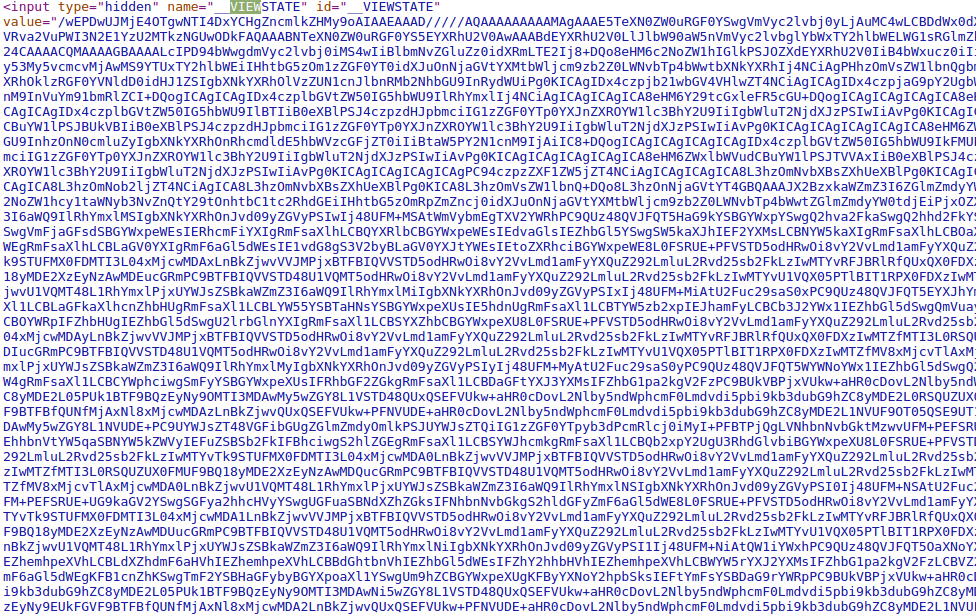
These types of websites usually send state data in requests and responses in order to keep track of the client's UI state. Think about those websites where you register by going through many pages while filling your data in HTML forms. An ASP.Net website would typically store the data that you filled out in the previous pages in a hidden field called "__VIEWSTATE" which contains a huge string like the one shown below:
ViewState example

I'm not kidding, it's huge! (dozens of kB sometimes)

This is a Base64 encoded string representing the client UI state and contains the values from the form. This setup is particularly common for web applications where user actions in forms trigger POST requests back to the server to fetch data for other fields.

The __VIEWSTATE field is passed around with each POST request that the browser makes to the server. The server then decodes and loads the client's UI state from this data, performs some processing, computes the value for the new view state based on the new values and renders the resulting page with the new view state as a hidden field.

If the __VIEWSTATE is not sent back to the server, you are probably going to see a blank form as a result because the server completely lost the client’s UI state. So, in order to crawl pages resulting from forms like this, you have to make sure that your crawler is sending this state data with its requests, otherwise the page will not load what it's expected to load.

Here’s a concrete example so that you can see firsthand how to handle these types of situations.

Scraping a Website Based on ViewState

The scraping guinea pig today is quotes.toscrape.com/search.aspx. This website lists quotes from famous people and its search page allows you to filter quotes by author and tag:
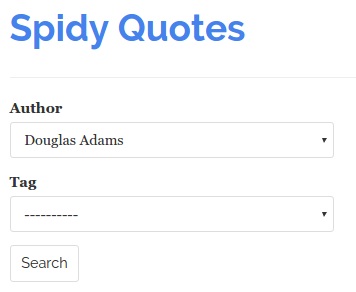
image05

A change in the Author field fires up a POST request to the server to fill the Tag select box with the tags that are related to the selected author. Clicking Search brings up any quotes that fit the tag from the selected author:
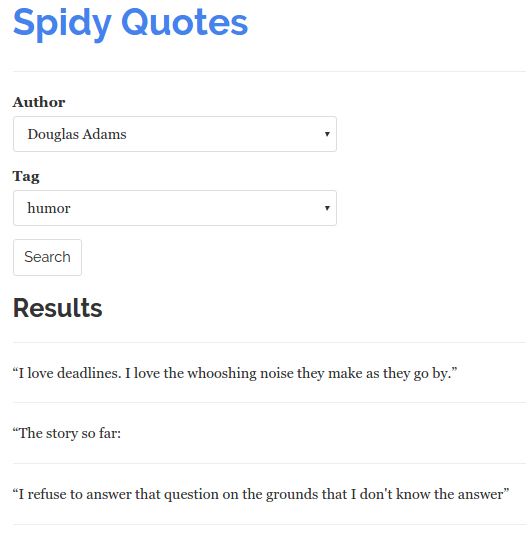
image04

In order to scrape these quotes, our spider has to simulate the user interaction of selecting an author, a tag and submitting the form. Take a closer look at each step of this flow by using the Network Panel that you can access through your browser's Developer Tools. First, visit quotes.toscrape.com/search.aspx and then load the tool by pressing F12 or Ctrl+Shift+I (if you are using Chrome) and clicking on the Network tab.

image00

Select an author from the list and you will see that a request to "/filter.aspx" has been made. Clicking on the resource name (filter.aspx) leads you to the request details where you can see that your browser sent the author you've selected along with the __VIEWSTATE data that was in the original response from the server.
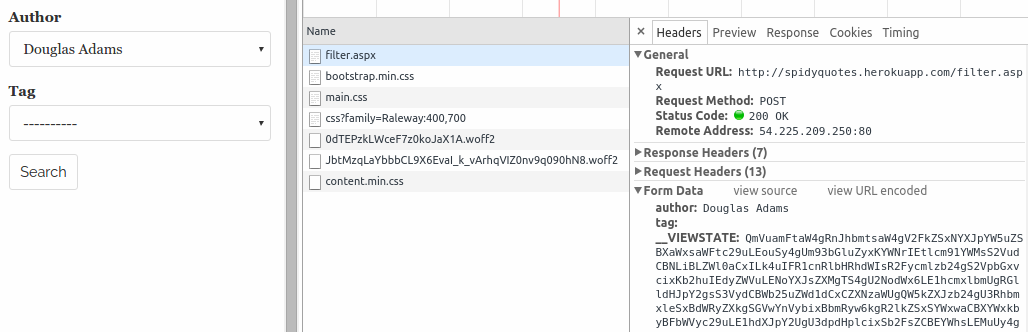
image02

Choose a tag and click Search. You will see that your browser sent the values selected in the form along with a __VIEWSTATE value different from the previous one. This is because the server included some new information in the view state when you selected the author.
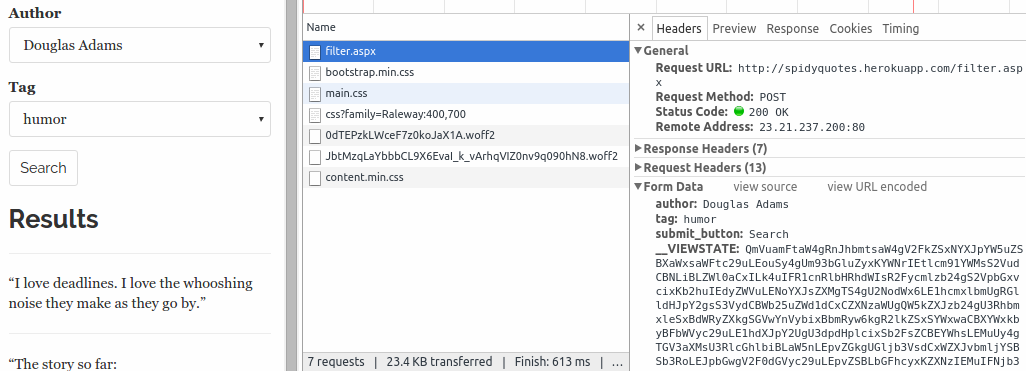
image01

Now you just need to build a spider that does the exact same thing that your browser did.

Building your Spider

Here are the steps that your spider should follow:

  1. Fetch quotes.toscrape.com/search.aspx
  2. For each Author found in the form's authors list:
    • Create a POST request to /filter.aspx passing the selected Author and the __VIEWSTATE value
  3. For each Tag found in the resulting page:
    • Issue a POST request to /filter.aspx passing the selected Author, selected Tag and view state
  4. Scrape the resulting pages

Coding the Spider

Here's the spider I developed to scrape the quotes from the website, following the steps just described:

Plain text

Copy to clipboard

Open code in new window

EnlighterJS 3 Syntax Highlighter

import scrapy class SpidyQuotesViewStateSpider(scrapy.Spider): name = 'spidyquotes-viewstate' start_urls = ['http://quotes.toscrape.com/search.aspx'\] download_delay = 1.5 def parse(self, response): for author in response.css('select#author > option ::attr(value)').extract(): yield scrapy.FormRequest( 'http://quotes.toscrape.com/filter.aspx', formdata={ 'author': author, '__VIEWSTATE': response.css('input#__VIEWSTATE::attr(value)').extract_first() }, callback=self.parse_tags ) def parse_tags(self, response): for tag in response.css('select#tag > option ::attr(value)').extract(): yield scrapy.FormRequest( 'http://quotes.toscrape.com/filter.aspx', formdata={ 'author': response.css( 'select#author > option[selected] ::attr(value)' ).extract_first(), 'tag': tag, '__VIEWSTATE': response.css('input#__VIEWSTATE::attr(value)').extract_first() }, callback=self.parse_results, ) def parse_results(self, response): for quote in response.css("div.quote"): yield { 'quote': quote.css('span.content ::text').extract_first(), 'author': quote.css('span.author ::text').extract_first(), 'tag': quote.css('span.tag ::text').extract_first(), }

import scrapy class SpidyQuotesViewStateSpider(scrapy.Spider): name = 'spidyquotes-viewstate' start_urls = ['http://quotes.toscrape.com/search.aspx'\] download_delay = 1.5 def parse(self, response): for author in response.css('select#author > option ::attr(value)').extract(): yield scrapy.FormRequest( 'http://quotes.toscrape.com/filter.aspx', formdata={ 'author': author, '__VIEWSTATE': response.css('input#__VIEWSTATE::attr(value)').extract_first() }, callback=self.parse_tags ) def parse_tags(self, response): for tag in response.css('select#tag > option ::attr(value)').extract(): yield scrapy.FormRequest( 'http://quotes.toscrape.com/filter.aspx', formdata={ 'author': response.css( 'select#author > option[selected] ::attr(value)' ).extract_first(), 'tag': tag, '__VIEWSTATE': response.css('input#__VIEWSTATE::attr(value)').extract_first() }, callback=self.parse_results, ) def parse_results(self, response): for quote in response.css("div.quote"): yield { 'quote': quote.css('span.content ::text').extract_first(), 'author': quote.css('span.author ::text').extract_first(), 'tag': quote.css('span.tag ::text').extract_first(), }

1import scrapy class SpidyQuotesViewStateSpider(scrapy.Spider): name = 'spidyquotes-viewstate' start\_urls = \['http://quotes.toscrape.com/search.aspx'\] download\_delay = 1.5 def parse(self, response): for author in response.css('select#author > option ::attr(value)').extract(): yield scrapy.FormRequest( 'http://quotes.toscrape.com/filter.aspx', formdata={ 'author': author, '\_\_VIEWSTATE': response.css('input#\_\_VIEWSTATE::attr(value)').extract\_first() }, callback=self.parse\_tags ) def parse\_tags(self, response): for tag in response.css('select#tag > option ::attr(value)').extract(): yield scrapy.FormRequest( 'http://quotes.toscrape.com/filter.aspx', formdata={ 'author': response.css( 'select#author > option\[selected\] ::attr(value)' ).extract\_first(), 'tag': tag, '\_\_VIEWSTATE': response.css('input#\_\_VIEWSTATE::attr(value)').extract\_first() }, callback=self.parse\_results, ) def parse\_results(self, response): for quote in response.css("div.quote"): yield { 'quote': quote.css('span.content ::text').extract\_first(), 'author': quote.css('span.author ::text').extract\_first(), 'tag': quote.css('span.tag ::text').extract\_first(), }
Copy

Step 1 is done by Scrapy, which reads start_urls and generates a GET request to /search.aspx.

The parse() method is in charge of Step 2. It iterates over the Authors found in the first select box and creates a FormRequest to /filter.aspx for each Author, simulating if the user had clicked over every element on the list. It is important to note that the parse() method is reading the __VIEWSTATE field from the form that it receives and passing it back to the server, so that the server can keep track of where we are in the page flow.

Step 3 is handled by the parse_tags() method. It's pretty similar to the parse() method as it extracts the Tags listed and creates POST requests passing each Tag, the Author selected in the previous step and the __VIEWSTATE received from the server.

Finally, in Step 4 the parse_results() method parses the list of quotes presented by the page and generates items from them.

Simplifying your Spider Using FormRequest.from_response()

You may have noticed that before sending a POST request to the server, our spider extracts the pre-filled values that came in the form it received from the server and includes these values in the request it's going to create.

We don't need to manually code this since Scrapy provides the FormRequest.from_response() method. This method reads the response object and creates a FormRequest that automatically includes all the pre-filled values from the form, along with the hidden ones. This is how our spider's parse_tags() method looks:

Plain text

Copy to clipboard

Open code in new window

EnlighterJS 3 Syntax Highlighter

def parse_tags(self, response): for tag in response.css('select#tag > option ::attr(value)').extract(): yield scrapy.FormRequest.from_response( response, formdata={'tag': tag}, callback=self.parse_results, )

def parse_tags(self, response): for tag in response.css('select#tag > option ::attr(value)').extract(): yield scrapy.FormRequest.from_response( response, formdata={'tag': tag}, callback=self.parse_results, )

1def parse\_tags(self, response): for tag in response.css('select#tag > option ::attr(value)').extract(): yield scrapy.FormRequest.from\_response( response, formdata={'tag': tag}, callback=self.parse\_results, )
Copy

So, whenever you are dealing with forms containing some hidden fields and pre-filled values, use the from_response method because your code will look much cleaner.

Wrap Up

And that’s it for this month! You can read more about ViewStates here. We hope you found this tip helpful and we’re excited to see what you can do with it. We’re always on the lookout for new hacks to cover, so if you have any obstacles that you’ve faced while scraping the web, please let us know.

Feel free to reach out on Twitter or Facebook with what you’d like to see in the future.
Try Zyte API

Build your first scraper in minutes

Free trial, no credit card. From a single request to production in an afternoon.

Get started
Open-source
V

Valdir Stumm Junior

More from this author

In this article

  • Dealing with ASP.Net Pages, PostBacks and View States
  • Scraping a Website Based on ViewState
  • Building your Spider
  • Coding the Spider
  • Simplifying your Spider Using FormRequest.from_response()
  • Wrap Up

Follow

Get the latest

Zyte and the data web in your inbox — or wherever you already are.

Subscribe

Or follow elsewhere

Continue reading

Scrapy in 2026: New release brings modern async crawling standards
Open Source

Scrapy in 2026: New release brings modern async crawling standards

Scrapy 2.14.0 is released with a major under-the-hood modernization. Say goodbye to Twisted Deferreds.

Robert Andrews·6 min·January 12, 2026
The new economics of web data: Smaller scraping just got cheaper
Open Source

The new economics of web data: Smaller scraping just got cheaper

Smarter tools and AI-driven automation are rewriting the rules of web scraping. As costs fall and setup barriers vanish, smaller teams can now compete at scale, reshaping how the web’s data economy works.

Theresia Tanzil·2 mins·October 6, 2025
A Deep Dive into Zyte's Open-Source Libraries
Open Source

A Deep Dive into Zyte's Open-Source Libraries

Discover how Zyte’s open-source libraries like ClearHTML, Extruct, Chomp.js, and more simplify web data extraction and processing.

Neha Setia Nagpal·1 mins·December 19, 2024

The Community · Newsletter

The best of Zyte and the data web, in your inbox.

One curated edition — new articles, product updates, and the stories shaping the data web. No noise.

G2.com

Capterra.com

Proxyway.com

EWDCI logoMost loved workplace certificateZyte rewardISO 27001 iconG2 rewardG2 rewardG2 reward

© Zyte Group Limited 2026