
Web scraping has long been viewed by many as simply an exercise in parsing HTML.
That idea emerged in the early days of the static web, when a website was simply a collection of files resting on a server, waiting to be read.
In that era, the standard workflow was simple: you fired up a script, downloaded the document, and used a library like Beautiful Soup or Cheerio to hunt for
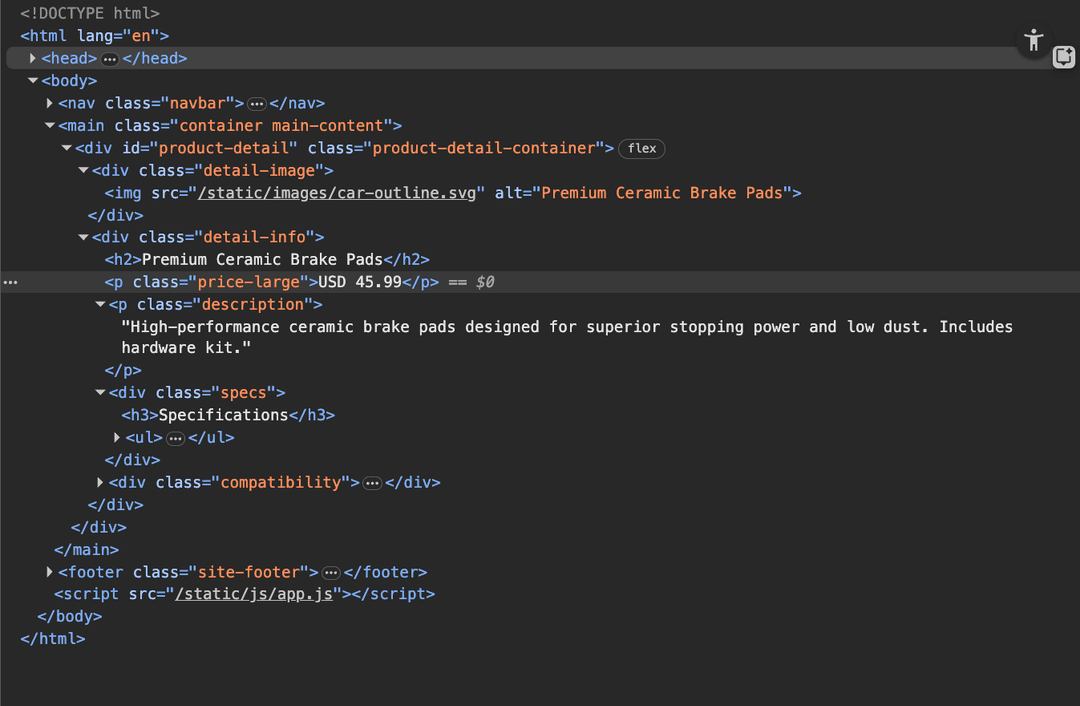
But, if you are applying this logic to a modern e-commerce platform, a dynamic Single Page Application (SPA), or a complex travel aggregator, you are fighting a losing battle. Modern frontends are volatile; a minor A/B test or a routine CSS update by the site's engineering team will shatter your selectors and bring your data pipeline to a halt.
From rendering to retrieval
So we look to a different method, API-first extraction.
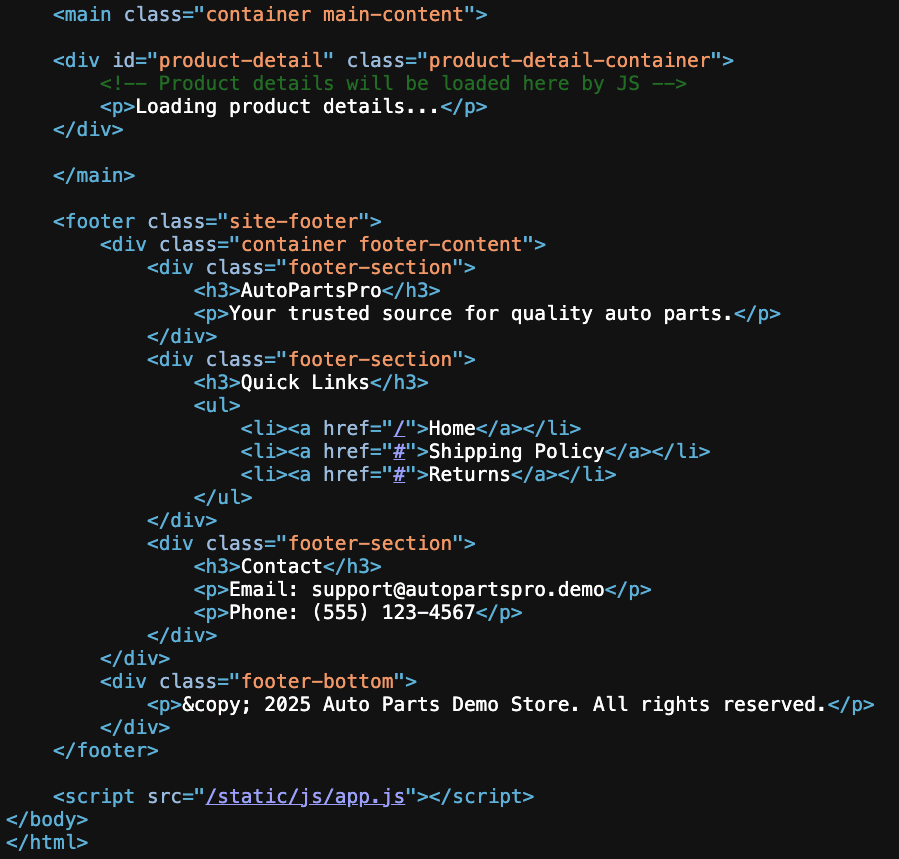
SPA (single page applications) websites rarely serve fully populated HTML to the user. Instead, they utilize a "Client-Side Rendering" (CSR) or "hydration" architecture. When you visit a product page, the server sends a lightweight skeleton - a template. Once that template loads in your browser, a piece of JavaScript executes, reaches out to a backend API, fetches the data (usually in JSON format), and dynamically paints the content onto the screen.
If you target the API directly, you bypass the presentation layer entirely. You no longer need to worry about the DOM structure, the CSS classes, or the layout. You only care about the structured data source. This approach is faster, cleaner, and significantly more resilient to frontend changes.
So, how do you do it?
Phase 1: The discovery (XHR filtering)
The discovery phase is an investigative process. You are looking for the "source of truth" - specifically, an API endpoint returning JSON output containing the site’s underlying data.
Open your target website in Chrome or Firefox, right-click, and inspect the page. Navigate to the Network tab. This is your command center. By default, this tab is a chaotic firehose of information - loading images, tracking pixels, font files, and CSS stylesheets.
You need to filter the noise. Click the Fetch/XHR filter. Now, you are seeing only the data traffic.
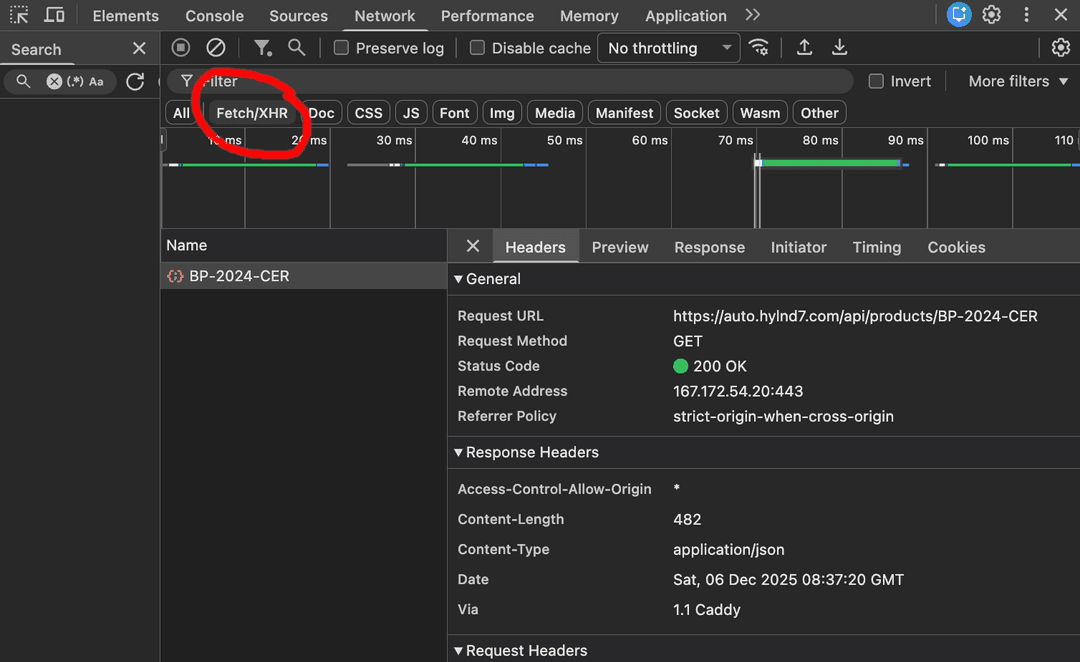
Trigger the request, by refreshing the page or, if the site uses infinite scrolling, scroll down. Watch the "waterfall" of requests. You are looking for specific patterns:
File types: Look for requests returning “application/json” or “graphql”.
Naming conventions: Developers are humans; they name endpoints intuitively. Look for “v1”, “api”, “search”, “catalog”, “inventory”, or “query”.
Payload size: Data-rich responses are often larger than the tiny status pings sent to analytics servers.
The JSON endpoint
When you identify a XHR/Fetch request that looks right (check for common words like “/api? Or “v1” in the url), click "Preview." If you see a nested JSON object containing prices, SKU numbers, image URLs, and stock levels (or whatever content your target site contains), you have found what you are looking for.
Often, this data is richer than what is displayed on the screen. A product card might show "$19.99" and "In Stock," but the underlying JSON object might reveal much more:
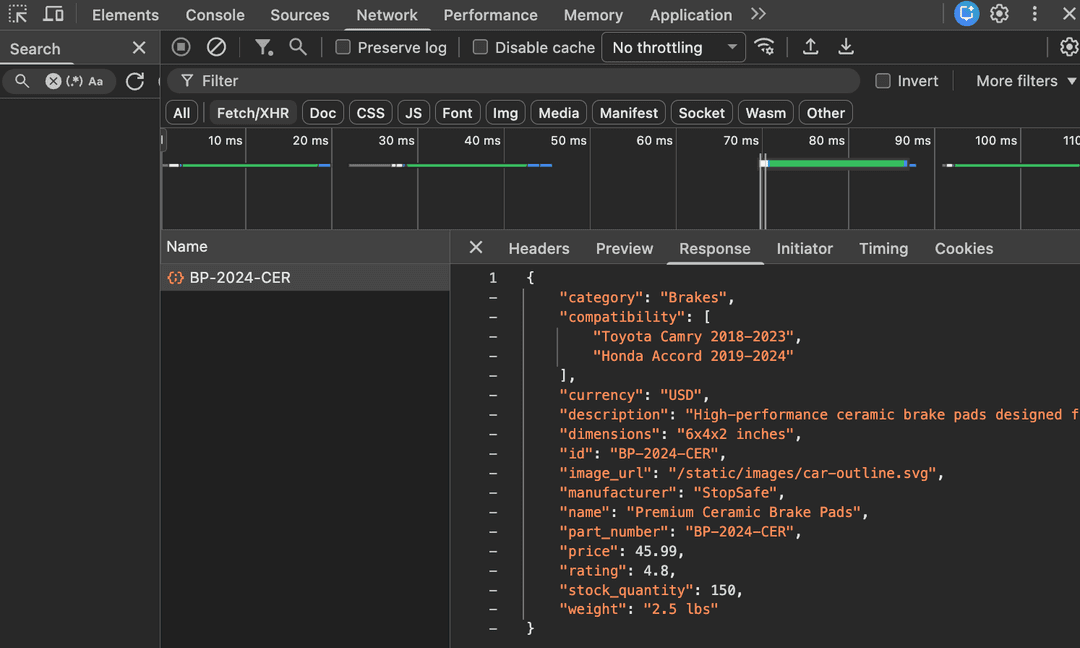
Once you have found the site’s API endpoint URL, verify its utility. Test it in your browser’s address bar. Change the parameters to push it to the max. If the URL ends in limit=20, change it to limit=100. If it says page=1, switch it to page=2. If the JSON response adapts, you have a functional, direct line to the database.
Phase 2: Isolate the request
Finding the endpoint is only step one. The next challenge is isolation: determining the minimum viable request data required for a 200 OK, outside the browser context.
Simply copying the URL into a Python script will often fail. The server expects the request to come from a trusted environment (a browser), not a script. To bridge this gap, we use a process of subtraction.
Copy as cURL: Right-click the successful request in DevTools and select "Copy as cURL". This brings ALL the information required for that request.
Import to client: Paste this into an API client like Postman, Bruno, or Insomnia.
The baseline test: Hit "Send." It should return a 200 OK
But there are a lot of headers and cookies we potentially don’t need. I like to strip it back to a clean and clear request that includes only the necessary headers and cookies.
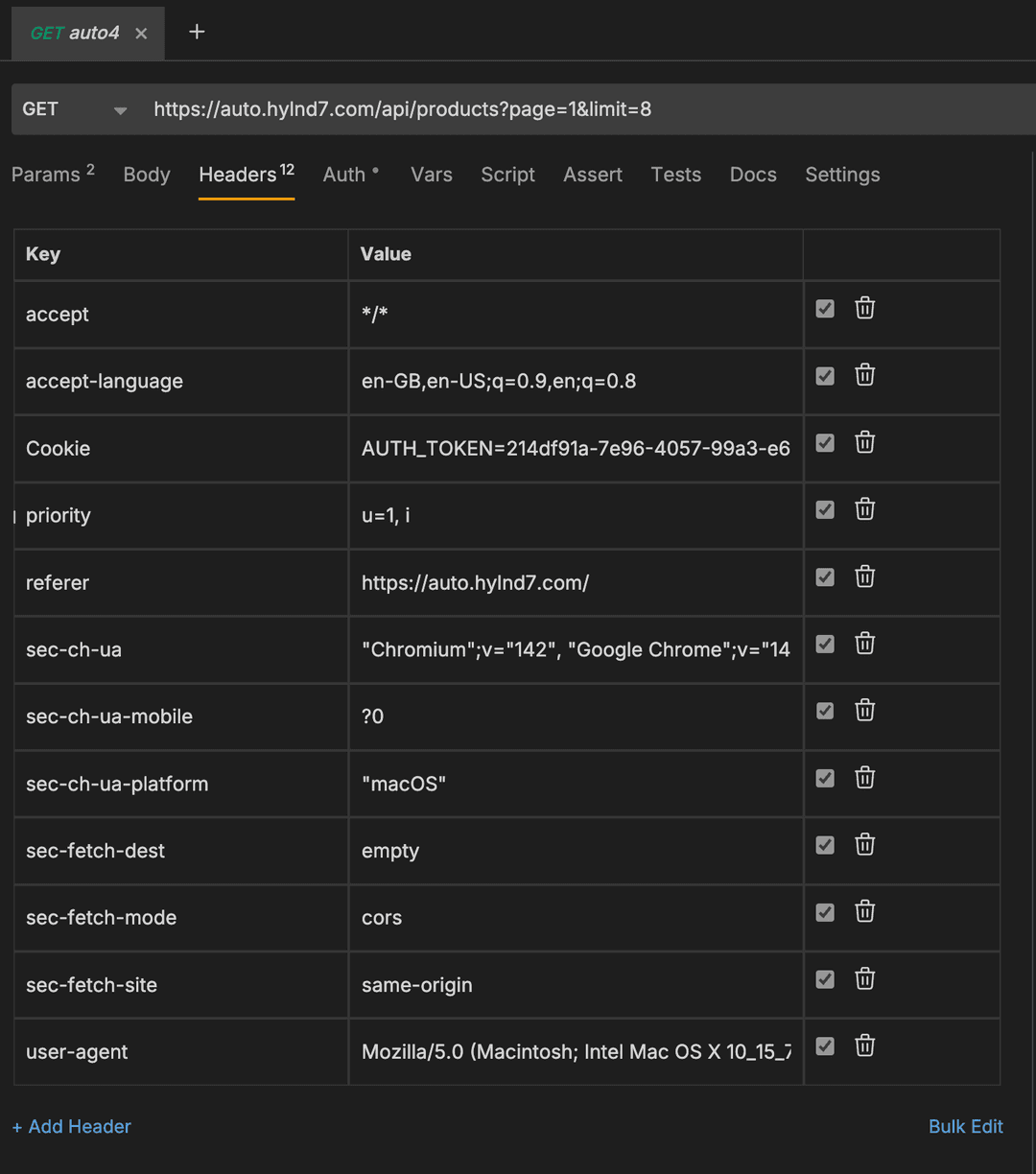
Start unchecking headers one by one and resending the request, seeing how that affects the outcome:
The cookie: This is the most critical test. If you remove the cookie header and the request still works, you have found a public API. You can scrape this endlessly with zero overhead. However, on most commercial sites, removing the cookie will trigger a 401 Unauthorized.
The Referer and Origin: Websites often check these headers to ensure the API request originated from their own frontend. If you remove them, the request may fail. This is a common Cross-Site Request Forgery (CSRF) protection mechanism acting as a scraper blocker.
The User-Agent: Some APIs block requests that identify as "python-requests" or "curl".
Eventually, you will arrive at the absolute minimum set of headers required to get the raw data. Usually, this is a specific User-Agent, a Referer, and a session-bearing cookie.
Phase 3: Building your code MVP
Sometimes, the theoretical simplicity of API-based data extraction collides with the brutal reality of modern anti-bot systems.
A developer will often take their cleaned request - the correct URL, the correct headers, and a valid cookie - paste it into their code, and immediately receive a 403 Forbidden or 429 Too Many Requests.
But why? After all, you have the credentials, it worked in Postman.
The answer lies in cryptographic binding and TLS fingerprinting.
Server tokens are IP-specific
API endpoints often enforce a strict, cryptographic link between the authentication token and the IP address used to generate it.
When you browsed the site to get the cookie, you did so through your home or office IP address. The server issued a token bound to that IP. However, when you run your scraper, it might be running on a cloud server (AWS, GCP) or routing through a proxy. The server sees a valid token coming from a different IP than the one that minted it. It flags this as a "session hijack" attempt and blocks the request.
Server tokens expire quickly
Furthermore, these tokens are ephemeral. Modern security architectures (like JSON web tokens) are designed to expire quickly - sometimes, in as little as five minutes. If you are scraping a catalog of 10,000 products, your static token will die before you reach product 50.
The TLS handshake
Beyond the headers, anti-bot vendors employed by many websites analyze the TCP/TLS handshake itself. A Chrome browser negotiates a TLS connection differently than a Python script. It uses different cipher suites and elliptic curves. This "JA3 Fingerprint" acts as a DNA test. Even if your headers say "I am Chrome," your handshake screams "I am a Python script."
Phase 4: Hybrid approach
To operate at scale against these defenses, you cannot simply write a script. You must engineer a system.
We have found that the only reliable way to bypass these checks without constant manual intervention is to implement a hybrid architecture. This approach splits the scraping process into two roles:
A browser worker to generate sessions and cookies, and store them
The extraction code, that pulls a session and cookie and uses it to extract the json data
Storing cookies
You need centralized storage to manage state, typically a fast key-value store like Redis. This database stores a "session object" containing:
The active auth token (cookie).
The specific proxy IP address used to generate that token.
The User-Agent string associated with that session.
The created_at timestamp.
The browser
This is a headless browser (using tools like Puppeteer, Playwright, or specialized stealth browsers like Nodriver/Camoufox). Its job is not to scrape data. Its job is to start the session.
It visits the site, executes the heavy JavaScript, passes the anti-bot checks, and waits for the session cookies to be set. Once the cookies are generated, it extracts them, bundles them with its current IP address, and pushes this "session object" to the storage unit.
HTTP client
This is your actual scraper. It does not use a browser. It is a lightweight HTTP client (like Python's rnet or curl-cffi).
Before every request, it queries the storage unit. It pulls the valid token and the exact same proxy IP used by the browser worker. It then hits the API directly.
Because it matches the identity created by the browser, the server accepts the request.
Session management and rotation
You need logic that monitors the health of the session.
Is the token older than five minutes?
Did we just get a 401 error?
Is the IP blocked?
If any of these flags are raised, the HTTP client tries again with a new session and cookie, whilst the browser runs again in a separate thread to maintain a minimum level of cookies in storage.
The hidden overhead
Suddenly, your "simple" scraping job has evolved into a complex microservices architecture.
You are no longer just scraping data.
You are managing a proxy rotation system to ensure the browser and HTTP workers share the same exit node.
You are managing a browser fleet to handle the CPU-intensive task of token generation.
You are writing complex error-handling logic to manage race conditions between token expiry and request execution.
This is the hidden tax of the API-first approach. The code to fetch the data is minimal - often just one function. But the infrastructure required to maintain the identity needed to access that data is massive.
At Extract Summit Dublin 2025, Fabien Vauchelles, creator of Scrapoxy, noted that the goal of modern anti-bots is not just to block, but to "raise the cost to play." By forcing you to run headless browsers and manage complex state, they make scraping computationally expensive and engineering-heavy.
The Zyte solution: Abstracting the complexity
This is why "just scraping the API" is harder than it looks. You end up spending 80% of your time managing infrastructure and only 20% analysing the data.
At Zyte, we believe developers shouldn't have to build a browser farm just to get a JSON response.
We have abstracted this entire "hybrid" architecture into a single API call. Zyte API handles the browser fingerprinting, the AI-driven unblocking, the IP management, and the session rotation automatically.
When you send a request to Zyte API, our internal systems:
Analyse the site.
Spin up a browser, if necessary, to generate the required session.
Seamlessly hand off the session details to an optimised HTTP layer.
Deliver you the clean response.
You simply send us the URL. We handle everything in the background, delivering you the data without the infrastructure headache.
The shift from HTML parsing to API-first isn't just a technical trick; it is a fundamental change in how we access parts of the web. We can build pipelines that are faster, cleaner, and immune to the constant visual changes that html parsing falls foul from.
While the infrastructure required can be higher with the requirement to manage sessions, the "Hybrid Architecture" proves that you don't have to compromise. You don't have to choose between the Access of a browser and the Speed of an HTTP client. By architecting your scrapers correctly, or by using an API that handles that orchestration for you, you can have both.