I came to Scrapy relatively recently, and like a lot of people learning a new framework, I wanted to go beyond just reading the docs. The best way I have found to understand how something is built is to build a small thing with it: something real enough to exercise the internals, but contained enough that you can hold the whole thing in your head.
Scrapy turned out to be a great framework for that kind of exploration. It is modular and signal-driven, and it has these well-defined extension points where you can hook in custom behavior without touching your spiders. I wanted to understand how those extension points actually worked from the inside, so I gave myself a small project: scrapy-beep, an extension that plays a triumphant fanfare when a spider finishes successfully and a sad trombone when something goes wrong.
It is about 75 lines, intentionally trivial, and it turned out to teach me more about the Scrapy ecosystem than hours of reading would have. This article walks through what I built and what I learned from it.
A quick Scrapy primer
If you have not used Scrapy before, here is the short version. Scrapy is a Python framework for writing web scrapers. You define a spider that describes where to start, which links to follow, and what to extract from each page. Scrapy takes care of the async request queue, retries, throttling, and passing scraped data through a processing pipeline before it lands in whatever output you need.
The comparison I keep reaching for is that it is to web scraping what Django is to web development: opinionated and batteries-included, but also genuinely extensible. You write the spider logic; the framework handles the plumbing. Once you have a spider working, the next natural question is how to add behavior around it, such as notifications, monitoring, and logging, without cluttering the spider code itself. That is exactly what extensions are for.
What Scrapy's extension points actually are
Scrapy gives you four ways to hook into the framework without touching the spider itself.
Pipelines process items as they are scraped, one at a time. They are the right place to clean, validate, or persist data, but they never see final run statistics because they close before the spider's last stats are tallied. A typical pipeline writes each item to a database as it arrives:
1class DatabasePipeline:
2    def open_spider(self, spider):
3        self.conn = sqlite3.connect("items.db")
4
5    def process_item(self, item, spider):
6        self.conn.execute("INSERT INTO items VALUES (?, ?)", (item["title"], item["url"]))
7        return item
8
9    def close_spider(self, spider):
10        self.conn.commit()
11 self.conn.close()Downloader middlewares intercept requests and responses at the HTTP layer, making them the correct tool for rotating proxies, injecting custom headers, or retrying on specific status codes. The scrapy-zyte-api package is a downloader middleware that routes every request through Zyte API's unblocking layer without changing a single line of spider code:
1# settings.py
2ADDONS = {
3    "scrapy_zyte_api.Addon": 500,
4}
5ZYTE_API_KEY = "your-api-key"Spider middlewares intercept items and requests as they flow between the spider and the engine, which is useful for filtering duplicates or modifying output before it reaches a pipeline. A deduplication middleware, for example, tracks seen URLs in memory and drops any item that has already been yielded:
1class DedupeMiddleware:
2    def __init__(self):
3        self.seen_urls = set()
4
5    def process_spider_output(self, response, result, spider):
6        for item in result:
7            if isinstance(item, dict):
8                url = item.get("url")
9                if url and url not in self.seen_urls:
10                    self.seen_urls.add(url)
11                    yield item
12            else:
13 yield itemExtensions attach to lifecycle signals such as spider_opened, spider_closed, and item_scraped. They are the right choice for any cross-cutting behavior that needs to know when the whole crawl is done, including the final item count, error total, and elapsed time. Scrapy ships with several built-in extensions following this exact pattern: AutoThrottle, the memory debugger, and the log stats reporter are all implemented as extensions.
Audio feedback at crawl-end is clearly an extension problem: it needs spider_closed, which pipelines and middlewares never see.
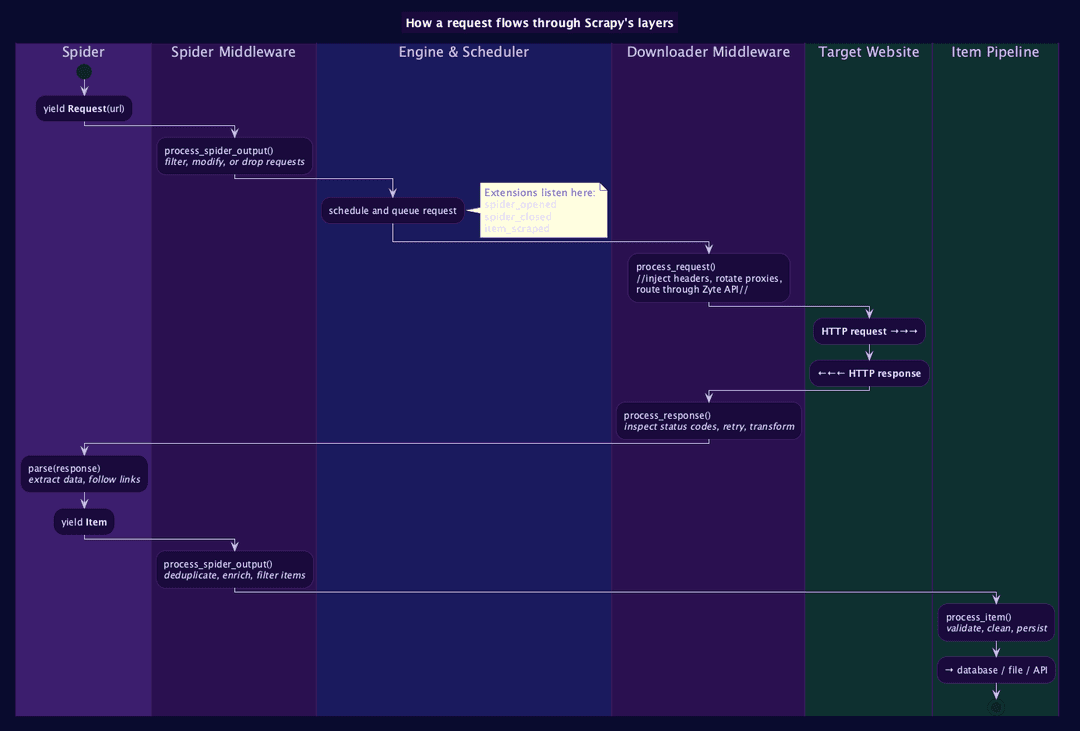
The diagram below shows how a single request travels through all four layers and where each hook type intercepts it:
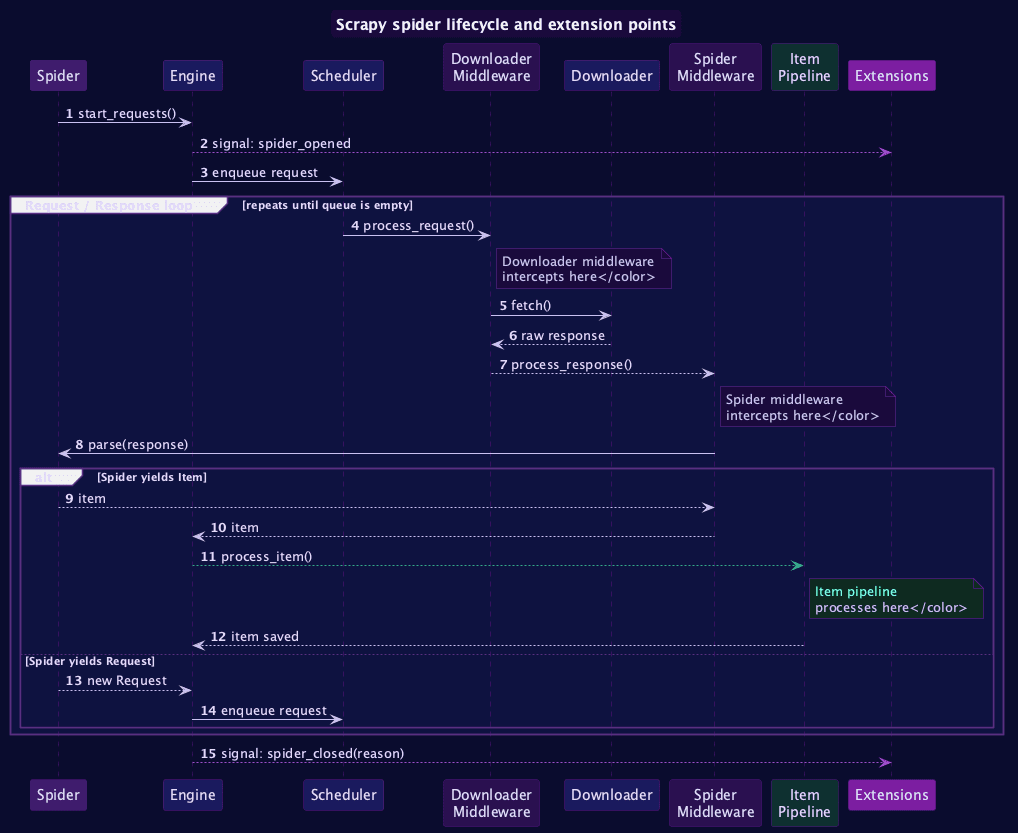
And here is the full spider lifecycle from start to finish, showing the signals that extensions listen to:
The four patterns every Scrapy extension uses
Here is the complete source for scrapy-beep:
1import sys
2import subprocess
3import pathlib
4from scrapy import signals
5from scrapy.exceptions import NotConfigured
6
7_SOUNDS_DIR = pathlib.Path(__file__).parent / "sounds"
8_DEFAULT_SUCCESS = str(_SOUNDS_DIR / "success.wav")
9_DEFAULT_FAILURE = str(_SOUNDS_DIR / "failure.wav")
10
11_SUCCESS_REASONS = {
12    "finished",
13    "closespider_itemcount",
14    "closespider_pagecount",
15    "closespider_timeout",
16}
17
18
19class BeepExtension:
20    def __init__(self, success_sound, failure_sound):
21        self.success_sound = success_sound
22        self.failure_sound = failure_sound
23
24    @classmethod
25    def from_crawler(cls, crawler):
26        if not crawler.settings.getbool("BEEP_ENABLED", True):
27            raise NotConfigured("BEEP_ENABLED is False")
28
29        success = crawler.settings.get("BEEP_SUCCESS_SOUND", _DEFAULT_SUCCESS)
30        failure = crawler.settings.get("BEEP_FAILURE_SOUND", _DEFAULT_FAILURE)
31
32        ext = cls(success_sound=success, failure_sound=failure)
33        crawler.signals.connect(ext.spider_closed, signal=signals.spider_closed)
34        return ext
35
36    def spider_closed(self, spider, reason):
37        stats = spider.crawler.stats.get_stats()
38        items = stats.get("item_scraped_count", 0)
39        errors = stats.get("log_count/ERROR", 0)
40
41        is_success = reason in _SUCCESS_REASONS and items > 0 and errors == 0
42
43        spider.logger.info(
44            "BeepExtension: reason=%s items=%d errors=%d success=%s",
45            reason, items, errors, is_success,
46        )
47
48        self._play(self.success_sound if is_success else self.failure_sound)
49
50    @staticmethod
51    def _play(path):
52        if not path:
53            return
54        if sys.platform == "darwin":
55            subprocess.run(["afplay", path], check=False)
56        elif sys.platform == "win32":
57            import winsound
58            winsound.PlaySound(path, winsound.SND_FILENAME)
59        else:
60 subprocess.run(["aplay", path], check=False)Seventy-five lines. Let us walk through the four patterns in there.
Pattern 1: from_crawler is the entry point. Scrapy calls this classmethod at startup for every class listed in EXTENSIONS. It receives the crawler object, which is your handle to settings, signals, and stats. This is where you read configuration, decide whether the extension should activate, and wire up the signal handlers that define its behavior. The constructor (__init__) only stores the values that from_crawler already resolved, keeping the two responsibilities cleanly separated.
Pattern 2: NotConfigured disables cleanly. Raising NotConfigured inside from_crawler tells Scrapy to skip the extension without logging an error or producing a stack trace. It is the idiomatic opt-out: one guard line covers the entire extension, so setting BEEP_ENABLED = False in a CI environment silences it completely with no side effects.
1if not crawler.settings.getbool("BEEP_ENABLED", True):
2 raise NotConfigured("BEEP_ENABLED is False")Pattern 3: Signals connect behavior to events. One line wires the extension's handler to a Scrapy lifecycle event:
1crawler.signals.connect(ext.spider_closed, signal=signals.spider_closed)When that signal fires, Scrapy calls ext.spider_closed(spider, reason) with the spider instance and a string describing why it stopped. The full signal catalog includes spider_opened, item_scraped, request_scheduled, request_dropped, and several more, each giving you a different hook into the crawl lifecycle.
Pattern 4: Read stats to understand what happened. Inside the signal handler, spider.crawler.stats.get_stats() returns the full dictionary of counters Scrapy accumulated during the run: item count, response codes, byte totals, error counts, and elapsed time. This is why extensions are the right tool for post-crawl analysis: they receive the complete, settled picture once the crawl is done, not a mid-run snapshot.
The success logic is worth pausing on. Spiders stopped by CLOSESPIDER_ITEMCOUNT, CLOSESPIDER_PAGECOUNT, or CLOSESPIDER_TIMEOUT count as success, because they hit a user-imposed limit with items in hand and no errors logged. Only closespider_errorcount, shutdown, and cancelled are treated as failures, because those imply something went wrong rather than a deliberate stop.
1spider_closed(reason)
2        │
3        ▼
4reason in SUCCESS_REASONS?
5  ├─ NO  ──────────────────────────► 📯 play failure sound
6  └─ YES
7        │
8        ▼
9item_scraped_count > 0?
10  ├─ NO  ──────────────────────────► 📯 play failure sound
11  └─ YES
12        │
13        ▼
14log_count/ERROR == 0?
15  ├─ NO  ──────────────────────────► 📯 play failure sound
16  └─ YES
17        │
18        ▼
19 🎺 play success soundRegistering and configuring the extension
Scrapy's recommended way to package and ship an extension for others to use is through the Addon API. An Addon is a small class with a single update_settings method. When Scrapy starts, it calls this method for every addon listed in ADDONS, passing a mutable settings object. The addon then uses settings.set() to register whatever extensions, middlewares, or download handlers it needs:
1# scrapy_beep/addon.py
2class Addon:
3    def update_settings(self, settings):
4        settings.set(
5            "EXTENSIONS",
6            {"scrapy_beep.extension.BeepExtension": 500},
7            priority="addon",
8 )From the project side, that is the entire integration — one line in settings.py:
1ADDONS = {
2    "scrapy_beep.addon.Addon": 500,
3}The key advantage over adding entries directly to EXTENSIONS is that the addon owns its own configuration. If the extension ever grows to need a downloader middleware or a custom setting, the addon's update_settings method is the single place to add it, and users do not have to touch multiple dictionaries in their settings file.
Three optional settings let you tune behavior without touching the extension code:
1BEEP_ENABLED = False               # disable entirely, e.g. in CI
2BEEP_SUCCESS_SOUND = "/path/to/custom.wav"
3BEEP_FAILURE_SOUND = "/path/to/custom.wav"The WAV files ship inside the Python package itself, declared under [tool.setuptools.package-data] in pyproject.toml, so installation requires no separate download. Playback uses afplay on macOS, winsound from the Python standard library on Windows, and aplay on Linux. Because subprocess.run is called with check=False, the extension fails silently on headless CI servers where neither tool is available.
Using Zyte API as a drop-in downloader middleware
As spiders graduate from local experiments to production targets, anti-bot protection tends to become the main obstacle. Sites that work fine during development start returning empty responses or outright blocks once a spider runs at any meaningful frequency. This is where scrapy-zyte-api comes in: a first-party, open-source downloader middleware and download handler maintained by Zyte that routes every Scrapy request through Zyte API's unblocking layer automatically, without changing a single line of spider code.
It is the right tool when you are targeting JavaScript-heavy pages that require browser rendering, sites with aggressive bot detection that block standard HTTP requests, or any target where vanilla Scrapy returns empty or incomplete responses. The middleware handles fingerprinting, session management, and browser emulation on the server side, so your spider stays focused on extraction logic.
Install it with:
1pip install scrapy-zyte-apiThen add the following to your settings.py:
1ADDONS = {
2    "scrapy_zyte_api.Addon": 500,
3}
4ZYTE_API_KEY = "your-api-key"That is the entire integration: one addon entry and an API key. The addon's update_settings method handles registering the download handler and downloader middleware for you — no need to touch DOWNLOAD_HANDLERS or DOWNLOADER_MIDDLEWARES directly. No changes to any spider. You can sign up for a free Zyte API trial to get started, and the Zyte API documentation covers the full range of configuration options, including per-request browser rendering and AI-powered structured data extraction.
Testing the extension without a real spider
Extensions look hard to test because they depend on Scrapy's crawler object, the settings system, and a running stats collector. In practice you only need to mock three things, and Scrapy ships one of them as a real class you can use directly in tests.
1from scrapy.settings import Settings
2from scrapy.statscollectors import MemoryStatsCollector
3from unittest.mock import MagicMock
4
5def _make_crawler(extra_settings=None):
6    settings_dict = {"BEEP_ENABLED": True}
7    if extra_settings:
8        settings_dict.update(extra_settings)
9    settings = Settings(values=settings_dict)
10    crawler = MagicMock()
11    crawler.settings = settings
12    crawler.signals = MagicMock()
13    stats = MemoryStatsCollector(crawler)
14    crawler.stats = stats
15 return crawlerMemoryStatsCollector is a real Scrapy class that stores statistics in memory with no Twisted reactor, no HTTP server, and no actual spider process, which means tests run instantly. With that helper in place, a full success scenario looks like this:
1from unittest.mock import patch
2
3@patch("scrapy_beep.extension.BeepExtension._play")
4def test_success_plays_success_sound(mock_play):
5    crawler = _make_crawler()
6    ext = BeepExtension.from_crawler(crawler)
7    spider = _make_spider(crawler, items=5, errors=0)
8
9    ext.spider_closed(spider, reason="finished")
10
11 mock_play.assert_called_once_with(ext.success_sound)Patching _play prevents any audio from playing during the test suite while still asserting that the correct sound path was chosen. The same pattern covers every branch: zero items, errors present, a shutdown reason, and each of the closespider_* variants.
Where to go from here
The four patterns above are reusable across a wide range of extensions. The three ideas below follow the same structure most directly.
Slack or webhook notification on crawl end. Connect to spider_closed, read stats["item_scraped_count"], stats["log_count/ERROR"], and stats["elapsed_time_seconds"], then call requests.post(webhook_url, json=payload) instead of subprocess.run. You get a message with the crawl summary every time a spider finishes, whether it ran locally or on Scrapy Cloud.
Custom metrics exporter. Listen to the item_scraped signal to accumulate domain-level counters during the crawl, then push the full set to Prometheus, Datadog, or StatsD inside the spider_closed handler. The stats dictionary gives you byte counts and response codes at no extra cost.
Production-grade monitoring with Spidermon. If your spiders run at scale and you need threshold-based alerts, field coverage validation, and JSON Schema checks on scraped items, the Zyte team has a detailed walkthrough on giving your spiders monitoring superpowers with Spidermon. It is a battle-tested extension built on the same four patterns and the natural next step once a custom extension starts growing into its own monitoring framework.
Two more ideas that are straightforward to build once you have the patterns down:
Retry-budget guard. Track retry counts across the crawl by listening to request_scheduled and response_received signals, then call crawler.engine.close_spider(spider, "retry_budget_exceeded") if retries cross a threshold you define. This prevents a spider from running indefinitely against a target that has started blocking it.
CI-friendly crawl summary. Write a machine-readable JSON file at spider_closed containing item count, error count, close reason, and elapsed time. CI pipelines can parse the file to gate deployment or trigger alerts without scraping log output.
Community extensions worth exploring
- scrapy-zyte-api: Zyte API as a drop-in downloader middleware, covered above, and the go-to for anti-bot unblocking
- scrapy-poet: dependency injection for Scrapy spiders, which makes spiders dramatically easier to test and reuse across projects
- scrapy-playwright: Playwright as a Scrapy downloader handler, for JavaScript-heavy pages where you need a real browser
- Spidermon: monitoring and validation framework for production spider fleets
Docs worth bookmarking
- Scrapy signals reference: the full signal catalog with argument signatures for every built-in signal
- Scrapy extensions documentation: built-in extensions as readable reference implementations, each following the four patterns from this article
- Scrapy addons documentation: how to package extensions and middlewares as self-contained addons that configure themselves
- Scrapy settings documentation: how settings resolution works across project, spider, and command-line scopes, which matters when building configurable extensions
All of these run unchanged on Scrapy Cloud: the same ADDONS entry, the same signal wiring, the same stats access, regardless of whether the spider is running on your laptop or in a managed production environment. If you want to go further with production deployments, the Zyte blog has a detailed walkthrough on automating your web scraper deployment with cloud-init for VPS setups.
The real payoff from building something like scrapy-beep is not the audio feedback itself: it is that you now have a working mental model of how every Scrapy extension is structured. Reading the source of scrapy-zyte-api, Spidermon, or any other plugin in the ecosystem becomes straightforward once you recognize the four patterns. They are the same every time.