The first spider I ever wrote yielded a plain dictionary, because that is what the tutorial did and it worked. Then I misspelled a key. The crawl finished green, the export looked full, and it was only three days later, when something downstream tried to read item["author"] and got nothing, that I found out half my records had been carrying a field called auther the whole time. Nobody had complained, because a dict never complains. That afternoon is the reason I care about item types at all, and it is the honest starting point for a question that trips up almost everyone new to Scrapy: which kind of container should you put your scraped data in, and does the choice actually matter?
It turns out to be two questions wearing one coat, and separating them clears up most of the confusion you will find online.
The one thing to get straight: types versus loaders
When you scrape a page you pull out small scraps of text: a quote, an author, a few tags. Two independent things happen to those scraps, and people mix them up constantly.
An item is the container that holds one scraped record. An item type is which kind of container you use. An item loader is an optional helper that fills the container for you. Types and loaders sit on different axes. "Which item type" is a question about the box. "Item loader or not" is a question about how you put things in the box.
Here is the detail that untangles it: Scrapy supports five item types, but there is only one item loader class. So when someone asks "which item loader should I use," the useful answer is that there is only one to pick from, and the real decision is the item type underneath it, plus whether to reach for the loader at all. Keep those two apart and the rest of this gets a lot simpler.
Why Scrapy has five item types
Five containers for one job sounds like over-engineering until you see where each one came from. The list is mostly history, not grand design.
| Type | Where it came from |
|---|---|
| dict | Plain Python. Always worked, always will. |
| scrapy.Item | Scrapy's own original container, from the early days. |
| dataclass | Added to Python itself in 3.7, back in 2018. People already used it everywhere. |
| attrs | A popular third-party library that inspired dataclasses and does more. |
| pydantic | A validation library that became a default across Python through FastAPI. |
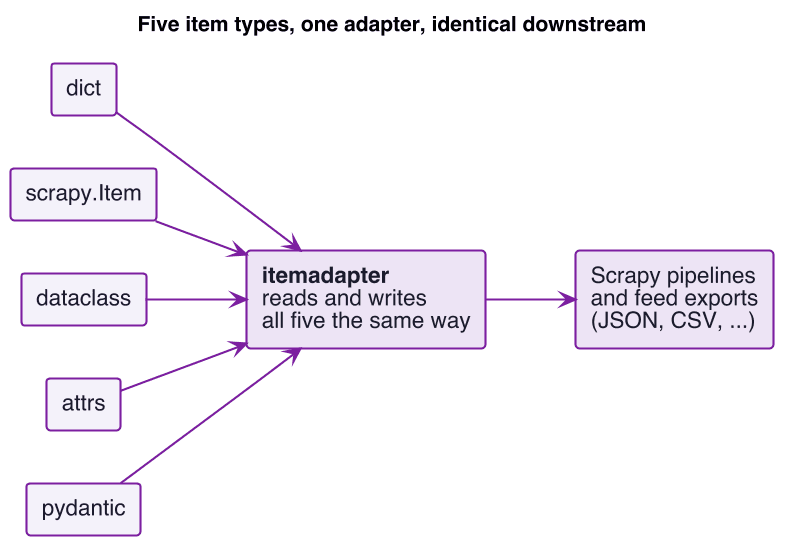
What ties them together is the interesting part. Scrapy did not want to force one choice on everybody, so it leans on a small library called itemadapter that knows how to read and write all five. That is why your spider can yield any of them and the rest of Scrapy, the pipelines and the feed exports to JSON or CSV, treats them identically. "So many types" really means "Scrapy chose to accept the containers people already use, instead of making you convert to its own."
What each type actually buys you
Every example below models the same record from quotes.toscrape.com, the sandbox used in the official Scrapy tutorial: an integer position idx, the quote text, the author, and a list of tags. Same data, one variable changing, so you can see what the container adds.
dict
1yield {"idx": idx, "text": text, "author": author, "tags": tags}You gain nothing to define and a shape everyone already knows. You also get no protection at all. Typos in key names pass silently, and nothing anywhere records what a quote is supposed to look like. Does it check types? No. This is the container that cost me three days.
scrapy.Item
1class QuoteItem(scrapy.Item):
2    idx = scrapy.Field()
3    text = scrapy.Field()
4    author = scrapy.Field()
5 tags = scrapy.Field()You declare the fields once, and assigning to a field you did not declare raises KeyError, so item["auther"] = ... fails loudly at the moment you make the mistake, not somewhere downstream. It is Scrapy-native and supports trackref for hunting memory leaks. The cost is a few lines of declaration, and the limit is that it checks field names, not values. Does it check types? Names yes, values no.
dataclass
1from dataclasses import dataclass, field
2
3@dataclass
4class QuoteDataclass:
5    idx: int = 0
6    text: str = ""
7    author: str = ""
8 tags: list = field(default_factory=list)This is a standard library, so no install, and the type hints document the shape while your editor autocompletes item.author. The catch is the one that surprises people: those hints are documentation only. Assign idx="NaN" and the dataclass accepts it without a word. Does it check types? No, despite looking like it should.
attrs
1import attrs
2
3@attrs.define
4class QuoteAttrs:
5    idx: int = 0
6    text: str = ""
7    author: str = ""
8 tags: list = attrs.field(factory=list)You get everything a dataclass gives you, plus optional converters and validators you can attach per field when you want them. attrs is not really a separate install, since Scrapy already pulls it in through Twisted and service-identity, though it is worth declaring in your own requirements rather than leaning on a transitive dependency. By default it still does not enforce types until you add a converter or validator yourself. Does it check types? Not by default, but it is one line away when you opt in. If you have ever used the typed items in zyte_common_items, such as Product or Article, you have already used attrs in production without thinking about it, because that is what those classes are built on.
pydantic
1from pydantic import BaseModel, field_validator
2
3class QuotePydantic(BaseModel):
4    idx: int
5    text: str
6    author: str
7    tags: list[str] = []
8
9    @field_validator("author")
10    @classmethod
11    def author_not_empty(cls, value):
12        if not value.strip():
13            raise ValueError("author must not be empty")
14 return valueThis is the only type that checks values at runtime. Pass idx="NaN" and it raises a ValidationError; pass the numeric string "1" and it coerces it into the integer 1. Custom rules are ordinary Python through @field_validator. It needs pip install pydantic, and it carries the most machinery of the five, which only pays off if you actually let it run. Does it check types? Yes, and that is the whole point of pydantic.
Watching the difference in one script
You do not have to take my word for the runtime behavior. Feed the same three values into all five types and the split is easy to see.
| Input value | dict | scrapy.Item | dataclass | attrs | pydantic |
|---|---|---|---|---|---|
| idx=1 (good) | stored as int | stored as int | stored as int | stored as int | stored as int |
| idx="1" (numeric string) | stays "1" | stays "1" | stays "1" | stays "1" | coerced to int 1 |
| idx="NaN" (garbage) | stays "NaN" | stays "NaN" | stays "NaN" | stays "NaN" | raises ValidationError |
Four of the five happily store "NaN" in a field you told them was an integer. Only pydantic stops it at the door, and only pydantic quietly fixes the numeric string on the way in. If your scraped values are clean and you control the source, that column is a curiosity. If they come off real web pages, where a price is sometimes "1,299" and a rating is sometimes empty, that column is the difference between catching a bad record during the crawl and finding out only when something downstream quietly breaks.
The pydantic trap: pay for it, then throw it away
pydantic is the strongest option on paper, so let me be blunt about how people waste it. The small scrapy-pydantic-poc project is a proof of concept for exactly this idea, and it is a useful cautionary tale. It defines pydantic models with real validation rules, then builds each item with .construct(), the pydantic v1 call that skips validation and coercion entirely, and finally yields item.dict(), a plain dictionary. So the model never flows through Scrapy as the item. A pipeline calls validate on the side and attaches any errors as an extra field, but the emitted data is the same unvalidated dict you started with, and the advertised coercion never happens in the output.
The lesson is not that the project is wrong, it is that pydantic only earns its weight when you let it work. If you adopt pydantic, yield the model itself and let validation run on the way out. Do that and the safety is real. Skip it and you have paid for the most complex option while getting less than a dataclass would have given you for free.
Once your items are validated on the way out, the next question is whether they keep matching that shape across thousands of pages and weeks of runs, which is a monitoring problem rather than a type problem. That is the job Spidermon does for a Scrapy pipeline, with schema checks and field-coverage alerts that fire when a site quietly changes shape under you.
The other axis: item loaders
An item loader fills a container. Instead of cleaning values inline in your parse method, you declare the cleanup once per field and let the loader apply it.
1from scrapy.loader import ItemLoader
2from itemloaders.processors import TakeFirst, MapCompose, Identity
3
4class QuoteLoader(ItemLoader):
5    default_output_processor = TakeFirst()   # one value per field
6    text_in = MapCompose(str.strip)          # stripped as it comes in
7 tags_out = Identity() # except tags, kept as a listTwo ideas do the work. An input processor runs on each value as you add it, for example stripping whitespace. An output processor runs on the collected list to produce the final value, for example TakeFirst for a single value or Join to glue a list into one string. Scrapy ships six built-in processors: Identity, TakeFirst, Join, MapCompose, Compose, and SelectJmes, the last of which pulls values out of JSON with a JMESPath expression.
The reason a loader exists, and the thing no item type does on its own, is collecting one field from several places on the page and then reducing it to one clean value:
1loader.add_css("author", "span.primary::text")   # gather from here
2loader.add_css("author", "span.fallback::text")  # and from here
3# input processor strips each; TakeFirst reduces the collected list to one value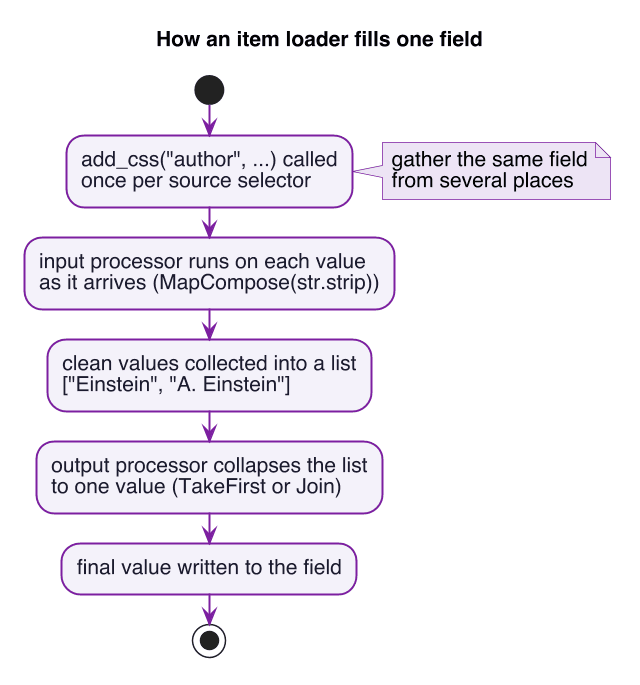
A bare item or a pydantic model can only validate a value you already have. Gathering it from a messy page is the loader's job. Reach for a loader when you have many fields needing the same cleanup, a field sourced from several selectors, or cleanup logic you want to reuse across sites. Skip it for a handful of fields with no cleanup, where populating the item by hand is clearer.
One gotcha worth knowing: a loader fills a container field by field, so the container needs optional fields. scrapy.Item is ideal because every field is optional. A dataclass or pydantic item needs a default for every field before a loader can fill it incrementally, which is why loader examples usually pair with scrapy.Item.
A decision guide you can actually use
Strip away the history and the choice comes down to how much you need to trust your data.
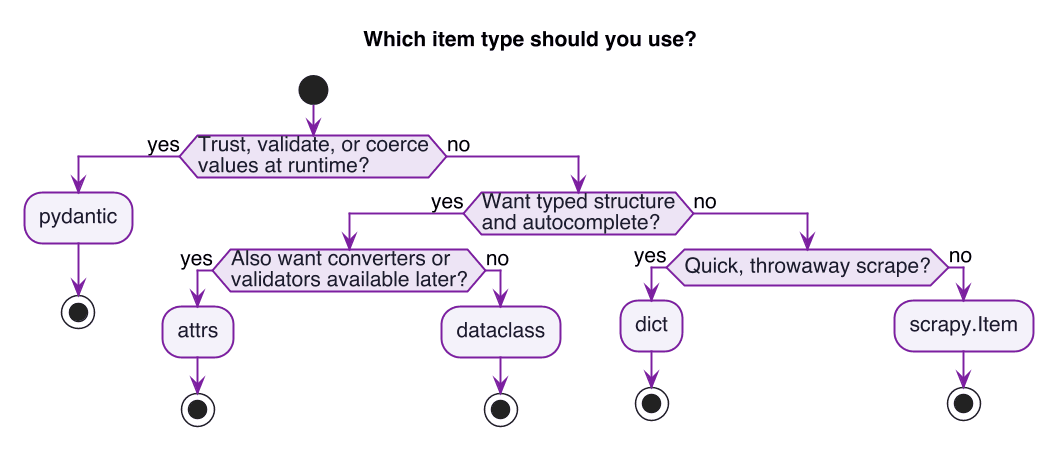
And the same trade-offs in a table, for when you want to compare at a glance:
| Type | Extra install | Runtime type safety | Validation power | Complexity | Best for |
|---|---|---|---|---|---|
| dict | no | none | none | lowest | throwaway scrapes |
| scrapy.Item | no | field names only | none | low | default, Scrapy-native |
| dataclass | no | none | none | low | typed structure, no deps |
| attrs | no (ships with Scrapy) | opt-in | medium | low to medium | structure plus optional validators |
| pydantic | yes | yes | high | highest | data you have to trust |
A reasonable default for a beginner: start with scrapy.Item, because it is safe, needs no extra installs, and is native to Scrapy. Reach for pydantic the moment data quality actually matters. If you want to go deeper on the framework itself while you are here, writing your first Scrapy extension is a good, small next project.
Where structured extraction fits
There is one more option that sidesteps the whole table, and it deserves an honest mention. If you are extracting common record types such as products, articles, or job postings, Zyte API's AI extraction returns the data already structured to a fixed schema, and the Python integration hands it back as typed items, the zyte_common_items classes I mentioned earlier. You get the schema and the field structure without hand-writing a model or a loader per site, which is the "let it validate" lesson from the pydantic section done for you. That does not make items and loaders obsolete, because plenty of scraping is bespoke enough that you will still model your own records. It just means the answer to "which item type" is sometimes "one you did not have to write," and knowing when that trade is worth it is its own data-quality question.
To close where we started: there is one item loader, and the real choice is the item type. All five types are interchangeable inside Scrapy because of itemadapter. dict and scrapy.Item differ mostly by safety, the typed three add real structure, and only pydantic checks values at runtime, and only if you let it. Pick the container that matches how much you need to trust the data, use a loader when the cleanup is repetitive or comes from several places, and you will not lose an afternoon to a field called auther.