When I planned this blog series, I had only 2 blogs in my mind, but working with the headless mode of a few different coding agents for a while I feel this feature deserves more attention, so here goes.
The first article in this series landed on a single idea worth repeating, which is that an AI agent is nothing more than a model plus a harness, where the model supplies the intelligence and the harness supplies the capabilities, so the same model wrapped in two different harnesses behaves like two completely different assistants. What that framing leaves open is a practical question, because once you accept that the harness is the part you actually control, you start to wonder how much harness you really need for a given job.
The answer is that harnesses come in sizes, ranging from a full interactive coding environment (like claude-code, open-code, codex) down to something so small you can drive it from a single line in a shell script, and the smallest one that still earns the name is already sitting inside almost every coding agent you have installed. It is called headless mode.
This article is about that minimal harness: what it is, why it is worth reaching for, how it works, how it differs from calling a model API directly, and what you can build with it. We will finish by pointing it at a web page and pulling clean, structured data out the other end in about ten lines.
One quick clarification before we go further, because the word "headless" is overloaded in the web scraping world. Here it means an agent running without an interactive interface, driven by a script rather than a person, and it has nothing to do with a headless browser, which is a browser running without a visible window. Same adjective, very different idea.
What headless mode actually is
Headless mode is the non-interactive way to run a coding agent. Instead of opening a chat session and typing back and forth, you hand the agent a prompt on the command line, it runs the full agentic loop on its own, prints a result, and exits. In Claude Code the flag is -p (short for --print):
1claude -p "Refactor utils.py to use pathlib, then run the tests"It reads from standard input too, which is what makes it feel at home in a shell, so you can pipe a file straight into it:
1cat build-error.txt | claude -p "Explain what caused this build failure"This is not a stripped-down version of the agent. It is the same engine, with the same tools and the same reasoning, simply driven by a script instead of a keyboard. Nearly every serious coding agent now ships an equivalent, because automation and continuous integration demand it:
| Agent | Non-interactive command |
|---|---|
| Claude Code | claude -p "..." |
| OpenAI Codex CLI | codex exec "..." |
| Gemini CLI | gemini -p "..." |
| Aider | aider --message "..." |
The smallest harness that still works
The first article laid out the parts that make up a harness: the loop that keeps the model running, the system prompt that tells it how to behave, the tools that let it act, the context management that decides what goes in front of it on each turn, the memory that survives between runs, and the planning and verification that decide when the work is actually done. None of those pieces disappear in headless mode. The loop still turns, the system prompt still loads, the tools still fire, context is still managed, and memory still persists. The single thing that gets removed is the human in the chair.
That is why it is fair to call headless mode the minimal harness rather than a different one. It is the same body the interactive agent uses, except instead of standing in the room and reacting to it, you mail it a set of instructions and read what it sends back. Same brain, same body, no conversation. For a surprising number of real jobs that turns out to be exactly enough, and the absence of a human in the loop is a feature rather than a limitation, because it is precisely what lets the agent slot into a pipeline, a scheduled job, or a build step.
Why you would reach for it
The reason to care is the same reason the first article gave for caring about harnesses at all, which is that the harness is the part you own. You are almost certainly not training a frontier model, but you have complete freedom over everything wrapped around it, and a point made well on the Zyte podcast episode on why the harness matters more than the model is that most of the value you can actually capture from a model sits in that wrapper. Headless mode gives you the wrapper in the form that is easiest to script against.
Two properties fall out of that. The first is that the agent becomes a Unix citizen: it reads standard input, writes standard output, returns a meaningful exit code, and therefore composes with pipes, loops, and every other tool you already use. The second is that it becomes schedulable and automatable, because nothing about it requires a person to be watching, which means it can run on a cron schedule, inside a continuous integration job, or as a step in a larger data pipeline. The moment you remove the human from the loop, the agent stops being a thing you talk to and becomes a thing you build with.
How it works in practice
A handful of flags cover almost everything you will want to do, and they are worth knowing because they are what turn a chat tool into a scriptable component.
Output format is the first one. By default the agent prints plain text, but --output-format json wraps the run in an envelope that includes the result, the session identifier, and usage and cost figures, while --output-format stream-json emits the same information as newline-delimited events as they happen, which is useful when you want to show live progress.
Structured output is where headless mode starts to earn its place in data work. The --json-schema flag forces the model to return JSON that validates against a schema you provide, and there are two details that trip people up the first time. The flag takes the literal schema text as its argument rather than a path to a file, and the validated object lands at the top-level structured_output key of the JSON envelope, not inside result, which holds only a plain-text summary that is often empty. Get those two right and you have a reliable way to pull typed data out of an agent.
Permissions matter the moment a run is unattended, because an agent that stops to ask "may I run this command?" will hang forever when no one is there to answer. You scope what the agent is allowed to touch with --allowedTools, and you stop it from prompting with --permission-mode bypassPermissions. This is also where the so-called "YOLO" mode lives, the setting that approves every action without asking, exposed in other agents as --yolo in the Gemini CLI, as --dangerously-bypass-approvals-and-sandbox in Codex, and as --yes-always in Aider. It is convenient and risky in roughly equal measure, so the sane way to use it is to keep the actions unrestricted but the blast radius small, by running inside a container or a throwaway working copy, scoping the tool list to only what the task needs, and keeping real credentials out of the environment.
Model selection is a single flag, --model, and the important thing to understand is that there is no special "headless model". Headless mode runs whatever model you have configured as your default, exactly as the interactive mode would, which fits neatly with the idea that the model is the swappable part, and the question of how to run any model inside Claude Code is a harness concern, not a headless one.
Context and memory behave just as they do interactively. Your project and user CLAUDE.md files load as standing context, long runs compact themselves as the conversation grows, and sessions are resumable with --continue for the most recent one or --resume for a specific session identifier, while a plain -p with neither flag starts fresh every time, which is usually what you want for a scheduled job. If you need a run that ignores all of that for the sake of reproducibility, the --bare flag skips loading CLAUDE.md, plugins, hooks, and auto-memory, which is handy in continuous integration where you want the same behavior on every machine. Skills still resolve if you invoke them explicitly.
Headless mode is not a raw API call
It is tempting to think of headless mode as a thin wrapper over a model API, and getting this distinction right is what tells you which tool to reach for. A direct API call, the kind you make with messages.create, is a single stateless inference: you send messages, you get one completion back, and everything else is your responsibility. If the model wants to use a tool, you parse that request, run the tool yourself, and feed the result back in your own loop. You manage the whole conversation, you build the safety rails, and you supply every piece of context.
Headless mode is the entire harness wrapped around those calls. The agentic loop is already built, the file, shell, and search tools are already wired in, context management and memory are already handled, and the permission system is already there. The useful way to hold the difference in your head is that the API is the engine while headless mode is the whole car. If your task is a single transformation, summarize this text, classify this comment, extract these fields from a string you already have, the API is leaner and cheaper and you should use it. If your task is "go read this repository, run the tests, fix the one that fails, and verify the fix", that is an agent, and rebuilding that harness on top of raw API calls is a large project in its own right.
What people build with it
Once the agent is a composable command, the uses write themselves. Teams put it in continuous integration to review a pull request, label it, or fix a failing lint rule and push the result. They schedule it to run research and summarization jobs overnight. They loop it over hundreds of files to carry out a mechanical refactor that would be tedious by hand. They wire it to a webhook so that an incoming issue turns into a draft pull request. And, most relevant here, they use it as the reasoning step in a data pipeline, where messy input goes in and clean, structured records come out, which is exactly the pattern behind building robust agentic workflows on top of fresh web data.
A small demo: a web page in, structured data out
Here is the whole idea in one small example. We will take a product page, fetch it, and turn it into clean JSON, using nothing but a fetch and a headless agent. The page is from books.toscrape.com, a sandbox built for exactly this kind of practice.
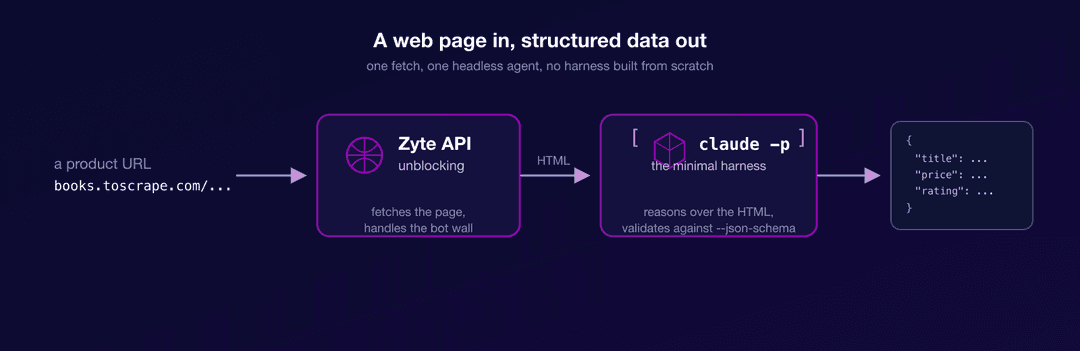
The first step is to fetch the page. On a sandbox a plain request would do, but real product pages tend to sit behind bot protection that returns a 403 or a CAPTCHA to anything that looks automated, so we route the request through Zyte API, whose unblocking handles that layer for us and hands back the raw HTML. The nice property of doing it this way is that the pipeline does not change when you point it at a defended site, because the unblocking is the same call.
1curl -s --user "$ZYTE_API_KEY:" \
2  -H "Content-Type: application/json" \
3  -d '{"url": "https://books.toscrape.com/catalogue/a-light-in-the-attic_1000/index.html", "httpResponseBody": true}' \
4  https://api.zyte.com/v1/extract \
5  | python3 -c "import sys, json, base64; print(base64.b64decode(json.load(sys.stdin)['httpResponseBody']).decode())" \
6 > page.htmlNext we describe the shape of the data we want, as a small JSON schema:
1{
2  "type": "object",
3  "properties": {
4    "title":        { "type": "string" },
5    "price":        { "type": "string" },
6    "availability": { "type": "string" },
7    "rating":       { "type": "string" }
8  },
9  "required": ["title", "price", "availability", "rating"]
10}Now we hand the HTML to the minimal harness and ask for that schema back. Notice that we pass an empty --allowedTools, because the agent does not need to touch the file system or the network for this job, since the page is already on its standard input, so the harness here is about as small as it gets, just the loop and the model reasoning over the text we gave it:
1cat page.html | claude -p "Extract the book's product details from this HTML page." \
2  --output-format json \
3  --json-schema "$(cat schema.json)" \
4  --allowedTools "" \
5  --permission-mode bypassPermissions \
6 | python3 -c "import sys, json; print(json.dumps(json.load(sys.stdin)['structured_output'], indent=2))"The result, pulled straight from the structured_output key, is exactly what we asked for:
1{
2  "title": "A Light in the Attic",
3  "price": "£51.77",
4  "availability": "In stock (22 available)",
5  "rating": "3 out of 5 stars"
6}The detail worth pausing on is the rating. Nowhere in the page does the string "3 out of 5 stars" appear, because the page encodes the rating as a CSS class named star-rating Three, and the model read that class and turned it into a human-readable value on its own. That small piece of reasoning is the whole reason you would use an agent here rather than a brittle CSS selector, and it is the difference between scraping a value and understanding one. The run took a little over four seconds and cost a few cents.
Try it yourself
Headless mode is the minimal agent harness: the same loop, prompt, tools, context, and memory the interactive agent uses, with the human taken out of the chair so the whole thing fits on a command line and slots into your scripts. You reach for it when you want the agent's judgment without the agent's interface, and you reach for a raw API call instead when you only need one inference and would rather own the loop yourself. None of it is exotic once you can name the pieces, which was the point of this series from the start.
If you want to try the demo against pages that actually fight back, the fetch step is the only thing that changes, and a free Zyte API key is enough to get the unblocking working. Point the same pipeline at a real product page and watch a defended page turn into clean JSON.