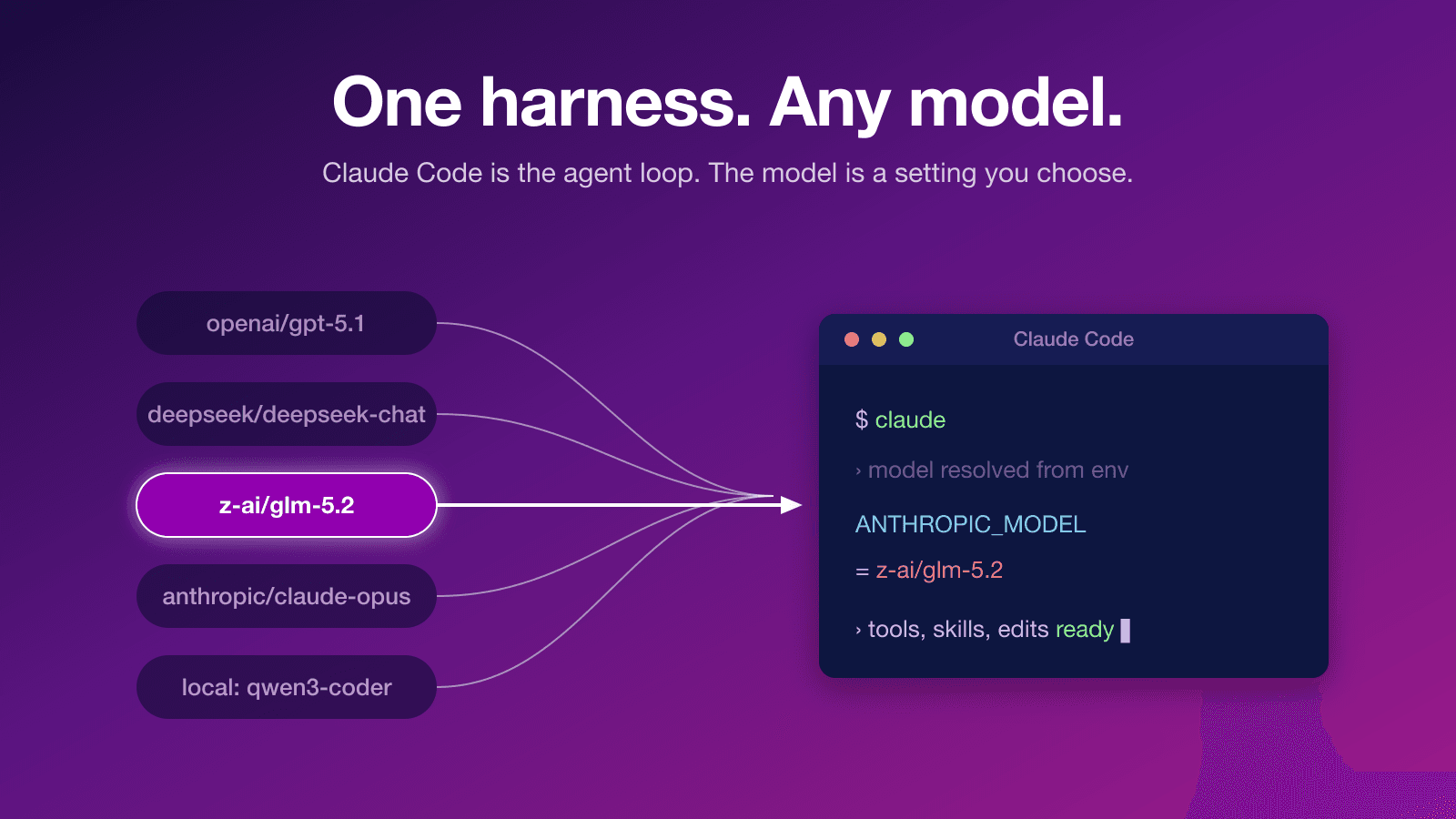
I keep trying new AI models as they ship, and Claude Code stays my preferred harness for putting them to work. What surprises people, often enough that it prompted this tutorial, is watching me run an open-weight model like GLM 5.2 inside Claude Code, with the same agent loop, tools, and skills, just a different model behind it. That is the part worth internalizing: Claude Code is a harness, and the model is a setting you choose. This post is a hands-on guide to swapping it, covering how to plug in a model through a gateway, switch with one command, let a router decide, and run a model on your own machine.
Why run more than one model?

"Best model" is not a single thing, because models have grown distinct temperaments. Some are strongest at open-ended reasoning and research, while others are tuned for execution: writing the diff, running the tool, reading the error, and moving on. I plan with one model and let a leaner, faster one carry out the mechanical edits. Cost reinforces the same split, because much agentic work is not hard, it is merely long, and paying frontier rates to read files, apply obvious edits, and run tests is waste when a cheaper or open model handles it for a fraction of the price.
The deeper reason is that, maybe at the end of the day harness matters more than the model. In "A frontier without an ecosystem is not stable," Satya Nadella argues that the real opportunity "is not in picking the best model but instead in building a learning loop on top of models where human capital and token capital compound," and that a company should be able to "switch out a 'generalist' model without losing the 'company veteran' expertise built into their learning system." Your skills, your tools, your context, and your agent setup are the durable asset, while the model underneath is increasingly a swappable commodity. Treating Claude Code as the harness, and the model as a setting, is that idea made concrete on your own machine.
A few more reasons round it out: availability, since switching models keeps you working when one provider is throttled or down; privacy, because some code cannot leave your machine; avoiding lock-in, since the next strong model is one slug away rather than a migration; and plain curiosity, because a one-line switch is the cheapest way to find out whether a new model is any good at your work.
Claude Code is a harness, not a model
Claude Code talks to a model over Anthropic's Messages API, and that is the only real constraint, because anything that can speak that API can sit behind the harness. You steer where it sends requests, how it authenticates, and which model it uses entirely through environment variables, so you never touch the binary or fork anything. That makes the whole setup a generic, three-knob recipe that works for any provider or service:
1export ANTHROPIC_BASE_URL="https://your-endpoint"   # where requests go: a gateway, proxy, or local shim
2export ANTHROPIC_AUTH_TOKEN="your-key"              # auth as an Authorization: Bearer header (most gateways)
3# export ANTHROPIC_API_KEY="your-key"               # alternative: auth as an X-Api-Key header (Anthropic-style)
4export ANTHROPIC_MODEL="provider/model-slug"        # which model to run
5claudeThree variables carry the setup. ANTHROPIC_BASE_URL points the harness at a different endpoint, whether that is a gateway like OpenRouter or a local proxy. ANTHROPIC_AUTH_TOKEN sends your key as an Authorization: Bearer header, which is what most gateways expect, while ANTHROPIC_API_KEY sends it as an X-Api-Key header; the token is checked first when both are present, so for a gateway you generally want the token. ANTHROPIC_MODEL names the model. Because Claude Code internally reaches for named tiers, you can also pin each one with ANTHROPIC_DEFAULT_HAIKU_MODEL, ANTHROPIC_DEFAULT_SONNET_MODEL, and ANTHROPIC_DEFAULT_OPUS_MODEL, which matters when you want the fast background tier on your chosen model rather than silently falling back to Anthropic. The older ANTHROPIC_SMALL_FAST_MODEL is deprecated in favor of the Haiku variable, and the --model CLI flag overrides ANTHROPIC_MODEL for a single run. The full list is in the Claude Code model configuration docs.
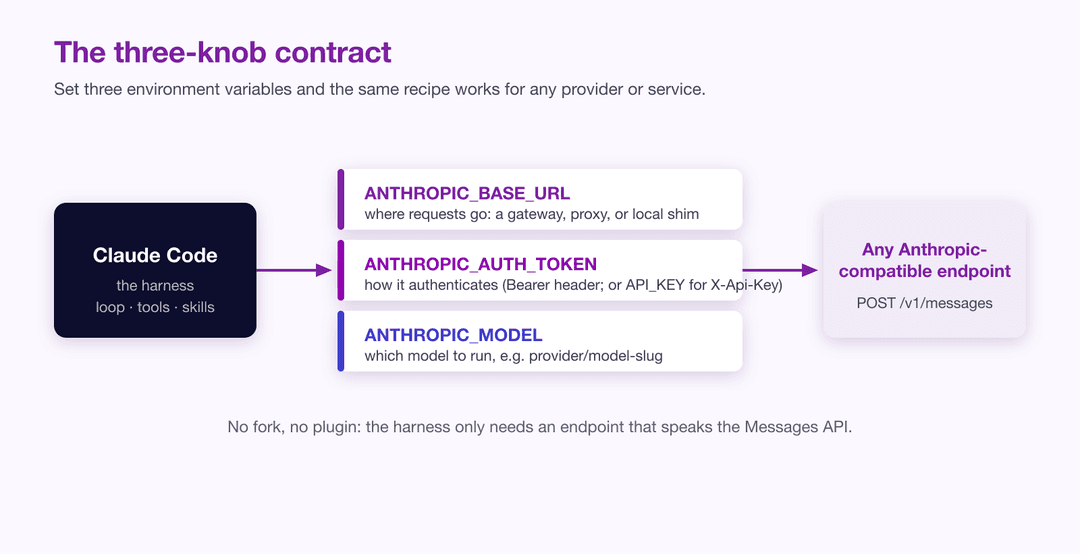
Everything below is just this recipe with the three values filled in for a specific service.
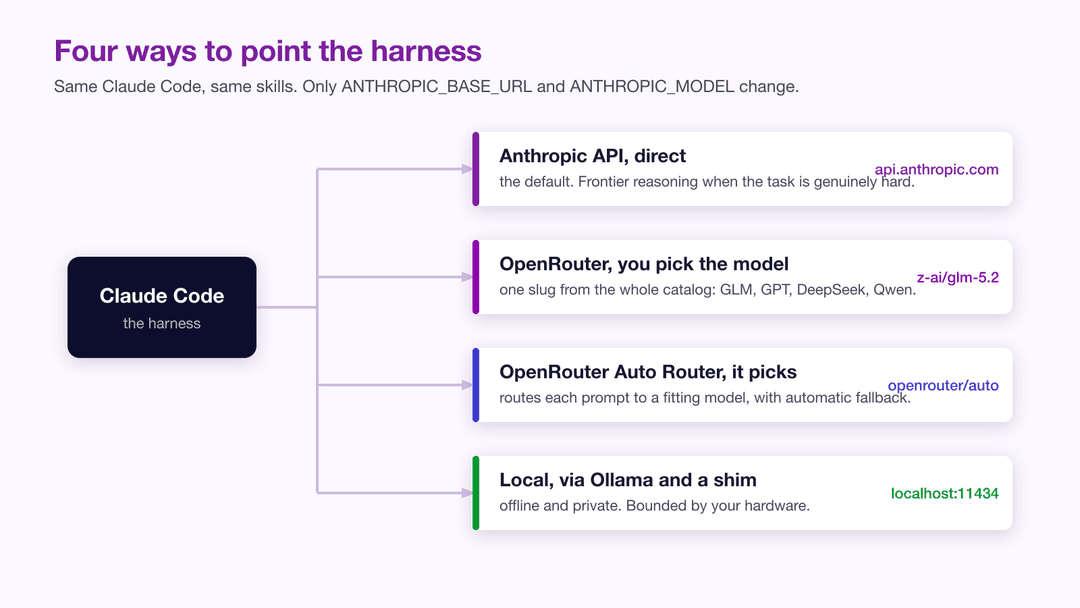
Plugging in a new model with OpenRouter
The fastest way to try a non-Anthropic model is through a gateway service, and OpenRouter is the one I reach for because it speaks the Anthropic Messages protocol natively. That native support is the detail that makes this painless: there is no translation layer to install, because OpenRouter exposes an Anthropic-compatible endpoint at https://openrouter.ai/api/v1/messages, and Claude Code appends the /v1/messages part itself.
That last point is the one gotcha worth slowing down for. Because the harness adds /v1/messages to whatever you give it, you set the base URL to https://openrouter.ai/api and not to https://openrouter.ai/api/v1. If you include the /v1 yourself you end up requesting /api/v1/v1/messages, which fails in a way that is annoying to debug. Get the base URL right and the rest is three exports:
1export ANTHROPIC_BASE_URL="https://openrouter.ai/api"
2export ANTHROPIC_AUTH_TOKEN="sk-or-v1-your-openrouter-key"
3export ANTHROPIC_MODEL="z-ai/glm-5.2"
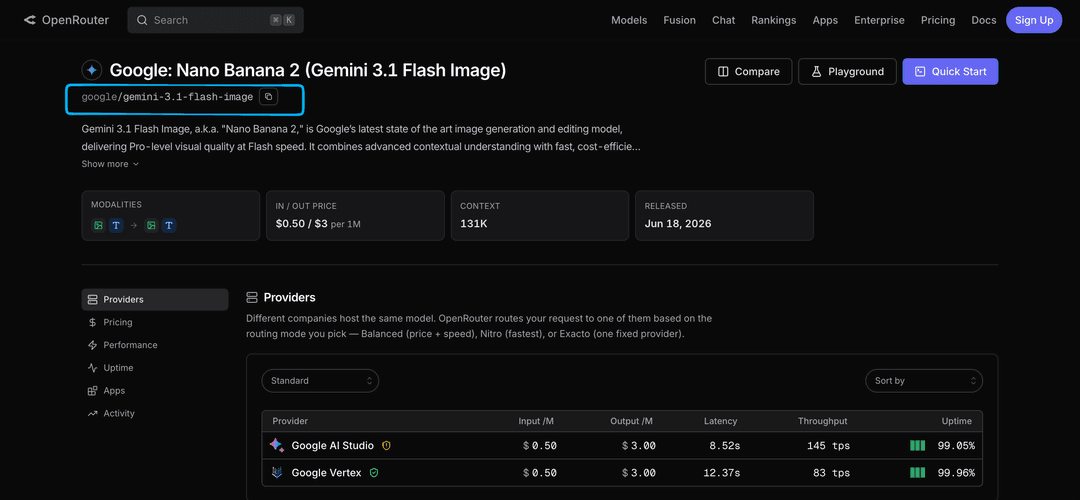
4claudeOpenRouter model slugs follow a provider/model pattern, so you have the entire catalog to choose from: z-ai/glm-5.2 for the GLM model I mentioned, anthropic/claude-opus-4.8 if you want a Claude model billed through OpenRouter, openai/gpt-5.1, deepseek/deepseek-chat-v3.1, qwen/qwen3-coder, and so on. You can confirm any current slug on the OpenRouter models page. Launch claude after those exports and the harness is now running entirely on your chosen model, with its tool calling, file edits, and skills intact.
One command to switch models
Exporting three variables by hand gets old quickly, and it leaks state into your shell that you then have to unset. The fix is a small function that takes the model slug as an argument, sets the variables only for that one invocation, and launches Claude Code. This is the function I keep in my shell config, lightly cleaned up:
1ccx() {
2  local model="z-ai/glm-5.2"          # default when no slug is given
3  if [[ -n "$1" && "$1" != -* ]]; then
4    # accept a bare slug or a pasted openrouter.ai URL, keep only the slug
5    model="${1#http://openrouter.ai/}"
6    model="${model#https://openrouter.ai/}"
7    model="${model#models/}"
8    model="${model%/}"
9    shift
10  fi
11  ANTHROPIC_BASE_URL="https://openrouter.ai/api" \
12  ANTHROPIC_AUTH_TOKEN="$OPENROUTER_API_KEY" \
13  ANTHROPIC_MODEL="$model" \
14  ANTHROPIC_DEFAULT_HAIKU_MODEL="$model" \
15  ANTHROPIC_DEFAULT_SONNET_MODEL="$model" \
16  ANTHROPIC_DEFAULT_OPUS_MODEL="$model" \
17  claude "$@"
18}Drop that into your ~/.zshrc or a sourced functions file, put your key in OPENROUTER_API_KEY once, and switching models becomes a single word followed by a slug:
1ccx                              # GLM 5.2, the default
2ccx openai/gpt-5.1               # paste a slug straight from the catalog
3ccx deepseek/deepseek-chat-v3.1 # something cheaper for the grind workTwo details matter. The function strips a pasted URL down to the slug, so you can copy a model's link straight from the catalog instead of retyping it. It also pins every tier, Haiku through Opus, to your chosen model, so the whole session runs on it rather than falling back to Anthropic for background tasks. Because the variables are set inline rather than exported, they vanish when the process exits and never pollute your shell. A couple of these aliases give you the multi-model workflow I described in my personal agent setup, where the model is a per-task choice rather than a default you forgot you were paying for.
Letting a router choose for you
Sometimes you do not want to pick a model at all, you want something to pick a good one for the task in front of you. OpenRouter offers this through its Auto Router, addressed with the slug openrouter/auto. It inspects your prompt, routes it to one of a curated set of models, and bills you at the rate of whatever it actually picked, with no surcharge for the routing itself. The model it chose comes back in the response so you are never guessing. Because it slots in exactly like any other slug, you point your function at it the same way:
1ccx openrouter/autoOnce the router has chosen a model, that model's normal provider routing applies, including automatic failover to another provider if the first is overloaded, so you get a degree of resilience for free. Alongside the smart router, OpenRouter also exposes preset routers that filter the pool by a constraint rather than by task: openrouter/free keeps you on zero-cost models, which is genuinely useful for throwaway experiments where you do not care about quality, and there are coding-tuned presets in the catalog as well. Routers are not magic, and for work where you know exactly which model you want they add a layer you do not need, but for exploratory sessions, or when you are price sensitive and happy to let availability decide, handing the choice to openrouter/auto is a reasonable default.
Running a model from your local machine with Ollama
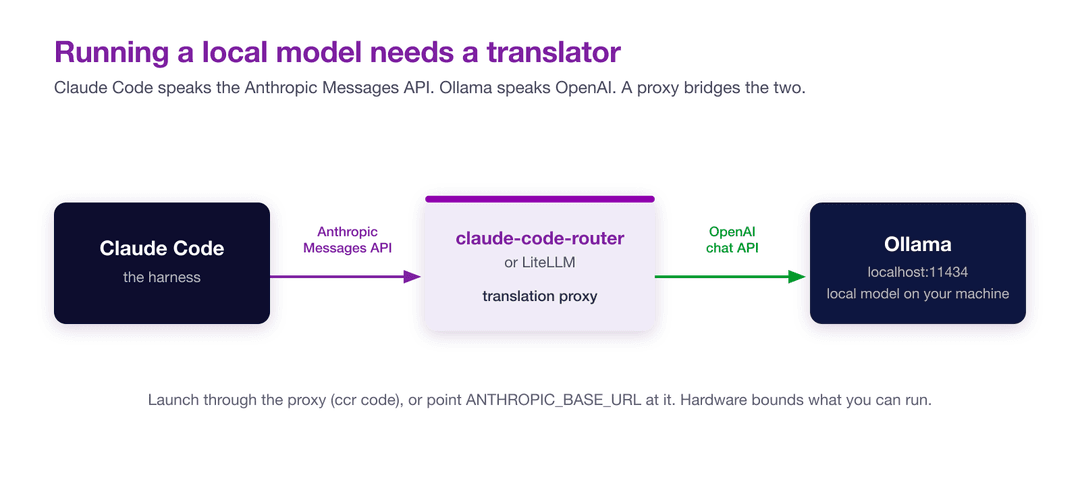
Everything so far has gone through a cloud gateway. The other end of the spectrum is running a model entirely on your own hardware, which you might want for privacy, for working offline, or simply to understand what is possible without an API bill. Ollama makes the local model part easy, but there is a wrinkle: Ollama serves an OpenAI-compatible API, and Claude Code speaks Anthropic's Messages format, so the two cannot talk directly. You need a small translation layer in between.
The community standard for this is claude-code-router, a proxy that accepts Anthropic-format requests from the harness and forwards them to OpenAI-compatible backends like Ollama. You install it alongside Claude Code, point it at your local Ollama endpoint, and launch through its ccr command instead of claude:
1# install the harness and the router
2npm install -g @anthropic-ai/claude-code
3npm install -g @musistudio/claude-code-router
4
5# pull a local model with Ollama (in another terminal)
6ollama pull qwen3-coder
7
8# launch Claude Code through the router
9ccr codeThe router reads a config file at ~/.claude-code-router/config.json, where you declare Ollama as a provider with its base URL of http://localhost:11434/v1/chat/completions and map it into the router's default slot. If you already run LiteLLM, that is an equally valid proxy: it does the same Anthropic-to-OpenAI translation, and you wire it in by exporting ANTHROPIC_BASE_URL="http://localhost:4000" to point the harness at the proxy, which is the same env-var trick from earlier sections.
The honest caveat is that hardware bounds what you can run. A laptop with a capable GPU or recent Apple Silicon will comfortably run a small to mid-size coding model, slower than a cloud call and less sharp on hard reasoning, while the large open models that approach frontier quality want far more memory than a typical workstation has. So treat local models as a genuine option for offline work, sensitive code, and learning how the pieces fit, rather than a free replacement for a top-tier cloud model. Knowing you can do it is worth a lot even when, most days, you will not.
The harness is not the only one
If the model is swappable, it is worth knowing the harness is too, because Claude Code is one of several agent loops you can run the same models through, and trying a few sharpens your sense of what the harness contributes versus what the model does. OpenCode is the one I run alongside Claude Code; it is model-agnostic by design, takes the model on the command line with a flag, and pairs naturally with OpenRouter so the same slugs carry over:
1opencode -m openrouter/z-ai/glm-5.2
2opencode -m openrouter/openrouter/autoBeyond it, Aider is a mature terminal pair-programmer with deep git integration that supports Claude, OpenAI, DeepSeek, and local models, Crush is a newer terminal agent from the Charm team, and Goose is an open-source agent from Block that leans heavily on tool extensions. They differ in their loop design, their tool calling, and their handling of skills and context, but they share the premise this whole post rests on: the agent and the model are separate choices, and you are free to mix them. The harness shapes how well a model's tool use and multi-step reasoning come through, which is also the theme of the best agent skill is the one that says the least, where what you feed the agent matters as much as which model is reading it.
Wrapping up
The mental shift that makes all of this pay off is small but real: Claude Code is a harness with a model-shaped slot, and you decide what goes in it. A frontier Anthropic model for the genuinely hard reasoning, a cheaper or faster model through OpenRouter for the long mechanical stretches, a router when you would rather not choose, and a local model when the work cannot leave your machine. The mechanism behind every one of those is the same handful of environment variables, wrapped in a one-line function so the switch costs you nothing.
For those of us building scraping and data-extraction agents, this turns into a practical lever rather than a curiosity, because so much of that work is iterative: you draft a spider, run it, read the failure, adjust, and repeat, and not every loop in that cycle deserves your most expensive model. Choosing the right model per task, and reaching for a tool like Web Scraping Copilot or the Zyte API when the job is to actually get the data, is how you keep an agentic workflow both sharp and affordable. Set up a couple of these aliases, paste a new slug in when something interesting ships, and let the harness stay the same while the models come and go.