Use the uv cheatsheet we created for Zyte’s community : https://github.com/zytelabs/uv-cheatsheet
uv initdoes not do what it did in April, the very few issues I had with it has been fixed in the recent releases but it’s one good package manager that I never felt a need to update and hence couldn’t really enjoy the latest and greatest, until this blog.
I keep a working reference in my repository, the kind you paste into a colleague's message when they ask how to start a project, and when I checked it against a current build the two entries I trusted most did not survive. One had been wrong since late July. The other had never been right on either version I tested, and I had been passing it around anyway.
This is normal for a tool moving at uv's pace rather than a scandal. The big ideas hold: uv is still the fast Rust-based package and project manager that replaced an awkward pile of older tools, and it is still the right default. What drifts is the layer underneath, the part you actually type.
Everything below was reproduced against uv 0.12.15, released on Tuesday, September 15, 2026, with uv 0.11.7 installed alongside, so every before and after is real terminal output rather than recollection.
The command that changed under everyone
Since uv 0.12.0, released on Tuesday, July 28, 2026, projects created with uv init define a build system and are packaged by default, so you get a src layout, a [project.scripts] entry, and a [build-system] table:
1$ uv init demo
2Initialized project `demo` at `/private/tmp/demo`
3$ find demo -type f -not -path '*/.git/*' | sort
4demo/.gitignore
5demo/.python-version
6demo/pyproject.toml
7demo/README.md
8demo/src/demo/__init__.py1[project.scripts]
2demo = "demo:main"
3
4[build-system]
5requires = ["uv_build>=0.12.15,<0.13.0"]
6build-backend = "uv_build"The older behavior gave you a bare main.py at the top level with no build system, which meant your own code was not installed into its own virtual environment and was importable only by accident of whichever directory you happened to be standing in. That layout still exists behind uv init --no-package, and existing projects are untouched, so nothing breaks.
The entry in my notes said the reverse. It said uv init --package was the flag you needed for a build system and a src layout, and that without it your imports worked by luck. True in April 2026, backwards now, and exactly the sort of small thing a reader copies into a project and then carries for a year.
Why switch?
I asked John, our developer engagement manager, what uv replaced for him, because I wanted the version of this that comes from using the thing rather than reading about it. His answer was pip and venv, which he called fine, just slow and dated next to modern tooling. He had tried Poetry, liked the idea of it, and never got it to stick. What he actually wanted was cargo for Python.
Two things closed that gap. One was speed. The other was the piece pip never had, which is a way to run a tool you have not installed. Node developers have had npx for years and Python had nothing, and uvx is that.
What he does now is unremarkable in the best way. Everything goes through uv, his agents run uv sync, and pyproject.toml turned dependency management and Dockerfiles into something standard rather than something every project reinvents. Scrapy and Scrapy Cloud work exactly as they did before.
His only complaint was having to delete the main.py file that uv init leaves behind.
That complaint is not an issue anymore. It is the same 0.12.0 change from the section above. The packaged default produces src/<name>/__init__.py and no main.py at all: WIN!!
1$ uv init mp && find mp -type f -not -path '*/.git/*' | sortOn uv 0.11.7 that leaves you a main.py to delete:
1mp/.gitignore
2mp/.python-version
3mp/main.py
4mp/pyproject.toml
5mp/README.mdOn 0.12.15 it does not:
1mp/.gitignore
2mp/.python-version
3mp/pyproject.toml
4mp/README.md
5mp/src/mp/__init__.pyHis one real gripe with uv is already fixed.
Where uv already lives in the Scrapy world?
Scrapy runs its continuous integration on uv today. The workflow pins astral-sh/setup-uv, drives the test matrix through uvx --with tox-uv tox, and sets UV_PYTHON_PREFERENCE: only-system with a comment explaining why, which is to make uv use the interpreter actions/setup-python already installed instead of downloading one of its own. Steal that last setting. In continuous integration you have usually already paid for a specific interpreter, and letting uv helpfully fetch a second one gives you a build that passes against a Python your users are not running.
Although Scrapy's installation guide doesn’t mention uv. It covers pip, it covers conda, it covers virtual environments, and it stops. Documentation usually trails practice so this is nobody's failure, but it is real and fixable, and since Zyte maintains Scrapy it is a gap we can close rather than complain about. If you have ever wondered what a genuinely useful first contribution to a large open-source project looks like, updating an installation page to match what the maintainers already do is a strong candidate.
The two modes that do not mix
uv has two personalities. In project mode, pyproject.toml and uv.lock are the source of truth, .venv is disposable output, and you drive everything with uv add, uv sync, uv lock, and uv run. In pip mode, uv venv and uv pip install reproduce the workflow you already know, and the source of truth is whatever you remember typing. Both are called uv, and nothing in the interface tells you which one you are in.
Everything uv does from the first command onward moves between three files, and almost every confusion is about which one a command writes to.
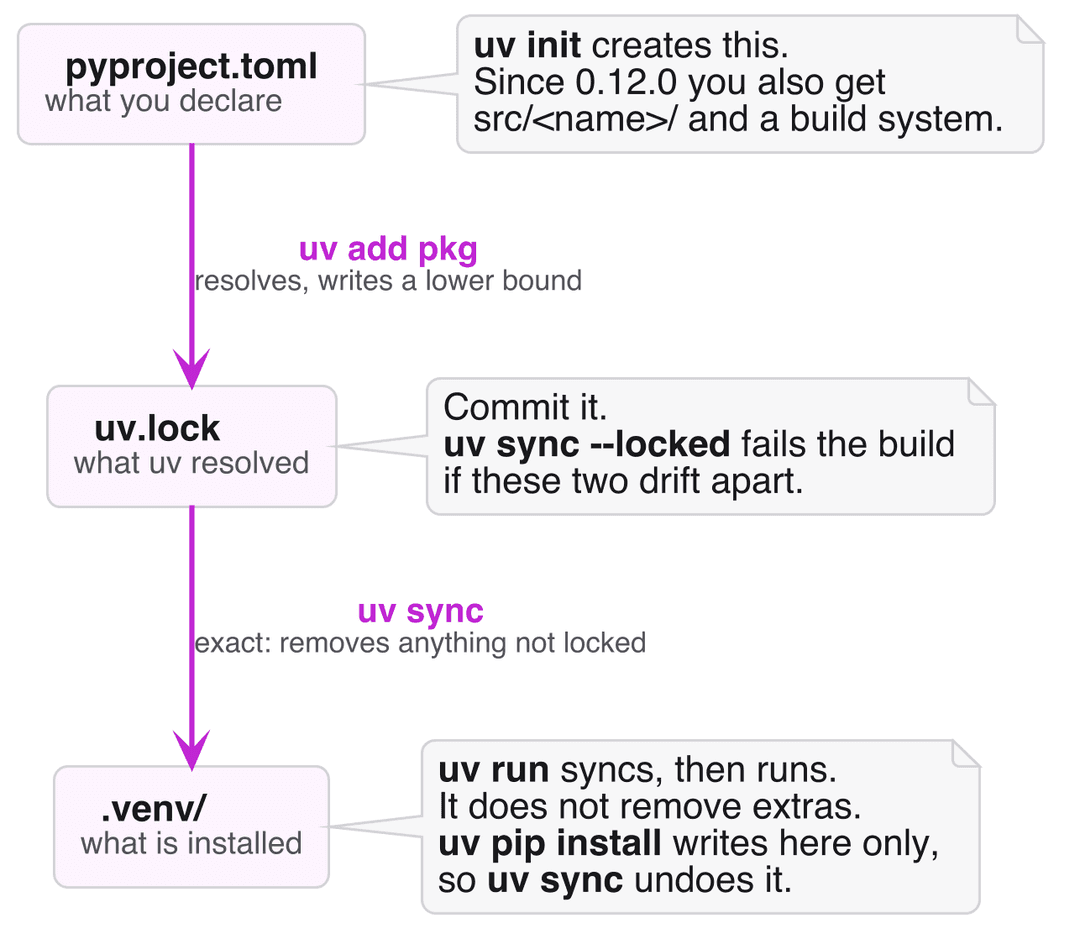
What each uv command actually writes to.
The folklore, which I had written down myself, says that uv pip install inside a project gets silently undone by the next uv run or uv sync. Tested on both 0.11.7 and 0.12.15, that is half right. uv run prunes nothing:
1$ uv pip install six          # six is not a project dependency
2$ uv run python -c "pass"
3$ uv run --no-sync python -c "import six"
4# six is still thereuv sync is what removes it, because uv sync is exact by default and makes the environment match the lockfile:
1$ uv sync
2Resolved 1 package in 2ms
3Uninstalled 1 package in 0.47ms
4 - six==1.17.0There is also an escape hatch almost nobody mentions. uv sync --inexact installs your declared dependencies and leaves anything extra alone, so the package survives the round trip:
1$ uv pip install six && uv sync --inexact
2# six is still thereMemorize the precise version rather than the vague one: uv sync is exact by default, --inexact opts out, and uv run does not prune. The practical advice is unchanged, since inside a project the durable ways to add a package are uv add or an edit to pyproject.toml followed by a lock, but knowing which command did the deleting is the difference between fixing a problem and performing a ritual.
The hash check that did nothing
If you pin dependencies by hash, you have probably written a requirements.txt beginning with the --require-hashes directive. Before uv 0.12.0, uv read that directive, told you it was unsupported, and installed your packages anyway without checking a single hash. Here is uv 0.11.7 against a file containing --require-hashes and one pinned requirement carrying no hash:
1warning: Ignoring unsupported option in `requirements.txt`: `--require-hashes` (hint: pass `--require-hashes` on the command
2line instead)
3Resolved 1 package in 82ms
4Installed 1 package in 1ms
5 + six==1.17.0The warning is accurate and the outcome is still wrong. You asked for a guarantee, and what you got was a note explaining the guarantee had been declined, followed by the install proceeding regardless. Scrolling past in a long build log, that line is invisible.
uv 0.12.0 made the directive real. The same file on 0.12.15:
1error: In `--require-hashes` mode, all requirements must have a hash, but none were provided for: six==1.17.0Nothing installs. The build fails, correctly, because a requirement with no hash cannot be hash checked.
The consequence deserves stating plainly. If you put --require-hashes in a requirements file, installed it with uv before July 28, 2026, and did not also pass the flag on the command line, you did not have hash-checked installs, whatever your build log implied. Any pipeline claiming hash pinning is worth revisiting to confirm which uv it ran on, and if the answer is pre-0.12, whether the directive was passed on the command line rather than only living in the file.
Pin uv itself
Most of us pin our dependencies. Far fewer pin the tool doing the pinning, and uv is pre-1.0 software sitting in the most load-bearing step of the build.
On Tuesday, September 15, 2026, uv shipped 0.12.14 and 0.12.15 on the same day, because 0.12.14 carried a regression that rejected valid installation commands, including uv pip install --system inside the official python Docker images. If your build used that command without pinning uv, it broke. The fix arrived within hours, which is a good outcome you would still rather have watched from a distance.
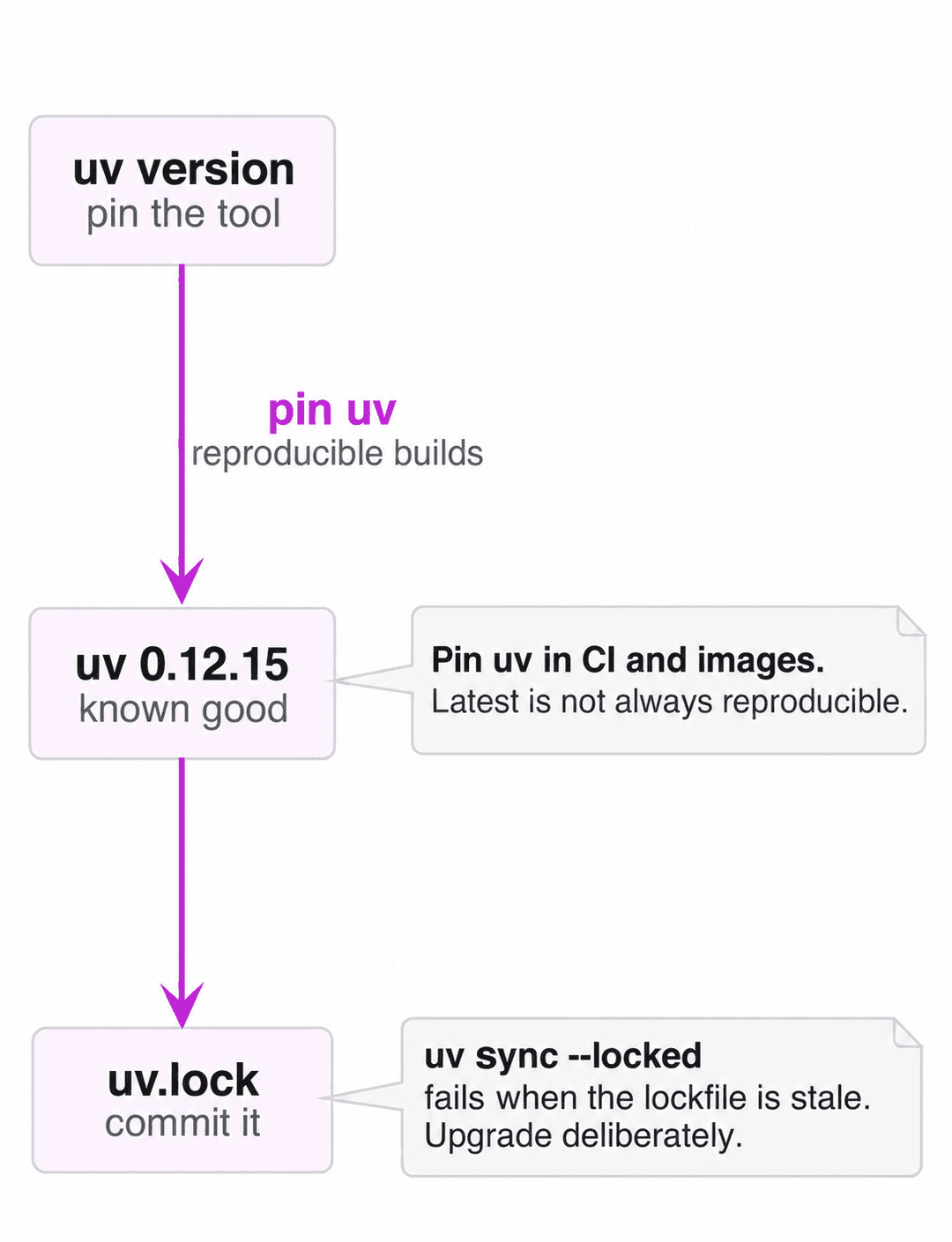
A quieter version of the same lesson turned up while writing this. My machine's package manager was serving uv 0.12.13 while upstream was on 0.12.15. Neither number is wrong, but "latest" and "latest from your package manager" are different claims, and only one of them reproduces for a colleague on another operating system. Pin the version in your images and your continuous integration, then upgrade deliberately, the way you would treat any dependency you cannot easily roll back.
Five traps worth five minutes
None of these are bugs. They are places where a reasonable expectation meets a different design decision, and all five were reproduced on 0.12.15.
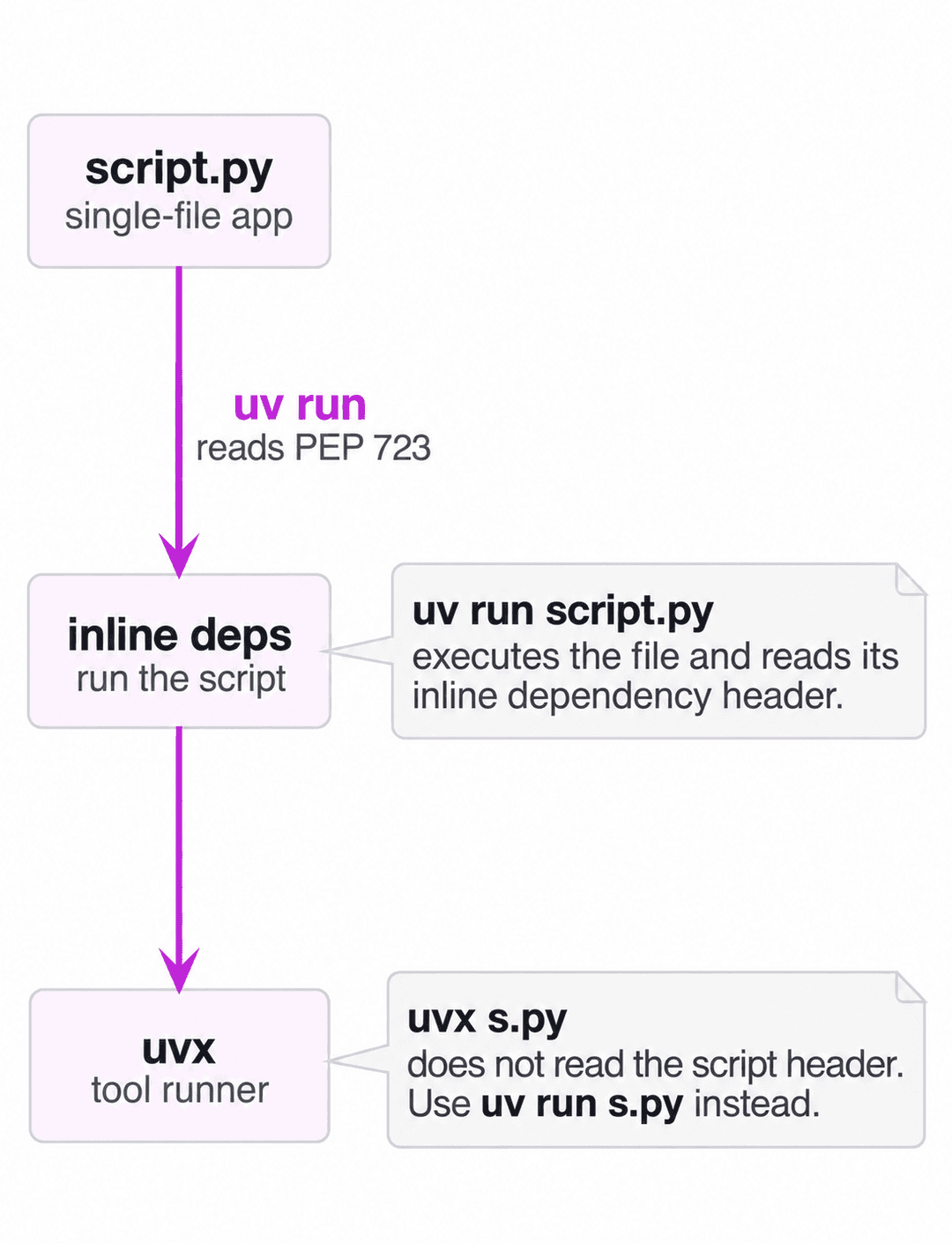
The first is that uv run runs a script while uvx runs a tool. uv run script.py executes the file and reads its PEP 723 inline dependency header; uvx is the tool runner and does not, which matters whenever a single-file program is driven by some other command. That trap nearly shipped in my earlier article on running web data workflows in a reactive notebook, where the documented command worked locally and would have failed for every reader who cloned the repository fresh. A clean-room test in an empty directory caught it before publication. To uv's credit, the error now signposts the way out.
1$ uvx s.py
2error: It looks like you tried to run a Python script at `s.py`, which is not supported by `uvx`
3hint: Use `uv run s.py` insteadSecond, --locked asserts and --frozen ignores. uv sync --locked fails when uv.lock no longer matches pyproject.toml, which is what you want guarding continuous integration. uv sync --frozen skips the check and installs against the stale lockfile without comment. Two flags that look like synonyms and behave like opposites.
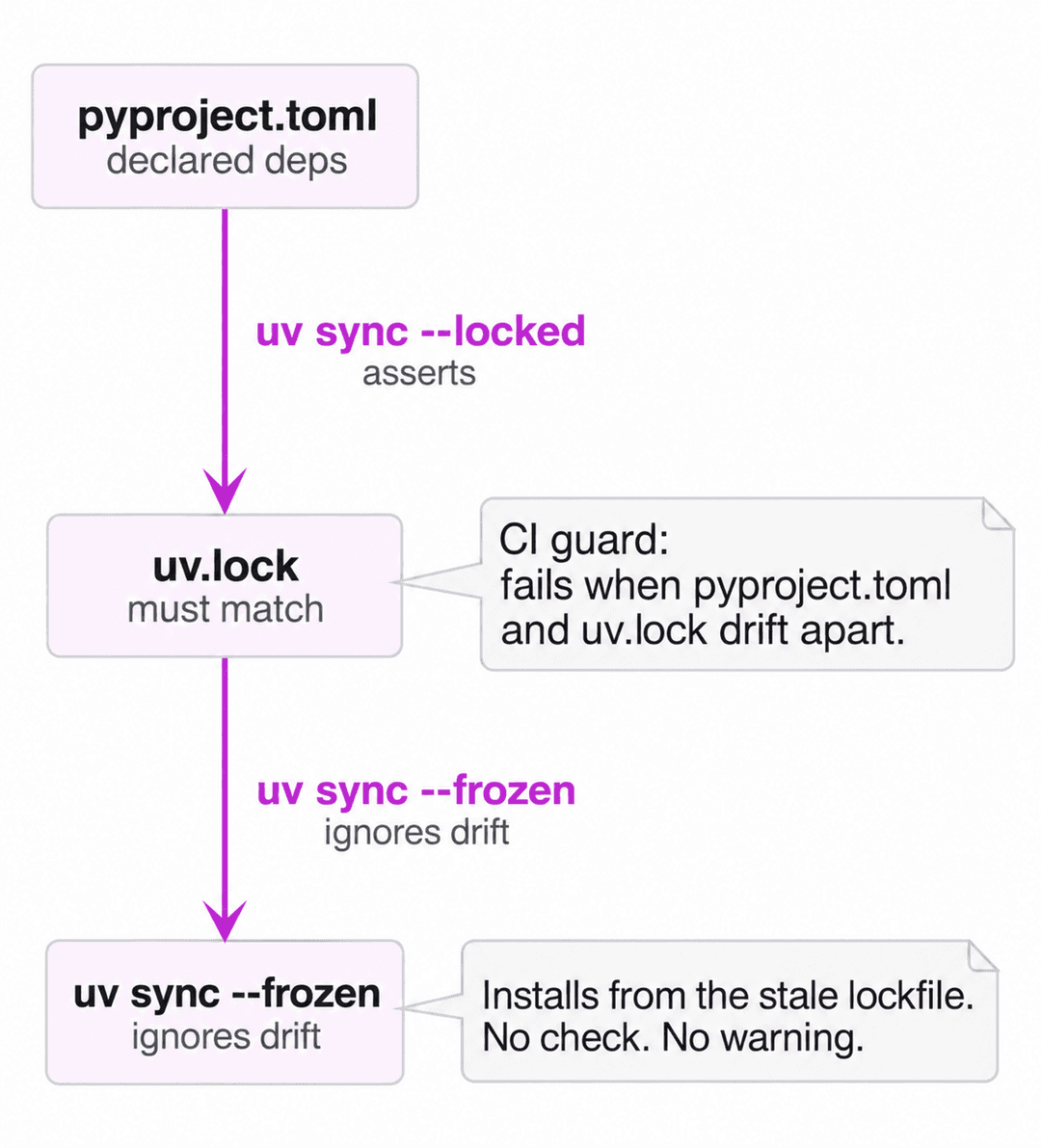
1$ uv sync --locked
2error: The lockfile at `uv.lock` needs to be updated, but `--locked` was provided.
3hint: To update the lockfile, run `uv lock`.Third, uv python pin does not rebuild your environment. It rewrites .python-version and stops, and the existing .venv keeps whatever interpreter it had until uv sync deletes and recreates it. Note also that requires-python outranks the pin, so pinning 3.12 under requires-python = ">=3.13" fails loudly rather than disagreeing in silence, which is the right call.
Fourth, uv virtual environments ship without pip. This is deliberate and almost always fine, right until a legacy tool shells out to python -m pip and reports no module named pip. uv venv --seed puts it back.
Fifth, uv add writes a lower bound rather than a pin. uv add six puts six>=1.17.0 in pyproject.toml, and the resolved version lives only in uv.lock. Commit the lockfile, for applications and libraries alike, because it is the only artifact recording what you actually tested against.
Locking a crawler
Scrapy is a good place to watch all of this land at once, because a crawler has the properties that make dependency management interesting: a lockfile that has to survive a rebuild, an image rebuilt every time a selector changes, and a continuous integration run where a stale lock should fail loudly rather than pass quietly.
Starting one takes two commands, and the second is the one that matters:
1$ uv init crawler && cd crawler
2$ uv add scrapy
3$ uv run scrapy version
4Scrapy 2.19.0That wrote scrapy>=2.19.0 into pyproject.toml and 47 packages into uv.lock. The 47 is the number worth noticing, because Scrapy pulls in Twisted, lxml, cryptography, and a long tail beneath them, so the distance between "I installed Scrapy" and "I can rebuild this exact environment in six months" is 46 packages you never chose. uv sync --locked is what closes that distance, and in continuous integration it is the difference between a build that fails on a stale lockfile and one that quietly resolves something new.
For the container, ordering does the work. Astral publishes uv as an image, and the pattern in their Docker guide copies the binary in at a pinned version rather than installing it:
Dockerfile
1FROM python:3.13-slim
2COPY --from=ghcr.io/astral-sh/uv:0.12.15 /uv /uvx /bin/
3
4WORKDIR /app
5COPY pyproject.toml uv.lock ./
6RUN uv sync --locked --no-install-project
7
8COPY . .
9RUN uv sync --locked
10
11CMD ["uv", "run", "scrapy", "crawl", "products"]Two details there earn their place. Dependencies are synced before your source is copied, so editing a spider leaves the layer holding Twisted, lxml, and cryptography untouched instead of rebuilding it. And the uv version is pinned in the COPY line, which is the concrete form of the advice from earlier: on September 15, that pin was the difference between a broken build and an uneventful one. If your crawls drive a browser, the same ordering matters more, because the dependency layer gets considerably heavier once a browser is in it, which John covers in running Playwright at scale.
What I would still change
An honest cheatsheet should say where a tool annoys its own users, and uv's issue tracker is unusually clear about this, since the requests are heavily upvoted and have been open a long time. As of Thursday, September 17, 2026, the most-supported open requests are using uv run as a task runner at 702 up-votes and 254 comments, an upgrade --all option at 536, a dedicated uv upgrade for bumping pyproject.toml at 532, and a uv shell activation command at 416.
Those four cluster around one theme, which is that uv replaced the tools people used for everyday chores without replacing the chores. Upgrading a dependency and writing the new bound back into pyproject.toml remains a two-step dance, and running a project's common commands still needs make, just, or a pile of shell aliases.
It is also worth knowing what to stop repeating. The criticism I still see most often, that Dependabot cannot read uv.lock, is out of date. uv is now a first-class ecosystem in GitHub's supported-ecosystems table, with its own uv value in the configuration rather than being routed through pip. It is not flawless, and dependabot-core carries several open issues about how it updates uv.lock, but "unsupported" is no longer the right word.
The larger open question is governance. On Thursday, March 19, 2026, Astral founder Charlie Marsh announced that the company had "entered into an agreement to join OpenAI as part of the Codex team", writing that "OpenAI will continue supporting our open source tools after the deal closes." I have no inside knowledge and no prediction. At the time of writing uv remains permissively licensed, actively developed, and pre-1.0 with no announced 1.0 date, and that is a fact worth holding alongside the adoption figures, which are substantial: on Thursday, September 17, 2026, pypistats reported 141,324,434 downloads of uv in the preceding 30 days, and the project repository showed 89,920 stars.
The cheatsheet, grouped by intent
Alphabetical command lists are useless when you cannot remember the command, so this is grouped by what you are trying to do. It also lives in a repository at zytelabs/uv-cheatsheet, along with a one-page printable version, so you can correct it when it goes stale, which it will.
Start something. uv init name for a packaged project with a src layout, uv init name --no-package for the old flat script layout, and uv init --lib when you are writing a library.
Change dependencies inside a project. uv add pkg, uv add --dev pkg for tooling that never ships, and uv remove pkg. Never uv pip install here. Use uv lock --upgrade-package pkg to bump one thing and uv lock --upgrade to bump everything.
Reproduce an environment. uv sync for exact, uv sync --inexact to leave extras alone, uv sync --locked in continuous integration so a stale lockfile fails the build, and uv sync --frozen only when you deliberately want the old lock.
Run things. uv run cmd inside a project, uv run script.py for a single file with a PEP 723 header, and uvx tool for a tool you have not installed. Never source .venv/bin/activate, because uv run syncs first and wins over an activated environment anyway, warning that a mismatched VIRTUAL_ENV "will be ignored" unless you pass --active.
Manage interpreters. uv python list, uv python install 4.13, and uv python pin 3.12 followed by uv sync to make it real. Set UV_PYTHON_PREFERENCE=only-system in continuous integration, or only-managed when you want uv's own builds.
Escape hatches. uv venv --seed when something needs pip in the environment, uv tree --invert --package pkg when you need to know who dragged a dependency in, and uv export when a downstream tool insists on a requirements.txt.
Containers. Pin the uv version in the image, use UV_PROJECT_ENVIRONMENT to control where the environment lands, and install dependencies before copying your source so the dependency layer caches. For scraping work, where images get rebuilt constantly as selectors change, that ordering is the difference between rebuilding a spider and rebuilding Twisted.
Where this leaves you
uv is infrastructure now. It sits under a very large number of builds, including the continuous integration of the framework this company maintains, and it is still pre-1.0 and moving fast enough that a six-month-old reference misleads rather than merely lags.
So treat your uv knowledge like a dependency. Give it a version, check it occasionally, and be willing to find that something you were confident about moved underneath you. I found two in my own notes, and I was not looking hard.
Pin the version, put --locked in continuous integration, and see what your build has been getting away with. The cheatsheet above is in zytelabs/uv-cheatsheet if you would rather print it than scroll it, and pull requests are the fastest way to make this article wrong.