Coding agents have their own fetch and search tools and often use them first, which works until a page returns a 403 and the agent has no other way in. Zyte MCP is Zyte's hosted Model Context Protocol (MCP) server, and it gives your agent Zyte API and Scrapy Cloud tools. You can use these to read pages that plain HTTP requests get blocked on, take screenshots, pull products and links as structured fields, search as seen from another country, price a site before you scrape it, check what the agent spent, and run Scrapy Cloud jobs.
Here’s a list of my favourite top Zyte API usage ranked in order. The CLAUDE.md / AGENTS.md, edits and skill ideas under each item are my personal suggestions.
Connect it to your agent
Zyte MCP is a hosted server at https://mcp.zyte.com/v1/mcp, so there is nothing to install, and your client connects to it with OAuth. In Claude Code you add the server with one command, then, as the Zyte MCP page describes, run /mcp inside Claude Code to connect your Zyte account:
1claude mcp add --transport http zyte https://mcp.zyte.com/v1/mcpThe same server URL works in Codex CLI, GitHub Copilot CLI, VS Code, claude.ai as a custom connector, and any other Model Context Protocol client; the Zyte MCP documentation has the exact steps for each.

A thing to remember is that even with the Zyte MCP server connected, your agent may still call its own tools, and the docs explain why: "Agents have their own tools to get web pages and search the web, and often use those instead of Zyte. Naming Zyte in your request, e.g. 'fetch with Zyte', is usually enough to get Zyte used." Every prompt in this post therefore names Zyte for that reason.
Which tool does the agent pick?
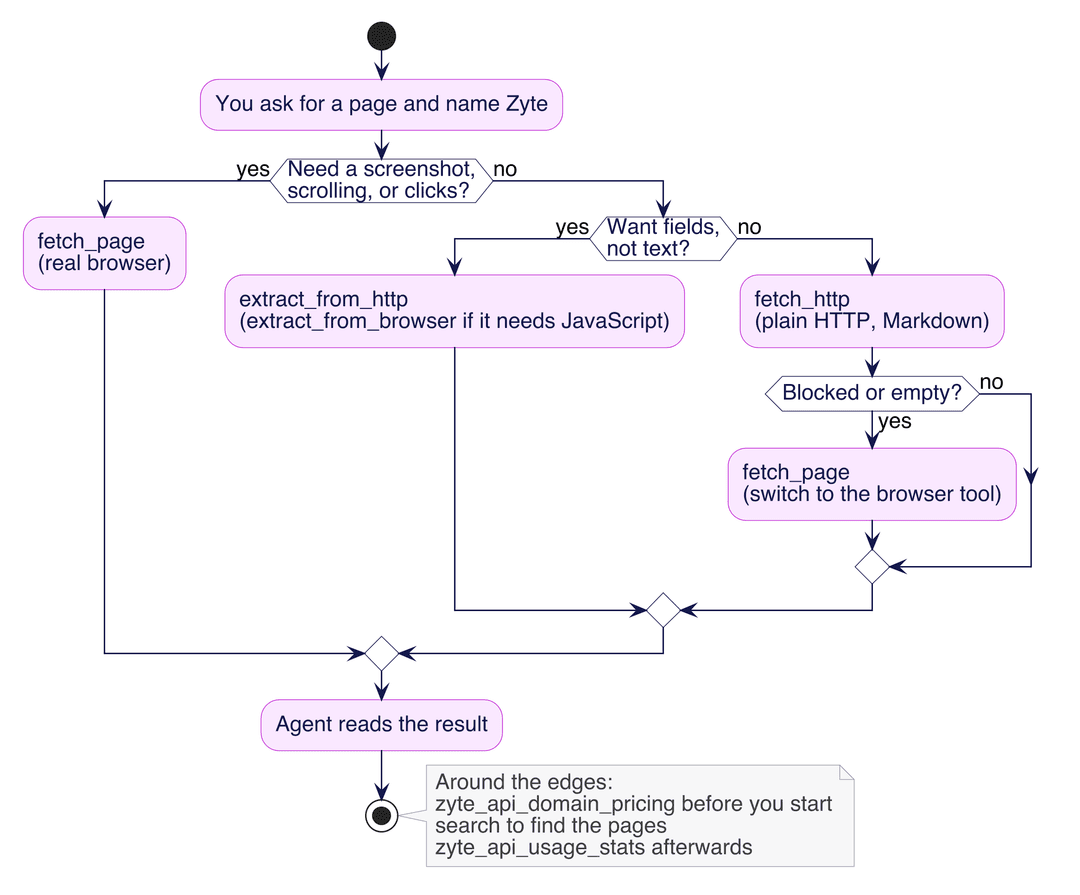
Zyte MCP exposes eight Zyte API centric tools (fetch_http, fetch_page, extract_from_http, extract_from_browser, search, zyte_api_domain_pricing, zyte_api_usage_stats, and user_info) plus 26 Scrapy Cloud tools. I think of them as an escalation ladder: start with fetch_http, which is plain HTTP and returns Markdown; switch to fetch_page, which runs a real browser, when plain HTTP fails or when you need a screenshot, scrolling, or clicks; and use extract_from_http or extract_from_browser when you want fields rather than text. Search, pricing, and usage stats sit around the edges of that ladder, helping you find pages before you start and see what you spent afterwards.
1. Read a page your own fetch tool can't get
This is probably the #1 reason to install Zyte MCP at all, and it is also where an agent most needs a nudge. Your agent tried to access a webpage but got banned or couldn’t access it, getting 403 which could hamper your agent’s ability to conduct and present complete research and hence the results might not be what you were expecting. Use Zyte MCP for seamless fetch. In your AGENTS.md :
1## Fetching pages with Zyte
2- Use Zyte MCP when I name Zyte. If your built-in fetch fails or returns a block page, retry using Zyte MCP.
3- If `fetch_http` fails, or returns an empty page or a block page, try `fetch_page` with the same URL, and tell me first that a browser request costs more.
4- Ask before making more than 10 Zyte calls for one request.
5- Tell me which Zyte tool returned the page.2. Get a product as clean fields, no selectors
extract_from_http tool with the type product turns a product page into named fields through Zyte API's Automatic extraction, so you don't have to write CSS selectors. On the "A Light in the Attic" page on books.toscrape.com it returned an extraction probability of 0.991 and the name, a price of 51.77, the currency GBP, availability InStock, SKU 1000, all of which matched the page when the test agent compared them by hand. A second product, the Abominable Hoodie on scrapingcourse.com, came back with a probability of 0.989, a price of 69.0 USD, and SKU MH09.
This prompt asks for the fields and the confidence score together:
1Using Zyte, extract the name, price, currency, availability and SKU of the product at https://books.toscrape.com/catalogue/a-light-in-the-attic_1000/index.html and tell me the extraction probability."Clean" here means structured, and a field's text is only as tidy as the page it came from: the description field carried a stray repeated fragment ("love th It's hard to imagine...") because the page's own HTML contains it, and I saw the same fragment in other output from that page, so the extraction was faithful to a messy source. Read the probability, and spot-check free-text fields before you trust them downstream.
A short rule keeps the agent from parsing HTML when it doesn't need to:
1## Product data
2- For product pages, call Zyte `extract_from_http` with type `product` instead of parsing HTML.
3- Always report the extraction probability; flag anything below 0.9.
4- Copy description text as returned; do not rewrite it.A zyte-product-fields skill could run the extraction, check the probability, and return a fixed set of fields as JSON so every product looks the same.
3. Take screenshots: viewport, full page, and phone-size
You can also use Zyte MCP to take screenshots of any webpage. I called fetch_page, which runs Zyte API's headless browser, with output: ["screenshot"] on the books.toscrape.com home page and got a 1920 by 1080 capture of the viewport. Screenshots are JPEG by default, so for this one I asked for a PNG with screenshotOptions.format: "png".
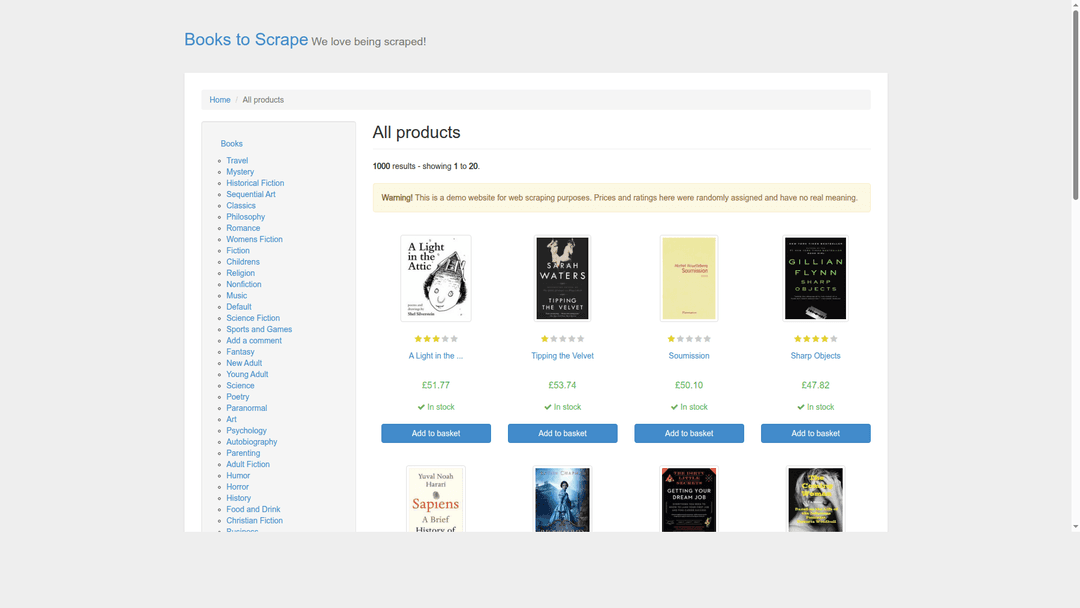
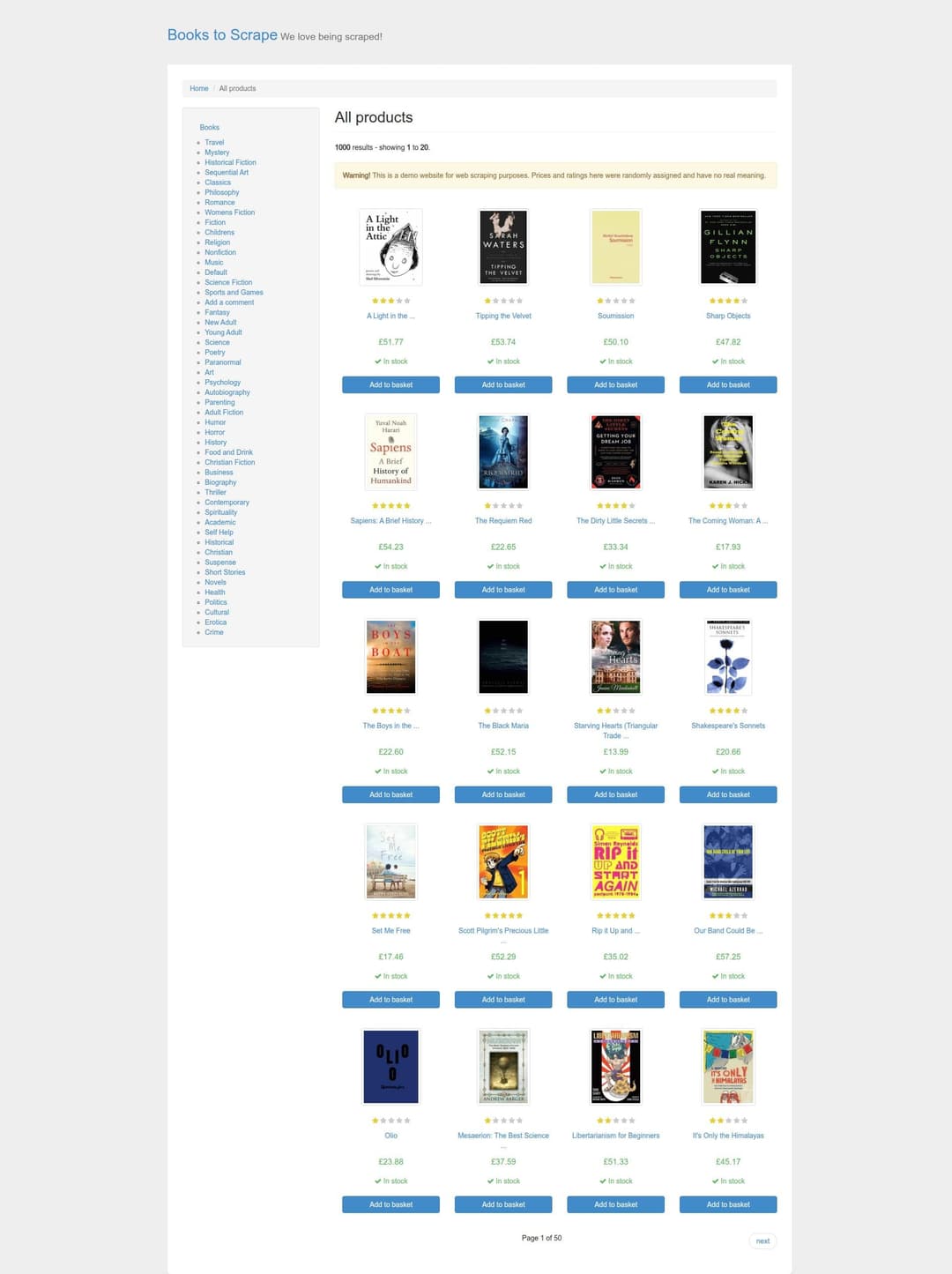
Setting screenshotOptions.fullPage to true produced a 1905 by 2549 JPEG of the whole page, down to the "Page 1 of 50" footer. According to the tool's own description, full-page capture is JPEG only and is clipped at 5000 by 10000 pixels.
A viewport of 390 by 844 made the site switch to its stacked, single-column mobile layout.
Try all of it in one prompt:
1Open https://books.toscrape.com/ in a browser with Zyte and take a full-page screenshot. Then take another at 390 by 844 and tell me how the layout changes.For a visible mobile check, set a browser viewport rather than a device option on plain HTTP: a test agent ran fetch_http with device: mobile and geolocation: DE on a sandbox page and got byte-identical content back. I did not measure what the screenshot feature itself costs, so check the stats (item 10) after your first few.
This rule tells the agent which knob to turn:
1## Screenshots
2- Take screenshots with Zyte `fetch_page` and `output: ["screenshot"]`; they are JPEG unless I ask for PNG (`screenshotOptions.format: "png"`).
3- For a whole page, set `screenshotOptions.fullPage: true` (JPEG only).
4- For a phone view, set `viewport: {width: 390, height: 844}`; do not rely on `device: mobile` with `fetch_http`.A zyte-visual-check skill could take the desktop, full-page, and phone screenshots of a URL in one go and save them side by side for review.
4. Ask for fields in plain words
There is no free-text mode in Zyte API AI extraction, but you can get close to one. You pass customAttributes, which are typed fields (string, integer, boolean, number, array, or object, up to 20 of them), on top of an extraction type, and if you only want your own fields you use the type pageContent. The fields are filled by "a Zyte-operated LLM", in the words of the tool description, so the wording of each field matters.
On the book page I asked for a upc and an author. The UPC came back as a897fe39b1053632, and the author came back as "Shel Silverstein", even though the page never prints a labeled author field: its description says "poetry and drawings from Shel Silverstein", so the model read it from the text. The fields that are not on the page at all, publisher, page_count, and publication_year, came back empty, with nothing invented. Adding "only if it is written on the page" to the field descriptions made no difference in my test; the result was identical either way.
You can describe the fields in your own words and let the agent build the attributes:
1Using Zyte, extract from https://books.toscrape.com/catalogue/a-light-in-the-attic_1000/index.html: the UPC, the author, the publisher, the page count and the publication year. If a field is not on the page, leave it empty."Shel Silverstein" was right, but the model read it from a sentence rather than a field, and on a less clearly written page the same kind of inference could produce a wrong answer just as confidently. Describe each field precisely and spot-check a few pages before you rely on it.
This rule sets those expectations for the agent:
1## Custom fields
2- For fields that are not part of a standard Zyte type, use `customAttributes` with type `pageContent`.
3- Give each attribute a precise description and a type.
4- Report empty fields as empty; never fill them from your own knowledge.A zyte-custom-fields skill could take a plain list of field names and descriptions, build the customAttributes schema, and return a table with empty cells left empty.
5. Search as seen from another country
The search tool runs a web search as seen from a country you choose. This is the one item where I used a real search query rather than a sandbox site, because the tool is a search tool, and I kept the query neutral: "web scraping api". A test agent searched from Germany, Brazil, and India (.de, .com.br, and .co.in) and compared the top nine organic results by registered domain. In that run the overlap was partial: Germany in English against Brazil scored 0.29 on the Jaccard index, Germany against India 0.38, Brazil against India 0.29, and German-language against English-language results from Germany 0.29. A repeat of the Germany and India searches later the same day scored 0.50, so expect these figures to move.
This prompt reproduces the comparison:
1Search the web for "web scraping api" with Zyte as seen from Germany, Brazil and India. Compare the top nine domains for each country and tell me which domains appear in all three.A rule saves the agent from the redirect-token mistake:
1## Searching with Zyte
2- Use Zyte `search` when I ask for results from a specific country.
3- Read domains from the displayed URL, not the `url` field.
4- If a search fails while requesting the AI overview, retry with organic results only.A zyte-geo-serp skill could confirm the number of searches first, then run the same query across a list of countries and return the domain overlap as a small table.
6. Load more, scroll, and click
fetch_page can perform browser actions before it returns the page, example - "Load more" buttons.
1Open https://www.scrapingcourse.com/infinite-scrolling with Zyte in a browser, scroll to the bottom twice, and return the product names and prices without duplicates.This rule keeps the context small:
1## Scrolling and clicking
2- For infinite scroll or "Load more" pages, use Zyte `fetch_page` with `scrollBottom` or click actions.
3- Deduplicate items by URL before counting or reporting them.
4- Summarize long results instead of pasting the full Markdown.
5- Ask before more than three scrolls or clicks on one page.A zyte-expand-list skill could take a URL and a capped number of scrolls or clicks, run them, and return only unique items.
7. Price a site before you scrape it
zyte_api_domain_pricing tells you whether Zyte API supports a site and what a request will cost, before you send a single request. For books.toscrape.com it reported the site as available, priced as toscrape.com in tier one, at $0.20 per 1,000 plain HTTP requests and $1.50 per 1,000 browser requests. For www.scrapingcourse.com a test agent got the answer no_permanent_tier with the instruction "Do not guess a price."
Ask the question directly:
1Does Zyte API support books.toscrape.com, and what does a plain HTTP request and a browser request cost per 1,000?They vary by domain: the example on the Zyte MCP page quotes $0.65 and $6.00 per 1,000 for example.com, because prices follow each domain's tier. A rule makes pricing the first step of any scraping plan:
1## Before scraping a new site
2- Call Zyte `zyte_api_domain_pricing` for the domain first and show me the HTTP and browser prices.
3- If the answer is `no_permanent_tier`, say so and do not estimate a price.
4- Estimate cost only as pages times price, and say it excludes retries.A zyte-cost-estimate skill could combine the domain price with a page count you supply and print an estimate with its assumptions spelled out. If you want to see how pricing fits into a fuller scraping plan, John covered that in how I use Zyte MCP to plan web scrapers.
8. Get the links to follow
extract_from_http with the type productNavigation returns the item links on a listing page and the link to the next page, which is the skeleton of any crawl. On page one of the books.toscrape.com catalogue it returned 20 items out of 20, with correct URLs, nextPage set to page-2.html, and item probabilities of about 0.994 to 0.999. The names were truncated exactly as the page truncates them.
This prompt gets both kinds of link at once:
1Using Zyte, give me the product links and the next-page link from https://books.toscrape.com/catalogue/page-1.html.Use the URLs, not the names: a truncated name is still a correct link to the full product page, and item 2 will give you the full name from there.
For listing pages, I would make this the agent's default:
1## Listing pages
2- To find product links on a listing page, use Zyte `extract_from_http` with type `productNavigation`.
3- Follow `nextPage` only when I ask for more than one page, and tell me how many pages you plan to fetch first.A zyte-crawl-plan skill could confirm a page cap with you, walk nextPage up to that cap, and return the full list of product URLs, ready to hand to a Scrapy spider.
9. List every item on a page
The productList type returns every product on a listing page with its price and URL in one call. On the Poetry category of books.toscrape.com it returned 19 of 19 items with the right prices and URLs, but 11 of the 19 names were truncated in exactly the way the site's own HTML truncates them ("A Light in the ..."). This prompt asks the agent to flag truncated names:
1Using Zyte, list every product on https://books.toscrape.com/catalogue/category/books/poetry_23/index.html with name, price and URL, and tell me if any names look truncated.Two gaps follow from those results. Truncated names need a second call per item if you want them in full, and the list result has no next-page field, so to go beyond the first page you pair it with item 8.
Both gaps belong in the rule, so the agent tells you about them:
1## Product lists
2- Use Zyte `extract_from_http` with type `productList` for a one-page list of items.
3- If names end in "...", say so; fetch full names with type `product` only if I ask.
4- `productList` has no next page; use `productNavigation` to paginate.A zyte-full-list skill could combine productList, productNavigation, and per-item product calls to return complete names across pages, with a page cap and an item cap, and with the total number of calls confirmed before it starts.
10. Ask what your agent spent
zyte_api_usage_stats lets the agent read its own bill. When you connect Zyte MCP, the agent's Zyte API requests use a dedicated API key named mcp_access_key, so filtering by that key separates the agent's spend from everything else on the account. Ask in plain words:
1How much did my agent spend on Zyte API today? Filter by the mcp_access_key API key and group by domain.A test agent found that a domain breakdown works, that searches are attributed to google.com whichever country you searched from, that calls showed up within about 1.5 minutes, and that costs come back. A rule makes the agent report spend without being asked:
1## Zyte spend
2- At the end of any task that used Zyte, call `zyte_api_usage_stats` filtered by `api_key_labels: ["mcp_access_key"]` for today.
3- Report requests, total cost in dollars rounded to four decimals, and any non-200 status codes.A zyte-spend-report skill could produce that summary on demand, broken down by domain and status code.
11. Extract from JavaScript pages
extract_from_browser renders the page in a browser before extracting, which matters on pages that build their content with JavaScript. On the infinite scrolling test page, extract_from_http with productList returned 12 items with low probabilities, between 0.12 and 0.28. extract_from_browser returned several times as many distinct products, between about 32 and 42 across the runs I saw, though with many duplicate rows and, in one run, some merged names at the end of the list. Those counts are approximate.
This prompt sets the two methods side by side:
1Use Zyte browser extraction on https://www.scrapingcourse.com/infinite-scrolling to list the products, and tell me how many distinct products you got versus a plain HTTP extraction.In this one run, the low probabilities from the HTTP extraction coincided with a page that loads more items with JavaScript, so I treat them as a hint rather than a rule. The browser result was larger but messier, so deduplicate it and check the last few items by hand.
The probability can work as that hint in a rule:
1## JavaScript-heavy pages
2- If `extract_from_http` returns item probabilities below 0.5, treat that as a hint the page needs JavaScript, and tell me before retrying with `extract_from_browser`.
3- Deduplicate items by URL and flag names that look merged.A zyte-js-extract skill could run both extraction tools, compare the counts, and keep the browser result only when it adds items.
12. Scrapy Cloud tools and workflows
Zyte MCP includes 26 Scrapy Cloud tools that let the agent list spiders and run spiders and scripts; list, get, cancel, and tag jobs; read a job's log, requests, items, and per-field item counts; create, pause, change, and delete periodic jobs; read and change project settings; and read, write, and delete collections and records.
Four workflows look most useful to me. The first is diagnosing a failed job, and the docs' own example prompt is "Why did the last job of my books spider fail?" In the example answer on the Zyte MCP page, the job failed at startup because scrapy-zyte-api is enabled in settings.py but missing from requirements.txt, and the log shows ModuleNotFoundError: No module named 'scrapy_zyte_api'. The second is scheduling, with the docs' example "Run my books spider every Monday at 09:00 UTC." The third is checking which fields a job actually filled in, using scrapy_cloud_get_job_item_stats, which reports "how many items each field". The fourth is my own idea rather than a documented recipe: using a collection as a small "seen before" store, so a job or an agent can check whether it has already handled a URL.
This prompt adapts the docs' first example:
1Why did the last job of my books spider fail? Read the job log and tell me the first error.Be mindful that the agent can start and cancel jobs, change schedules and settings, and write and delete collection records; writing a record replaces any record with the same key, and deleting a schedule, a collection, or its records cannot be undone. Given that, I would start with a rule that makes Scrapy Cloud read-only:
1## Scrapy Cloud
2- Treat Scrapy Cloud as read-only: listing projects, jobs, logs, and stats is fine; summarize job items rather than pasting them.
3- Do not run, cancel, or schedule jobs, change settings, or write or delete collection records unless I ask for that exact change in this session.
4- Before any change, show me the tool call and wait for a yes; deletes cannot be undone.
5- Scrapy Cloud jobs are outside both the `mcp_access_key` spending limit and its usage stats.A scrapy-cloud-triage skill could read the last failed job's log and item stats and return the first error and the emptiest fields, without touching anything. For debugging a crawl while it is still running, see Scrapy MCP: debug your crawl while it runs, and for an agent that repairs a crawl mid-run, see self-healing spiders.
What I would not use Zyte MCP for
These are my views, and I did not test them.
- Recurring bulk crawls. An agent drives Zyte API one tool call at a time, and one prompt can fan out into many billed requests, for example one per page of a paginated listing. For anything you run every day, write a Scrapy spider and run it on Scrapy Cloud, and use the agent to help you plan it.
- Pages your agent's own fetch already reads fine. If the built-in tool returns the page you need, Zyte MCP adds cost without adding anything, so keep it for the pages that fail. The caveat to this is if the agent’s own fetch tool is omitting data from the page you need.
Frequently asked questions
Is Zyte MCP free?
Zyte MCP itself is free. What your agent does through it is billed to your Zyte account at Zyte API prices, and new users get trial credit.
Which clients does it work with?
The docs list Claude Code, Codex CLI, GitHub Copilot CLI, VS Code, and claude.ai as a custom connector, and it works with any MCP client because it is a hosted server at https://mcp.zyte.com/v1/mcp.
How do I stop my agent from overspending?
Set a spending limit on the mcp_access_key API key that the agent's requests use, check zyte_api_usage_stats filtered by that key, and ask for zyte_api_domain_pricing before a large job. Scrapy Cloud jobs the agent starts fall outside both that limit and that stats filter, according to the docs.
Why isn't my agent using Zyte?
Agents often use their own fetch and search tools first. Naming Zyte in the prompt, as in "fetch this URL with Zyte", is usually enough, and a rule in CLAUDE.md or AGENTS.md can help, although I have not measured how much.
What is the difference between Zyte MCP and the Agentic Web Data plugin?
Zyte MCP is a hosted server that gives any MCP client tools for fetching, extracting, searching, and Scrapy Cloud. Agentic Web Data is a plugin for Claude Code, Codex CLI, and GitHub Copilot CLI that packages agent skills together with Zyte MCP.
Can Zyte MCP run my spiders?
According to the docs, yes: its Scrapy Cloud tools can run spiders, schedule periodic jobs, and read job logs and items. I did not run those tools for this post.
Try it yourself
Everything in this post runs against practice sites, so you can repeat it before pointing your agent at anything you care about. Sign up for Zyte API, which comes with trial credit, connect the server as shown above, and follow the Zyte MCP documentation for your client. Start with item 1, check item 10 when you finish, and keep the rules that your stats show the agent actually followed.