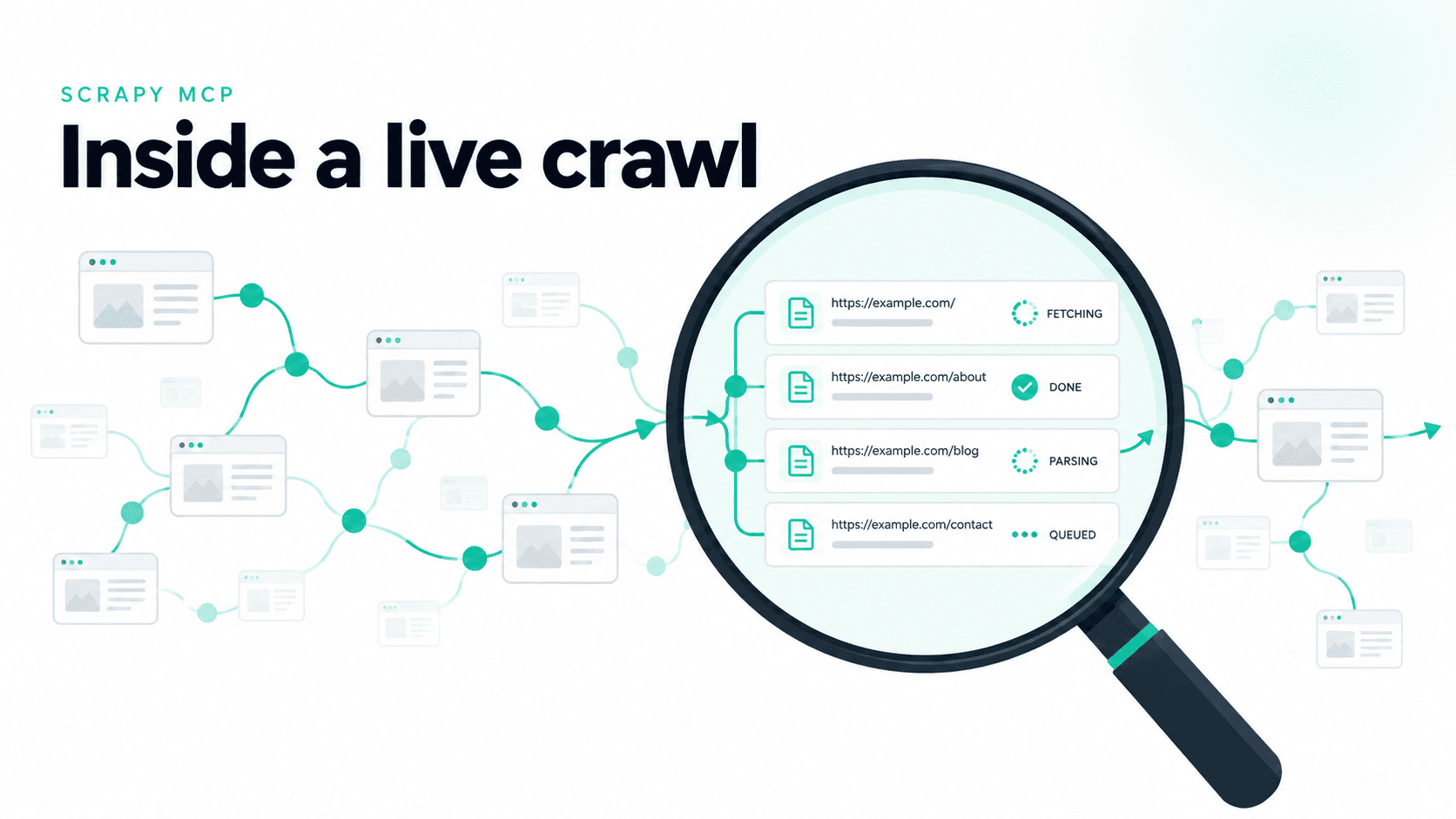
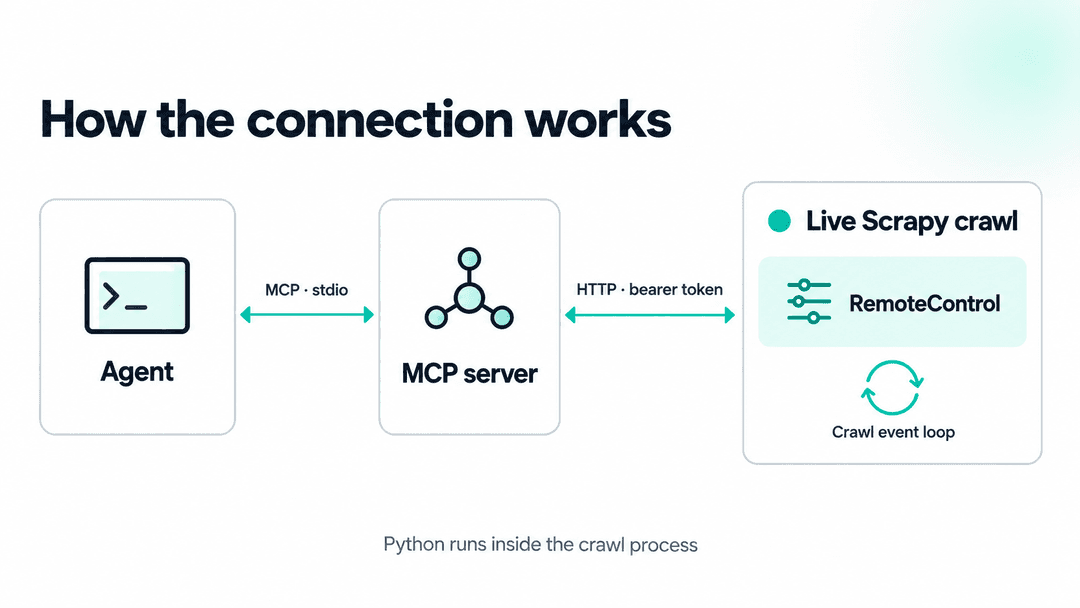
Scrapy 2.19 added an extension called RemoteControl, and it's on by default, which means every crawl you start on the asyncio reactor is already running a small HTTP server that will execute Python inside the crawl for anything holding the right token. Scrapy MCP is the client it was built for, and the announcement post covers that side, but the extension doesn't need MCP at all. This post is about the piece underneath: how it starts, how it's secured, what the code you send can reach, and what you can actually do with it on a running crawl, from reading queues and testing selectors to fixing throughput without a restart. It ends with the traps, methods that look like reads but change state, and what changes once the crawl runs through scrapy-zyte-api. Every number below came from a real crawl, and every snippet works the same whether an agent sends it through Scrapy MCP or you send it with curl.
1. How RemoteControl works
RemoteControl is listed in Scrapy's default extensions and controlled by the REMOTE_CONTROL_ENABLED setting, which defaults to True. It needs asyncio support, so on a crawl without it the extension switches itself off with a warning rather than failing the crawl.
When the engine starts, the extension starts an aiohttp server bound to 127.0.0.1 on a random free port, generates a random bearer token, and only then writes a job file describing the crawl. You can see it happen in the crawl's own log:
1uv run scrapy crawl books -o books.jsonl1[scrapy.extensions.remote_control] INFO: Remote control HTTP server listening on port 33093 (job 276910-b678ab03dbe24747a1fc0df7d3404417)On Linux the job file lands in ~/.local/state/scrapy/job_files/, named after the process ID plus a random suffix, and the REMOTE_CONTROL_JOBS_DIR setting moves it somewhere else. The directory is created with 700 permissions and the file is written atomically with 600, because the token inside it is the only thing standing between a local process and code execution in your crawl:
1{"version": 1, "pid": 276910, "port": 33093, "token": "f_lW...pkkXI", "spider": "books",
2 "project": "mcp_demo", "scrapy_version": "2.19.0", "start_time": 1790316836.763313}When the engine stops, the extension deletes the job file first and then shuts the server down. That only happens on a clean shutdown, though. A crawl that's killed or crashes leaves its file behind, and I found 23 of them on my machine from earlier runs, every one pointing at a process that no longer existed. Anything reading these files, Scrapy MCP's list_jobs() included, has to check the process is still alive before trusting one.
Two endpoints
The server has two routes, and both check the Authorization: Bearer header on every request, comparing it with hmac.compare_digest. Without the token you get nowhere:
1curl -s http://127.0.0.1:33093/status1{"error": "unauthorized"} (HTTP 401)With it, GET /status describes the crawl:
1curl -s -H "Authorization: Bearer $TOKEN" http://127.0.0.1:33093/status1{"pid": 276910, "spider": "books", "project": "mcp_demo", "scrapy_version": "2.19.0", "start_time": 1790316836.761879}POST /execute takes a JSON body with code and an optional timeout_sec, runs the code inside the crawl, and returns whatever it printed:
1curl -s -H "Authorization: Bearer $TOKEN" -H "Content-Type: application/json" \
2  -d '{"code": "print(crawler.stats.get_value(\"response_received_count\"))"}' \
3 http://127.0.0.1:33093/execute1{"status": "ok", "output": "5\n", "traceback": null, "elapsed_sec": 0.0}status is one of ok, error (the code raised, and traceback has the details), compile_error (it didn't parse), or timeout.
What your code can see
The code is compiled with top-level await allowed and run with three names already defined: crawler, the live Crawler instance; stash, a dictionary that persists between calls; and print, swapped for a version that writes into the response instead of the crawl's stdout. It runs on the crawl's own event loop, inside the same process, so there's no sandbox and no copy of the state. A print() reads the actual Crawler that's driving the actual requests, and a line that mutates something mutates the real crawl.
stash is what lets separate calls build on each other. Store a reading in one call, and a later call can pick it up:
1stash["t0"] = crawler.stats.get_value("response_received_count")1now = crawler.stats.get_value("response_received_count")
2print("then:", stash["t0"], "now:", now)1then: 5 now: 9It's cleared when the crawl stops.
Limits, and the one that bites
Each call gets a timeout, 30 seconds by default and capped at 600 by REMOTE_CONTROL_TIMEOUT_DEFAULT and REMOTE_CONTROL_TIMEOUT_MAX, and output is truncated past 64 KB, tracebacks past 16 KB. An await asyncio.sleep(5) with timeout_sec set to 1 comes back as {"status": "timeout", ..., "elapsed_sec": 1.001}, exactly as you'd hope.
The catch is that the timeout can only cancel code at an await. Synchronous code runs to the end, and while it runs it holds the event loop that the whole crawl shares. The same test with time.sleep(4) instead:
1{"status": "ok", "output": "", "traceback": null, "elapsed_sec": 4.0}It ignored the one-second timeout, and a /status request I sent a second into it took three seconds to answer, because nothing else on that loop could run, the crawl included. Keep snippets short, prefer await asyncio.sleep() to time.sleep(), and don't loop over something large synchronously on a crawl you care about.
Where Scrapy MCP fits
Scrapy MCP is a thin layer over all of this: list_jobs() reads the job files, status(job_id) calls /status, execute(job_id, code) calls /execute, and inspection_reference() gives the agent a guide to Scrapy's internals so it knows what to ask for. Everything from here on is code sent to /execute, so it works the same from either.
2. Inspecting progress, queues, and active components
Once attached, the scheduler's queue classes and the downloader's per-domain slots are live objects, not documentation:
1s = crawler.engine.scheduler
2print("pqclass:", s.pqclass.__name__)
3print("mqclass:", s.mqclass.__name__)
4print("dqclass:", s.dqclass.__name__ if s.dqclass else None)
5print("pending:", len(s))
6
7d = crawler.engine.downloader
8for key, slot in d.slots.items():
9    print(key, "delay=", slot.delay, "concurrency=", slot.concurrency,
10 "transferring=", len(slot.transferring), "queue=", len(slot.queue))1pqclass: DownloaderAwarePriorityQueue
2mqclass: ScrapyRequestQueue
3dqclass: ScrapyRequestQueue
4pending: 0
5books.toscrape.com delay= 3.0 concurrency= 1 transferring= 0 queue= 1DownloaderAwarePriorityQueue is the current default. Reading its actual source: it picks the slot with the fewest active downloads, and when several slots are tied on that count, it round-robins among just those tied slots rather than always picking the same one. "Round-robin" alone undersells it, the active-download count is what decides most of the time; the round-robin only breaks ties. pending: 0 here just means the scheduler had already handed everything to the downloader, not that the crawl is idle.
The same live-object approach works for enabled middleware. Settings tell you what's configured; the actual middleware.middlewares tuple tells you what's installed, as real instances, in the order they run:
1names = [type(m).__name__ for m in crawler.engine.downloader.middleware.middlewares]
2print("downloader middlewares:", names)1downloader middlewares: ['OffsiteMiddleware', 'RobotsTxtMiddleware', 'HttpAuthMiddleware',
2'DownloadTimeoutMiddleware', 'DefaultHeadersMiddleware', 'UserAgentMiddleware',
3'RetryMiddleware', 'MetaRefreshMiddleware', 'HttpCompressionMiddleware',
4'RedirectMiddleware', 'CookiesMiddleware', 'HttpProxyMiddleware', 'DownloaderStats']If you already know which class you're after, crawler.get_downloader_middleware(Cls) (and the matching get_spider_middleware, get_item_pipeline, get_extension, get_addon) hands back that one instance directly, or None if it isn't enabled:
1from scrapy.downloadermiddlewares.robotstxt import RobotsTxtMiddleware
2mw = crawler.get_downloader_middleware(RobotsTxtMiddleware)
3print("robots middleware instance:", mw)1robots middleware instance: <scrapy.downloadermiddlewares.robotstxt.RobotsTxtMiddleware object at 0x7f420566c980>3. Testing a selector against a live response
The demo project's stalled spider fetches pages fine but never yields an item, and it holds its last response on self.last_response, which Scrapy doesn't do for you, so that a selector can be tested against real, already-fetched HTML, with no extra request.
1print("item_scraped_count:", crawler.stats.get_value("item_scraped_count"))
2print("response_received_count:", crawler.stats.get_value("response_received_count"))
3
4sel = crawler.spider.last_response
5print("used selector, matches:", len(sel.css("article.product-pod")))
6print("candidate selector, matches:", len(sel.css("article.product_pod")))1item_scraped_count: None
2response_received_count: 9
3used selector, matches: 0
4candidate selector, matches: 20Nine responses in, zero items, and the crawl still looks healthy from the outside since pagination doesn't depend on the broken selector. The candidate selector matching 20 elements against the same live response is the actual fix, confirmed before touching the spider's source at all: article.product-pod should be article.product_pod.
Your own spider won't have last_response unless you add it, which is one line at the top of parse(): self.last_response = response. Without it, the same trackref module section 5 uses can still hand you a response that's in memory:
1from scrapy.utils.trackref import get_oldest
2resp = get_oldest("HtmlResponse")
3print("response:", resp)
4print("candidate selector, matches:", len(resp.css("article.product_pod")))1response: <200 https://books.toscrape.com/catalogue/page-1.html>
2candidate selector, matches: 20It returns the oldest response still referenced rather than the latest, and None if nothing is holding one, so check the URL it prints before trusting the result.
4. Diagnosing and fixing throughput without restarting
The books spider sets DOWNLOAD_DELAY = 3.0 and CONCURRENT_REQUESTS_PER_DOMAIN = 1 against a static site with no rate limit of its own. Measuring real throughput means reading a stat twice with a sleep in between, not trusting a setting:
1import asyncio
2before = crawler.stats.get_value("response_received_count", 0)
3await asyncio.sleep(10)
4after = crawler.stats.get_value("response_received_count", 0)
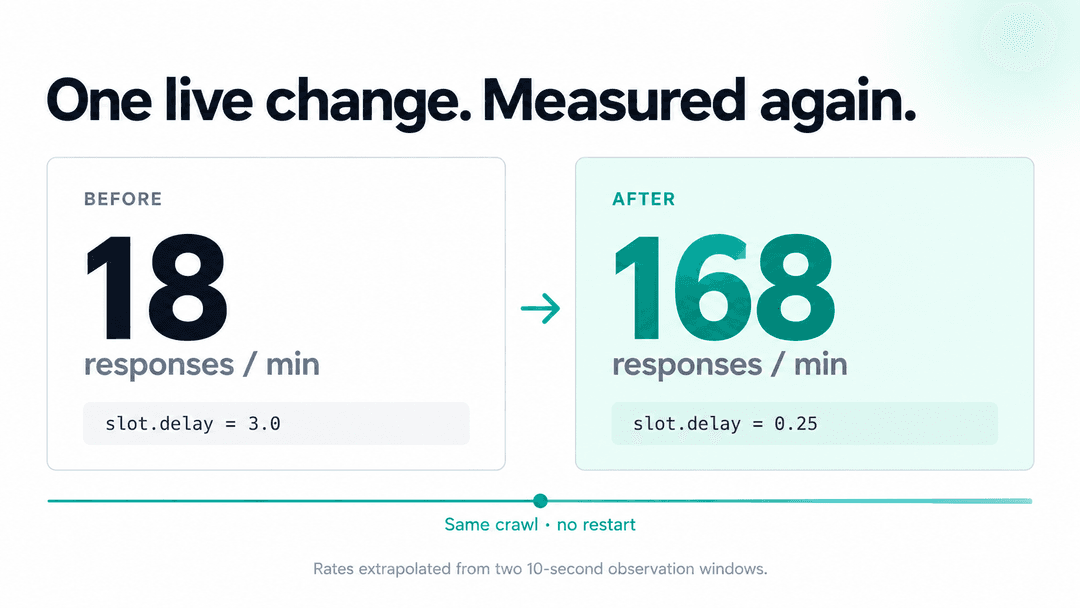
5print("before:", before, "after:", after, "pages/min:", (after - before) * 6)1before: 7 after: 10 pages/min: 18That's one call with an await inside it, which fits comfortably in the default 30-second timeout and doesn't hold up the crawl while it waits. For a longer window, keep the first reading in stash and take the second in a later call, as in section 1.
Eighteen pages a minute. Rather than stop the crawl, edit custom_settings, and restart it, patch the live slot directly. Slots are keyed by domain, so swap in one of the keys the section 2 snippet printed for your own crawl:
1d = crawler.engine.downloader
2slot = d.slots["books.toscrape.com"]
3print("before patch, delay=", slot.delay)
4slot.delay = 0.25
5print("after patch, delay=", slot.delay)1before patch, delay= 3.0
2after patch, delay= 0.25Same measurement again:
1before: 23 after: 51 pages/min: 168Eighteen to a hundred sixty-eight, on a crawl that never stopped running. It finished entirely before I got to the next thing I wanted to try, which is its own kind of answer: sometimes the fix really is one attribute.
One thing worth being clear about: this is a live experiment, not a lasting fix. slot is recreated the next time the crawl restarts, so slot.delay = 0.25 only holds for this run. If the new number is actually correct, put it in the spider's custom_settings or the project's settings.py afterward. What you did live was confirm the number before committing to it, not replace the need to commit to it.
5. Checking what's still allocated
Scrapy tracks live instances of Request, Response, Selector, Item, and Spider through scrapy.utils.trackref. On a long-running crawl where memory keeps climbing, this tells you what's actually still referenced, instead of guessing:
1from scrapy.utils.trackref import print_live_refs
2import io, contextlib
3buf = io.StringIO()
4with contextlib.redirect_stdout(buf):
5    print_live_refs()
6print(buf.getvalue())1Live References
2
3BooksSpider 1 oldest: 10s ago
4HtmlResponse 5 oldest: 9s ago
5Request 6 oldest: 10s ago
6Selector 5 oldest: 9s agoRemoteControl only swaps out print inside the snippet you send, and print_live_refs() calls the real one, so without the redirect its output goes to the crawl's own stdout instead of back to you. A count that keeps growing across snapshots, especially Response, usually means something is holding a reference too long: most often a response pinned in request.meta, cb_kwargs, or a callback closure that never lets go.
6. Mutation traps, and the edge of what's safe to patch
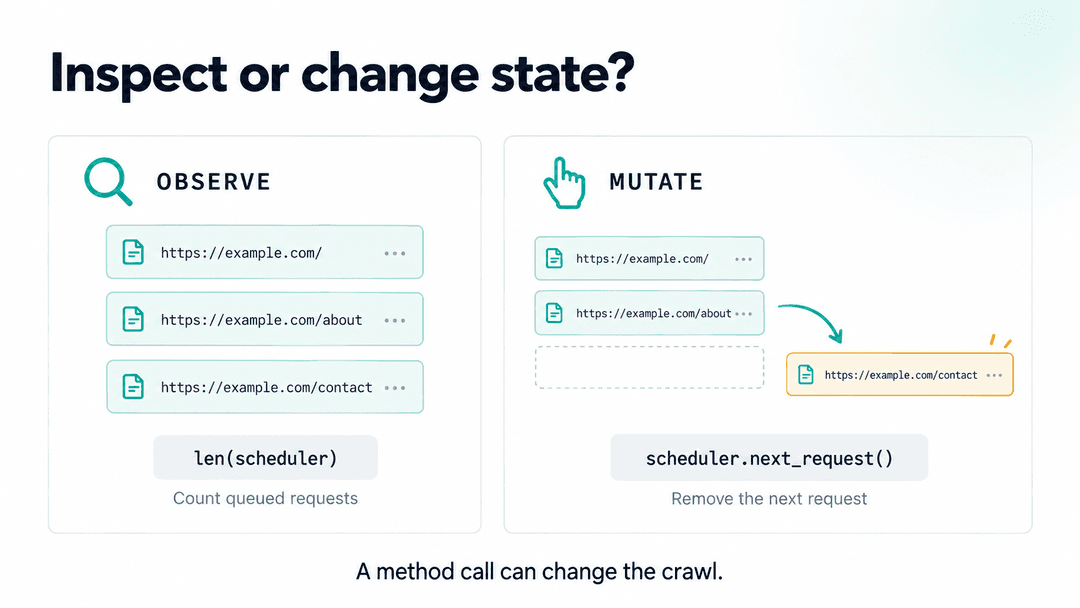
Everything above was either a plain attribute read or, in section 4, changing one number on a live object and watching the effect. A few methods look exactly the same from the outside but change the crawl's state the moment you call them, purely to "check" something:
df.request_seen(req)records that fingerprint. Call it just to check whether a URL was already seen, and the crawl now skips that URL for real.scheduler.next_request()doesn't peek at the next request, it dequeues it, handing it to whoever called the method instead of the engine. Uselen(scheduler)for a count.stats.set_value()/stats.inc_value(),engine.pause()/unpause(), and popping anything offmqs,dqs, or a slot's own queue are all mutations dressed as inspection.
Treat any method whose name suggests it advances, records, or pops something as off-limits unless mutating is actually the goal, and prefer reading an attribute over calling a method when both are available.
Section 4 changed a number on a live object; going further, into replacing a callback's actual code while the crawl runs, is a sharper and much less forgiving version of the same idea. Two things worth knowing before attempting it, verified against Scrapy 2.19.0, kept short because neither was reproduced live here:
- Where a queued request's callback comes from depends on which queue it's in. A request sitting in the scheduler's in-memory queue holds the literal bound method it was created with, so reassigning that method on the spider afterward doesn't change requests already queued in memory. A request in a disk queue (
JOBDIRset) is serialized by name and only resolved withgetattr(spider, name)when it's dequeued, so it does pick up a reassigned method. Same "queued" request, two different behaviors, depending on which queue it landed in. - Swapping a callback's compiled code can defeat Scrapy's own source check. By default (
WARN_ON_GENERATOR_RETURN_VALUE, on unless you turn it off), Scrapy callsinspect.getsource()on a generator callback once, caching the result so it isn't repeated on every call. If you replace that callback's__code__with one compiled from a string sent to/execute, its filename is<execute>, the name RemoteControl compiles every snippet under, which is absent fromlinecache, soinspect.getsource()raisesOSErrorfor it. Scrapy's check only catchesIndentationError, and because the error happens before the result gets cached, that cache never kicks in either, the lookup, and the failure, repeat on every call to that callback. The exception itself is loud: it surfaces as a loggedspider_exceptions/OSErroreach time. What's lost quietly is whatever items or requests that call to the callback would have yielded.
Neither of these is a reason to avoid /execute. They're a reason to keep patching scoped to changing a value on an object you can already see, the way section 4 did, and to treat replacing a function's actual code as a different, much riskier category of change.
7. When the crawl runs through scrapy-zyte-api
Everything above assumes a fairly plain Scrapy crawl, fetching directly. Point the same inspection at a crawl running scrapy-zyte-api, and a couple of specifics change. Detectable from the live state: ZYTE_API_KEY in settings, ScrapyZyteAPIHTTPDownloadHandler and ScrapyZyteAPIHTTPSDownloadHandler registered for http and https in downloader.handlers if you use the scrapy-zyte-api add-on, or ScrapyZyteAPIDownloadHandler for both if you configured the settings by hand, and ScrapyZyteAPIDownloaderMiddleware in the enabled middleware list from section 2.
CONCURRENT_REQUESTS still applies. It's passed straight through as the connection pool size for the underlying Zyte API client, so the setting you already know still governs overall concurrency. What's genuinely different is the delay: Zyte API requests run on their own zyte-api@<domain> slot, and whether that slot's delay gets zeroed out depends on ZYTE_API_PRESERVE_DELAY, which defaults to the opposite of whatever AUTOTHROTTLE_ENABLED is set to. With AutoThrottle off, the delay is preserved and behaves like an ordinary slot. With AutoThrottle on, the delay is zeroed so AutoThrottle's own dynamic adjustment can drive it instead of a static DOWNLOAD_DELAY.
Retries and throttling also happen a layer lower than usual, inside the python-zyte-api client, before a Scrapy response exists at all, so read scrapy-zyte-api/* stats rather than assuming retry/count tells the whole story. Two different families of those stats answer two different questions: error_ratio and 429 count every attempt, including ones that were retried and then succeeded, so they describe how much friction the crawl is hitting. fatal_errors and success_ratio describe the final outcome after retries. A request throttled twice and then fine on the third try shows up in both: a real signal of load in the first family, and a completed, successful response in the second. Read both; they're not answering the same question.
Takeaway
RemoteControl is a small piece of code, two endpoints, a token and a job file, but it turns every running crawl into something you can ask questions of. Reading a live crawl through it is safe and genuinely useful: the scheduler's real queue classes, the downloader's actual slot state, a selector tested against a response already in memory, a stat sampled twice. Changing one number on a live object, the way section 4 did, is a live experiment you still have to commit to a setting afterward if it's right. Replacing a callback's actual code is a different, sharper category of change, with failure modes that depend on which queue a request happens to be sitting in. Know which one you're doing, and keep synchronous snippets short, because while they run the crawl doesn't.
Further reading: the RemoteControl source, Using Scrapy with coding agents, the Remote Control extension docs, scrapy/scrapy-mcp-official, and the scrapy-zyte-api docs.