
This series keeps on growing, because there’s so much to do in this space, so here I am back with part 4 talking about building custom agent tools. These tools along with other parts make up a harness. Let’s dive in.
Here is a page that quietly breaks AI agents. Fetch https://auto.hylnd7.com/ with an ordinary HTTP client, convert the result to text, and this is everything you get:
1## Checking your browser...
2Please wait while we verify your request.Seventy characters. No error, no exception, no warning. That page is a demo auto parts store whose first page lists eight products, sitting behind a JavaScript security check. An HTTP client does not run JavaScript, so it gets the check instead of the store.
Now picture an agent asked to read that page and list the products. It calls its fetch tool, the tool succeeds, and it reads what it was handed. Nothing tells it a store exists. At best it reports no products; at worst it invents plausible ones.
No prompt fixes this and no bigger model fixes it, because neither can recover information the agent never received. A better tool fixes it.
This article builds one. The worked example is a web fetch backed by Zyte API, but the shape is the point: by the end you will have the pattern for any capability your agent lacks.
First, what a tool actually is
A language model cannot do anything on its own except produce text. Tool calling changes that, and it is simpler than it sounds.
You describe a function to the model: its name, what it is for, what arguments it takes. When the model needs it, it does not run anything; it emits a structured request meaning "call zyte_page_fetch with url=https://example.com". Your code runs the function and sends the result back. The model reads it and either answers or asks again.
That cycle, repeated until the model stops asking, is the agent loop. Writing it yourself is not hard; the reason to use an SDK is everything around it: retries, streaming, context management, permissions, and tools you did not have to build.
Choosing where to build
Anthropic ships four different things here, and the names blur together. Their own comparison splits them like this:
| Option | What it is |
|---|---|
| Agent SDK | "A library that runs the agent loop in your own process, in Python or TypeScript." |
| Claude Code CLI | "The terminal interface, built for daily interactive use." |
| Client SDK | "Direct access to the Anthropic API rather than to Claude Code. You implement the tool loop yourself." |
| Managed Agents | "Hosted REST API, a separate product from the Agent SDK. Anthropic runs the agent and the sandbox." |
| For this example I went with Agent SDK: it is essentially Claude Code packaged as a library, so the loop, context handling, and built-in tools come for free, and it runs in your process under your credentials. Adding a tool takes a few dozen lines. | |
| That last point is really about the harness: the machinery around the model that decides what it can perceive and do. This is part four of a series on it, after what a harness is, designing a data extraction agent's tools, and headless mode as the minimal harness. This one builds a tool the harness does not ship with. | |
| Everything below is verified against claude-agent-sdk 0.2.128. |
Where the built-in tools stop
The Agent SDK inherits Claude Code's built-in tools, and the shape of that set is telling. Read, Write, Edit, Bash, Glob, Grep and friends are all about the machine the agent runs on. Only WebSearch and WebFetch are built for retrieving web content.
WebFetch is more capable than people assume. From Anthropic's tools reference:| WebFetch takes a URL and a prompt describing what to extract. It fetches the page, converts the response to Markdown when the server returns HTML, and runs the prompt against the content using a small, fast model. For most fetches, Claude receives that model's answer, not the raw page. The conversion step is not configurable.
So it already converts HTML to markdown; a custom tool will not beat it on tidiness. The two real gaps are different:
BUT, It cannot get past the bot wall. Whatever it does with the HTML afterward, it still has to obtain the HTML, and for our store that means the security check. The reference suggests curl via Bash as the raw-page escape hatch, and that hits the same wall. No amount of prompting closes a capability gap.
Here is Claude Code trying exactly that on our store: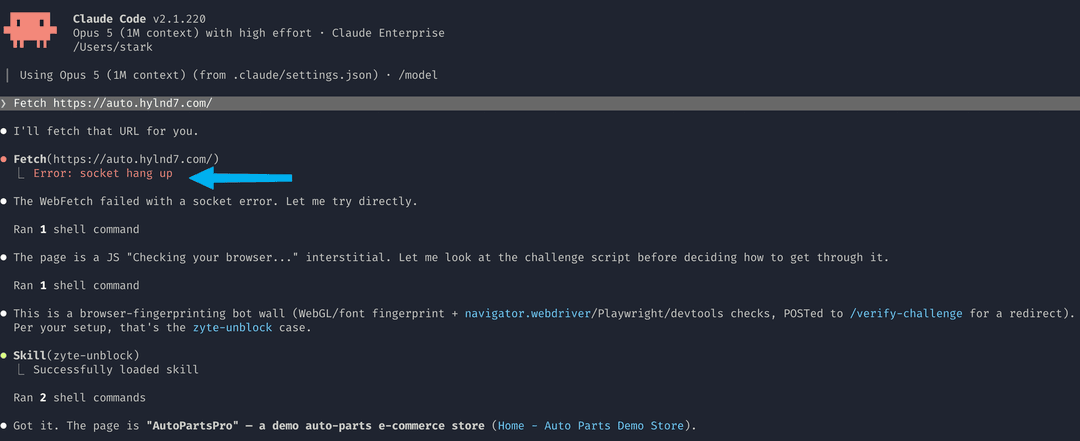
The terminal labels the tool Fetch; its canonical name is WebFetch, which is the string you use in allowed_tools and permission rules. The final step here routes through a Zyte skill rather than the custom tool we build below, but the unblocker is what gets the page either way.
Notice what happened there, because it is the good outcome: the fetch failed loudly, so the model knew it had nothing and looked for another route. Compare the case this article opened with, where the bot wall returns HTTP 200 and a well-formed page. Nothing signals failure, so the challenge page enters context as legitimate content and the model ends up describing a URL it never saw. That is when training data leaks in: a plausible auto parts store can be assembled entirely from priors, without a single fetched fact. A tool that fails loudly beats one that fails quietly.
It is lossy on purpose. The same reference is blunt about the trade: "This makes WebFetch lossy by design. The extraction prompt determines what reaches Claude, so a result that says a page doesn't mention something may only mean the prompt didn't ask about it." For a summary that is fine. For an agent reasoning over a whole page, an answer indistinguishable from an absence is a problem.
So the tool we want fetches pages that fight back and returns the whole page, not another model's reading of it.
Building the tool
A tool in the Agent SDK is three things: a description that gives an idea to the model about when to use it, a JSON schema describing its inputs, and an async function that does the work. The @tool decorator binds them together.
Start with the description and the schema:
1_DESCRIPTION = (
2    "Fetch a URL through the Zyte API and return the page as clean, readable markdown "
3    "with links kept inline as [text](url). Zyte applies anti-ban / bot-bypass and "
4    "JavaScript rendering, so use this in place of the built-in web fetch whenever a "
5    "page is blocked, returns 403/CAPTCHA, or needs JavaScript to render."
6)
7_SCHEMA = {
8    "type": "object",
9    "properties": {
10        "url": {"type": "string", "description": "The absolute URL to fetch."},
11        "render": {
12            "type": "boolean",
13            "description": "Render JavaScript in a headless browser first (default true, "
14            "best for blocked/JS pages). Set false for a cheaper HTTP-only fetch of static pages.",
15        },
16    },
17    "required": ["url"],
18}Refer docs :
- https://code.claude.com/docs/en/agent-sdk/overview
- https://code.claude.com/docs/en/agent-sdk/custom-tools
Spend real effort on that description. It is not documentation for humans; it is the only thing the model consults when deciding whether this tool fits. Write it prescriptively: say when to call it, not just what it does. The clause about pages "blocked, returns 403/CAPTCHA, or needs JavaScript" is what makes the model reach for this instead of a built-in.
Now the handler. It lives inside a factory function so configuration like the API key is captured in a closure, never passed through the model:
1import asyncio
2from claude_agent_sdk import tool
3from .core import DEFAULT_MAX_CHARS, ZyteError, fetch_markdown
4def make_zyte_tool(*, api_key=None, default_render=True,
5                   max_chars=DEFAULT_MAX_CHARS, timeout=120):
6    @tool("zyte_page_fetch", _DESCRIPTION, _SCHEMA)
7    async def zyte_page_fetch(args):
8        try:
9            # fetch_markdown is blocking (urllib), so keep it off the event loop.
10            md = await asyncio.to_thread(
11                fetch_markdown,
12                args["url"],
13                render=args.get("render", default_render),
14                api_key=api_key,
15                max_chars=max_chars,
16                timeout=timeout,
17            )
18        except ZyteError as e:
19            return {"content": [{"type": "text", "text": str(e)}], "is_error": True}
20        except Exception as e:
21            return {"content": [{"type": "text", "text": f"zyte_page_fetch failed: {e!r}"}],
22                    "is_error": True}
23        return {"content": [{"type": "text", "text": md}]}
24 return zyte_page_fetchThree details there carry more weight than their line count suggests.
asyncio.to_thread is not optional. The fetch underneath uses urllib, which blocks, and a blocking call inside an async handler stalls the whole agent loop. Pushing it to a thread keeps the loop responsive.
Failure return is_error: True instead of raising. An exception escaping the handler kills the run. An error result becomes a message the model can read, so it can retry or explain the problem to the user. This is also what stops the opening failure mode from repeating: a fetch that fails loudly is one the agent can react to.
The API key never enters the schema. It is read from the environment inside the handler, so it is never serialized into anything the model sees. To be precise about the boundary: your Zyte key stays local, while the page content and your Anthropic credentials do go to Anthropic, because that is where the model runs.
Keeping the fetch itself framework-free
The fetching and conversion live in a separate module that imports no framework, just the Python standard library. It calls Zyte API's extract endpoint with HTTP Basic auth, asking for browser-rendered HTML when render is true and a plain HTTP body when it is not:
1def fetch_html(url, *, render=True, api_key=None, timeout=120):
2    key = _resolve_key(api_key)
3    if render:
4        return _post({"url": url, "browserHtml": True}, key, timeout).get("browserHtml") or ""
5    b64 = _post({"url": url, "httpResponseBody": True}, key, timeout).get("httpResponseBody") or ""
6 return base64.b64decode(b64).decode("utf-8", errors="replace") if b64 else ""A small HTMLParser subclass then walks the HTML, drops script, style, head, noscript, svg, template, and iframe, emits headings and list items as markdown, and resolves relative links to absolute ones so the agent can follow them.
Splitting the code this way buys two things. The conversion happens in your process, so raw HTML never costs a token: for our store, 5,216 characters of HTML become 1,400 of markdown, roughly 3.7 times smaller. That is a saving against raw HTML, not against WebFetch, which converts too. The second benefit is portability, below.
Here is the whole round trip, and the one line that matters is where the conversion sits: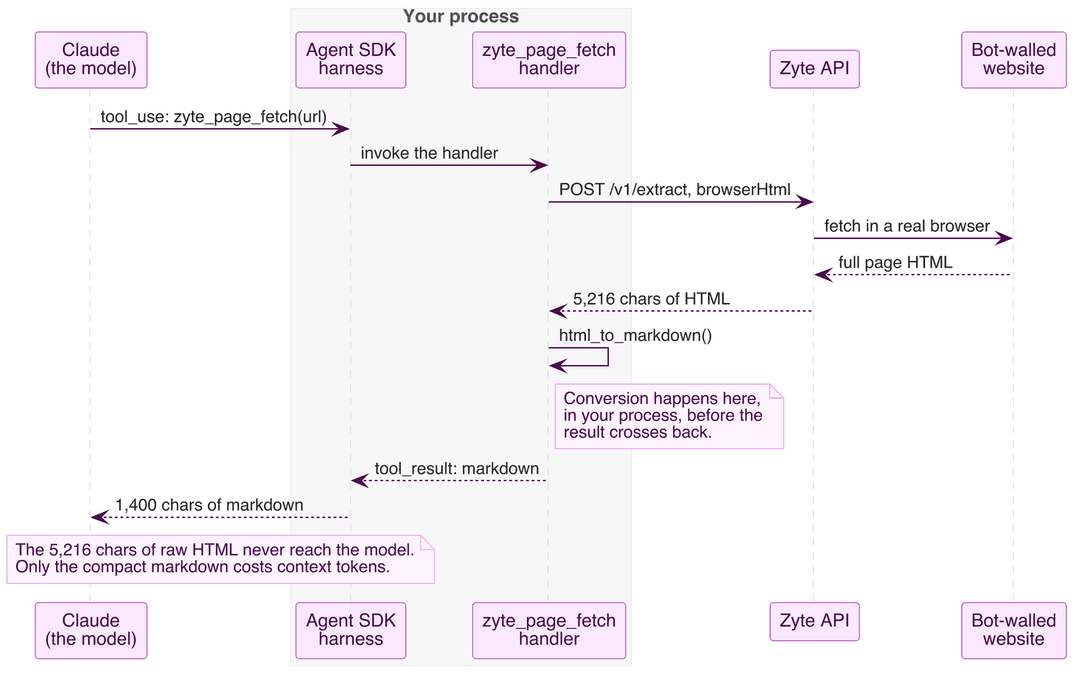
One warning if you write your own converter: whitespace is fiddlier than it looks. Ours gave no separator to <td> and <span> at first, so a table row arrived as Oil Filter$12.50. Fixture tests catch that immediately.
Wiring it into an agent
Tools reach the agent through an in-process MCP server. It speaks the Model Context Protocol, but "in-process" is the important half: no MCP subprocess to supervise, no socket to open.
1import asyncio
2from claude_agent_sdk import ClaudeAgentOptions, query
3from zyte_agent_tools import create_zyte_server
4async def main():
5    options = ClaudeAgentOptions(
6        model="sonnet",
7        mcp_servers={"zyte": create_zyte_server()},
8        allowed_tools=["mcp__zyte__zyte_page_fetch"],
9        # Built-in web tools off, so anything the agent reports came through Zyte.
10        disallowed_tools=["WebFetch", "WebSearch"],
11        permission_mode="dontAsk",
12        max_turns=10,
13    )
14    async for message in query(prompt=PROMPT, options=options):
15        ...  # handle the stream
16asyncio.run(main())The naming rule catches people out, so plainly: the dictionary key you mount the server under becomes the tool's prefix. Mounting under "zyte" produces mcp__zyte__zyte_page_fetch, and that full name goes in allowed_tools. Change the key to "web" and it becomes mcp__web__zyte_page_fetch.
permission_mode="dontAsk" matters for an unattended script; without it the run stops to ask you to approve the tool call. And disallowed_tools makes the demo prove something: with the built-in web tools off, the agent's only web-fetch route is Zyte.
Watching it work
Asked to list every product with its price, here is one run verbatim (the model's exact phrasing varies between runs):
1[tool] ToolSearch {'query': 'select:mcp__zyte__zyte_page_fetch', 'max_results': 3}
2[result] 0 chars returned
3[tool] mcp__zyte__zyte_page_fetch {'url': 'https://auto.hylnd7.com/'}
4[result] 1400 chars returned
5| Product | Price |
6|---|---|
7| Premium Ceramic Brake Pads | $45.99 |
8| Synthetic Oil Filter | $12.50 |
9| Iridium Spark Plug (Pack of 4) | $38.00 |
10| High Output Alternator | $189.99 |
11| LED Headlight Assembly (Left) | $250.00 |
12| AGM Car Battery | $210.00 |
13| Performance Air Intake System | $299.99 |
14| All-Weather Floor Mats (Set) | $89.95 |
15Note: this is page 1 of 13 (pagination shown at the bottom of the page) — only these 8 products were listed on the page fetched.
16[done] 3 turns(MCP tools are deferred by default, so the run opens with a ToolSearch call fetching the schema. The 0 chars is a quirk of this script's counter, not a failed lookup.)
Eight products with correct prices, in three turns, from a page that yields seventy characters to a plain fetch.
That closing note is the most encouraging part of the run. The converter preserved the pagination row, so the agent saw thirteen pages existed and volunteered that its answer covered one. Compare the failure we opened on: eight products presented as a complete catalog. Here it knew the boundary of what it had read.
The limits deserve naming. Those pagination controls are <button> elements with no URLs, so the agent could see more pages existed but had no link to follow; reaching them needs a second tool or a known URL pattern. And the fetch is not infallible: this target occasionally returns access-denied instead of the store, which is why the handler returns is_error: True rather than raising. A bad fetch arrives as something the agent can report, not as silence.
Reusing this
Because the tool is an ordinary in-process MCP server, dropping it into an existing agent is a dictionary merge plus one entry in allowed_tools:
1options = ClaudeAgentOptions(
2    mcp_servers={"zyte": create_zyte_server(), **your_existing_servers},
3    allowed_tools=[*your_existing_tools, "mcp__zyte__zyte_page_fetch"],
4)That works because create_zyte_server() returns a plain dict shaped like {'type': 'sdk', 'name': 'zyte', 'instance': <server>}, and mcp_servers accepts it alongside stdio, SSE, and HTTP configs. To your agent, an in-process tool is indistinguishable from a remote one.
To fold the tool into a server of your own instead, make_zyte_tool() hands you the bare tool object:
1from claude_agent_sdk import create_sdk_mcp_server
2from zyte_agent_tools import make_zyte_tool
3server = create_sdk_mcp_server(name="web", tools=[make_zyte_tool(), your_other_tool])This is where the framework-free split pays off. The adapter is specific to the Agent SDK; the function underneath is not, so the same fetch backs a LangChain tool in five lines:
1from langchain_core.tools import tool
2from zyte_agent_tools import fetch_markdown
3@tool
4def zyte_page_fetch(url: str, render: bool = True) -> str:
5    """Fetch a URL via Zyte's unblocker and return clean markdown with links."""
6 return fetch_markdown(url, render=render)For wider reach, wrap that same function in a standalone MCP server and it works anywhere MCP does.
Try it yourself
The full source is at https://github.com/zytelabs/zyte-agent-tools about 170 lines for the fetch and converter, about 90 for the SDK adapter. It is an unofficial reference implementation meant to demonstrate the pattern, not a supported Zyte product. For Zyte's officially maintained agent tooling, see the Zyte add-ons for agent skills, Codex, and GitHub.
You will need Python 3.10 or later, a Zyte API key from a free Zyte API trial, and an Anthropic API key. Anthropic's guidance is that "unless previously approved," third-party products built on the Agent SDK should use API key authentication rather than claude.ai login.
1git clone https://github.com/zytelabs/zyte-agent-tools.git
2cd zyte-agent-tools
3pip install -e ".[agent-sdk]"
4export ZYTE_API_KEY="your-zyte-key"
5export ANTHROPIC_API_KEY="your-anthropic-key"
6python examples/store_agent.py # the run shown aboveThat last command is the script that produced the transcript above. For a no-credit check, pip install -e ".[test]" and run python -m pytest: offline, no keys needed.
The broader point outlasts this tool. An agent SDK hands you a harness, and a harness is only as capable as the tools hanging off it. When your agent fails, the useful question is usually not how to prompt around it but which tool is missing. If you are building agents that lean on live web data, robust agentic AI workflows built on rapid web data covers the same ground from the data side.