People still run into usage limits with their coding agents. On GitHub, the Claude Code issue "Instantly hitting usage limits with Max subscription" has 1,499 comments. A usage limit is about spend, and running out is about window size. On Claude's current models you rarely run out of the window. You still pay to carry everything in it, and compaction can drop detail you need.
Why should I care about context?
LLM Models are stateless by design, so an AI agent may give you a notion that you’re having a continuous back and forth chat with it but in practice every message carries the entire history with the API call. And as the conversation grows the model tends to lose context of earlier messages because of finite context window size, usually ~1million tokens of latest AI foundational models.
But it’s not just messages that the model sees, it sees the tools you have, the mcp servers you’re connected to, your AGENTS.md/CLAUDE.md (both global and local) and more. The more the context window fills up the harder it becomes for a model to retain memory, better handle your request, perform tasks and you can also overrun your usage allowance quota based on your subscription. Hence it becomes important to manage the context window. It may not be when models have context window of 100M tokens but for now, let’s make most out of what we got.
First Steps
The Claude Code best practices page has a table called "What you can stop doing". Its first row retires the advice to treat the context window as your main constraint. The reason: most current models have a 1M-token window and compact on their own, "so running out is rare."
The Claude Code costs page names two usual causes of surprise spend on an API or cloud-provider plan. They are long sessions that nobody cleared, and Opus left as the default model. In this post, "cost" means dollars on an API key and plan usage on a subscription.
To manage the context window, keep the files that load every turn small. Pick one model and effort level per session so the cache stays warm. Run /clear between tasks or better have different sessions per task, and put anything that must survive into a file. Use /context and /usage to see where your tokens go. Leverage prompt caching without unintentionally breaking it. Cached prompts are generally billed at extremely discounted rates based on your model.
Quick reference: six rules I follow
- Give each agent session one goal. When the mission changes, start a new session.
- Review your CLAUDE.md or AGENTS.md often, and cut lines the agent no longer needs.
- Don't default to the strongest model or the highest effort. My default is Sonnet at medium effort. Max effort makes the model think longer and spend more tokens, and the result is often no better. Look at the job first, then choose the model and effort.
- Batch several commands into one message. For longer work, give Claude a goal with /goal, so it keeps working without a new prompt each turn.
- When you know which files need changes, name them with @ so the agent doesn't search for them.
- Don’t change any settings mid session - this breaks prompt caching.
Where every token goes on each turn
Each Claude Code request has three parts. The prefix holds the system prompt, the tool definitions, your CLAUDE.md files, and the list of skills. The history holds every message, tool result, and file the agent read. The new input is your latest message.
The model then writes its output, and output is the expensive side. On every current Claude model, an output token costs five times an input token. Claude Opus 5.5, for example, costs $4 per million input tokens and $20 per million output tokens, according to Anthropic's pricing page.
Claude Code automatically caches the prefix and the history, so you don't pay full price for them on each turn. A cache read on Opus 5.5 costs $0.20 per million tokens, which is 5% of the input price. On a subscription, within your plan's usage, the cache for the main conversation lasts one hour. On an API key or usage credits, it lasts five minutes.
The most common cache breaks are a model switch, a new MCP server, and a gap longer than the cache lifetime. After a break, the next request processes everything again at full price or more. Compaction breaks part of the cache. Claude Code must cache the conversation again, but the system prompt and project context can stay cached. A long session with a warm cache costs less than it looks, and frequent cache breaks cost more.
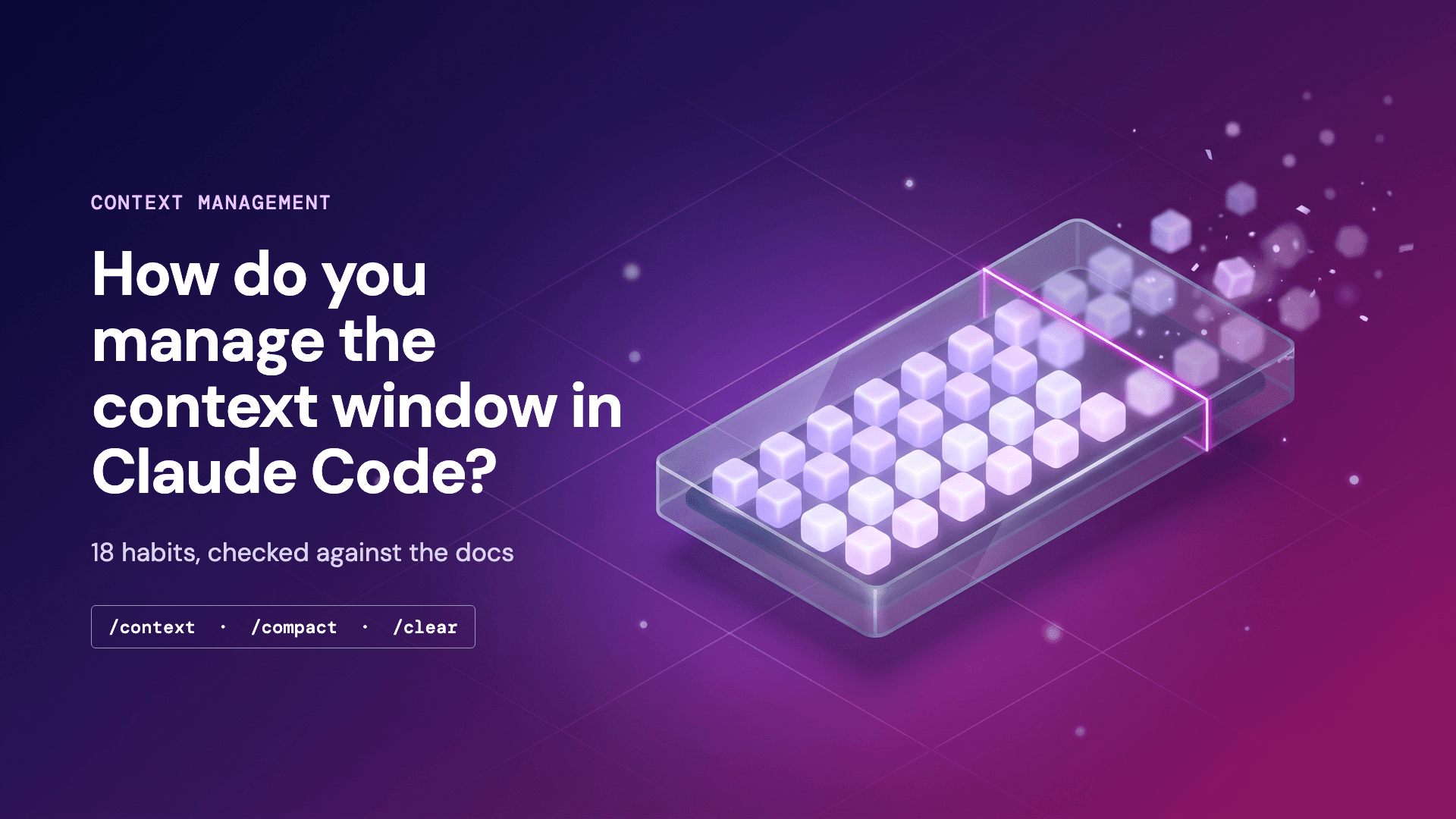
Two commands show where you stand. /context draws a grid of what fills the window right now. /usage shows the session cost and your plan usage. On Pro, Max, Ultra, Team, and Enterprise plans, it also breaks usage down by skill, subagent, plugin, and MCP server.
Size also affects quality. Chroma's Context Rot report from July 2025 tested 18 models and found them "increasingly unreliable as input length grows", even on simple tasks. Those were 2025 models, so treat the result as a direction, not a number. The Claude Code docs say the same thing: "a focused context gets you better answers".
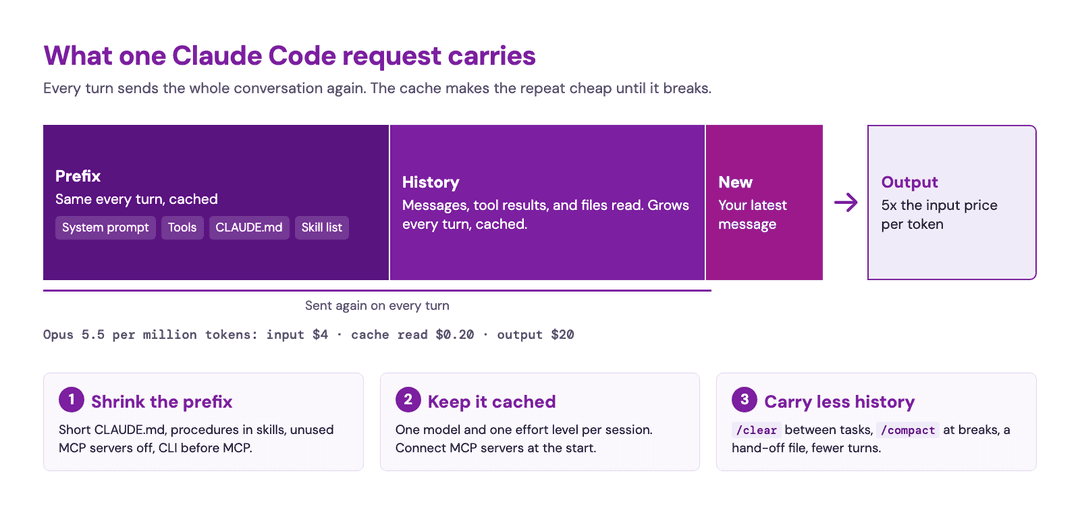
Every habit below pulls one of three levers. You can shrink the prefix, keep it cached, or carry less history and take fewer turns.
Shrink what loads every turn: CLAUDE.md, skills, and MCP servers
The prefix goes out with every request, so each line in it costs you on every turn. Claude Code builds part of it from three memory files. ~/.claude/CLAUDE.md applies to every project, ./CLAUDE.md to the current project, and ./CLAUDE.local.md holds your private notes on that project. Claude Code loads all three and joins them. The memory docs suggest that you keep each file under 200 lines.
I put rules that apply everywhere in the global file, such as how to commit and which credentials never leave my machine. Project facts go in the project file, and notes I don't want in git go in CLAUDE.local.md. When Claude ignores a line, I don't add "IMPORTANT" in capitals. The best practices page says that a rule that can't bend belongs in a hook or a deny rule. If Claude misses a line in a long file, the file needs to be shorter.
Skills keep long procedures out of the prefix. At session start, Claude sees only each skill's name and description. The full SKILL.md loads only when the skill runs. My blog-writing and image-generation workflows are skills, so they cost a few lines each until I need them.
MCP servers used to take the most space. In one GitHub issue on MCP context usage, /context showed MCP tools using 39.8k tokens. More than half of a 200K window was in use before the first prompt.
Claude Code now defers MCP tool definitions by default, so only tool names and server instructions load until Claude calls a tool. I connect servers at the start of a session, because connecting or removing one mid-session breaks the cache.
My rule for tools is CLI first, MCP second. The costs page agrees: command-line tools such as gh, aws, and gcloud are more context-efficient than MCP servers because they add no tool listing. Their output still lands in context, so filter it. The docs show a hook that greps a 10,000-line log for ERROR, which turns tens of thousands of tokens into hundreds. CLI first is my personal preference. A CLI can't match the flexibility of an MCP server, especially a hosted one that any MCP client can connect to with nothing to install, so choose what suits you in this trade-off.
How to manage MCP servers that have many tools
Deferral fixes most of the token cost in Claude Code, but a long tool list still makes the choice harder. The tool search docs say that tool selection gets less accurate past 30 to 50 tools. One hosted MCP server I measured in November 2026 had 39 tools on its own. Its definitions came to about 34k tokens, an estimate from characters divided by four, so treat it as a floor.
I set up MCP servers per project. In Claude Code, claude mcp add uses local scope by default, which loads a server only in the project where you added it. I use --scope user only for servers I need in every project, every day. --scope project writes a .mcp.json file that your team shares through git. I turn off everything else with /mcp or the disabledMcpServers setting. The servers I keep are the ones I use every week, such as the one in 12 things I use Zyte MCP for.
Other agents and APIs load tools in different ways. OpenAI's MCP guide has a section on filtering tools. It warns: "Some MCP servers can have dozens of tools, and exposing many tools to the model can result in high cost and latency." If your agent sends every definition up front, filter the tools for each server. Codex CLI has enabled_tools and disabled_tools, and Gemini CLI has includeTools and excludeTools. On the Claude API, set defer_loading: true on your tools and add the tool search tool.
How to save tokens with prompt caching
On the Claude API you set prompt caching yourself, and the rule is strict: the cached prefix must match byte for byte. If one token changes, everything after it is a cache miss.
According to Anthropic's prompt caching docs, a five-minute cache write costs 1.25 times the input price and a one-hour write costs two times. A read costs 0.1 times on most models, 0.05 times on Opus 5.5 and Sonnet 5.5, and 0.025 times on Fable 5.1. A five-minute cache pays for itself after one read. Put the parts that never change first, and mark the end of them:
1import anthropic
2
3client = anthropic.Anthropic()
4
5response = client.messages.create(
6    model="claude-opus-5-5",
7    max_tokens=1024,
8    system=[
9        {
10            "type": "text",
11            "text": open("style_guide.md").read(),  # large, never changes
12            "cache_control": {"type": "ephemeral"},  # add "ttl": "1h" for long gaps
13        }
14    ],
15    messages=[{"role": "user", "content": "Review this paragraph: ..."}],
16)
17
18usage = response.usage
19print("written to cache:", usage.cache_creation_input_tokens)
20print("read from cache:", usage.cache_read_input_tokens)Run it twice within five minutes. The second call should show the style guide under cache_read_input_tokens. If you build on the API from inside Claude Code, the bundled /claude-api skill loads the current API reference. Its /claude-api cost-optimize workflow profiles your API spend and proposes changes such as caching, batching, effort, and model choice.
Choose the model when the session starts and keep it. Each model has its own cache, so a /model switch mid-session processes the whole request again. I plan with Opus and write code with Sonnet. Log triage and git summaries go to a subagent with model: haiku, so the main session never switches.
Effort is the same kind of setting. It controls how much the model thinks and writes, and it applies to all output tokens, including thinking. The docs call it a behavioral signal, not a hard budget, and max_tokens is the hard cap. On most models each effort level has its own cache. Opus 5.5, Sonnet 5.5, Haiku 5.5, and Fable 5.1 keep the cache by default.
The prompt caching page for Claude Code gives one rule for both settings. "Pick your model and effort level at the top of a session, then save /compact for natural breaks between tasks."
Batch independent work into one message. Each tool round trip is a new request that sends the conversation again. For example, ask: "Read src/auth.ts and src/session.ts, then propose the fix." Claude can then request both reads together, which takes fewer requests and less waiting.
Claude Code /compact vs /clear vs a new session
| Command | What it does | Use it when |
|---|---|---|
/compact <focus> |
Summarizes the conversation and continues | You are mid-task and want to keep the thread |
/clear <name> or a new session |
Starts an empty conversation; CLAUDE.md, memory, tool names, and the skill list load again. /clear <name> keeps the old one in /resume |
The task is done, Claude is stuck, or you switch to unrelated work |
| Hand-off file | A note in the repo that the next session reads | Anything must survive a clear or a compaction |
When to use /compact
/compact takes a focus, such as /compact keep the API changes and the test commands. Compaction has two costs. It breaks the cache for the conversation, and on a long session the summary is itself a large request.
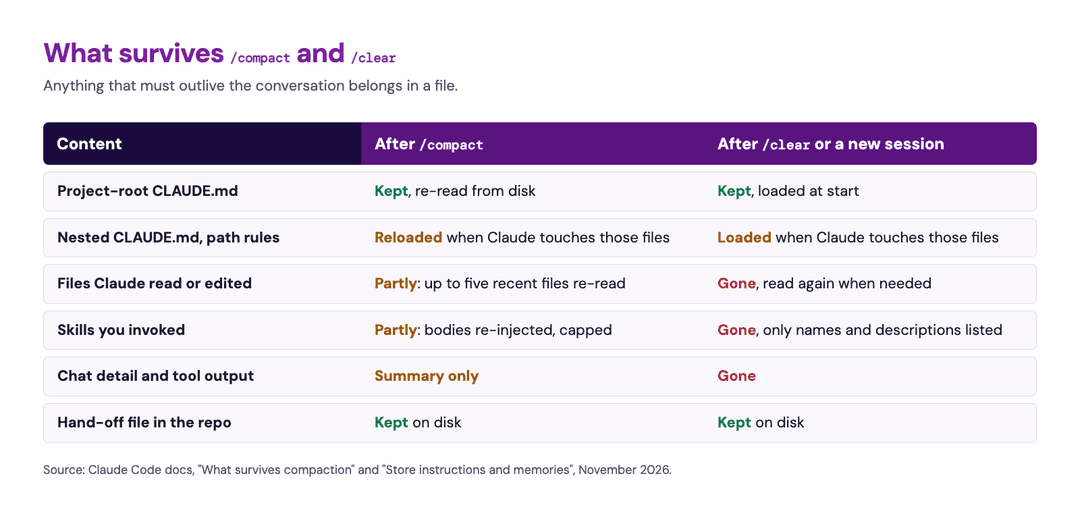
Compaction also loses detail, and it does not list what it dropped. The context window docs list what comes back. Claude Code re-reads the project-root CLAUDE.md from disk, re-reads up to five recent files, and restores skill bodies up to a cap. Tool output and detail you pasted into the chat survive only as a summary.
A February 2026 Hacker News thread on compaction losing pasted data shows the risk. After compaction dropped the markup a developer had pasted, Claude started to guess at selectors. The common advice in that thread matches my habit: put large content in files, not in chat.
Why does Claude Code keep compacting?
Claude Code compacts on its own in two cases. It compacts as the conversation nears the context window limit. On the one-hour cache, it also compacts an idle session past about 200K tokens shortly before the cache expires. The terminal then shows "Compacted while idle".
To compact earlier, run /autocompact 500k. To stop automatic compaction, turn off Auto-compact in /config or set DISABLE_AUTO_COMPACT=1. Manual /compact still works.
When to use /clear or a hand-off file
/clear costs nothing, and /clear oauth-migration names the old session so you can resume it later. The docs give a rule I now follow: after two failed corrections, run /clear and write a better prompt instead of a third.
There is no official hand-off command, so I write a hand-off file before I clear or close a session. A file survives /clear and /compact, and a chat message does not. Mine looks like this:
1# HANDOFF.md (read this first)
2Goal: add rate limiting to /api/search (spec in docs/rate-limit.md)
3Done: middleware in src/middleware/rateLimiter.ts, unit tests pass
4Open: Redis key expiry not tested; integration test fails on CI only
5Decisions: per-API-key limits, not per-IP (support tickets, Oct 2026)
6Do not touch: src/auth/*, owned by another team
7Next step: reproduce the CI failure with `make test-integration`My default is one session per task. When I finish a task, I add what the next session needs to CLAUDE.md or the hand-off file, and I start fresh. claude --continue reopens the last session, and claude --resume <name> opens a named one. A resume after the cache has expired reads the whole history again at full price or more. Resume only when you need that history. In my experience, a short, focused session does better work than a long one that has drifted from the task.
How to reduce token usage from files, images, and web pages
If I do the same steps twice, I ask the agent to write a script, and then I run the script. A script costs no tokens on its tenth run, but an agent loop pays for its context on every run.
Research subagents run in their own context, and only their final message comes back to the main session. That keeps noisy work out of your way. The best practices page also states the limits: subagents cost extra tokens, and handing a task to one does not make the answer better. In one test run, four subagents that each fetched one web page cost me $3.81 in model usage. One batched command-line call from the main session fetched 12 pages for a single tool call, plus the Zyte API cost for the pages. Now I batch before I fan out.
Don't give the agent every document before it needs it. Anything you paste rides along on every turn. Load a document when the task calls for it, or give the agent a way to fetch it. Jess Weng at LangChain makes a similar case in Context Engineering Starts with Retrieval, with a pattern called "retrieve, offload, delegate": save large results to files, and let subagents read them and return the key facts. A fetch also gets the current version, which matters because, as the post warns, outdated text "can look just as convincing to a model as the right answer".
For web pages, I use Zyte MCP as that fetch tool. Its fetch_http tool gets a page over plain HTTP and returns the main content as Markdown by default, without navigation, headers, footers, and sidebars, so a page doesn't bloat the window. fetch_page does the same in a browser when the page needs JavaScript. Requests go through Zyte API, which handles bans automatically and doesn't charge when it can't avoid one.
Screenshots are context too. Claude counts an image in 28-by-28-pixel patches. According to the vision docs, a 1920x1080 screenshot costs up to about 2,700 tokens. A computer-use task can send many screenshots, and each one costs tokens. Crop to the region you care about. When the question is about text, give the agent the text or the page DOM instead of a picture.
Web pages have the same problem, because raw HTML is mostly markup. On one product page, I ran product extraction through Zyte API instead of keeping the raw HTML. The JSON it returned was 29 times smaller. After I kept only the seven fields I needed, it was 77 times smaller. The same method gave about nine times on a lighter page. That is in characters, not tokens, and page weight drives the spread.
When you need the prose, fetch the page as clean Markdown. The comparison of seven ways to convert a website to Markdown for AI shows the options. Claude Code's own fetch tool already summarizes pages, which saves context but can drop detail, as I explained in WebFetch is lossy by design.
Name files directly. "Fix the null check in src/api/client.ts" costs one read. "Fix the null check in the API client" can cost a search and a few wrong reads first. An @ mention puts the file content in the conversation, up to 25,000 tokens by default. It also adds any CLAUDE.md files in that file's folders, so mention only the files Claude needs.
Skip the thank-you turn and set a spend limit
In April 2025, OpenAI CEO Sam Altman replied to a post on X with a joke. Polite prompts cost the company tens of millions of dollars, he said, and the money was well spent, as Windows Central reported. In a coding agent, most of that cost comes from the extra turn. A "thanks" message is a full request that sends the whole conversation again.
Take an API key, Opus 5.5, and a 150K-token conversation. With a warm cache, the "thanks" turn costs about $0.03. More than five minutes after your last turn, the cache has expired, and the same turn costs about $0.75. I derived both figures from Anthropic's prices. On a subscription, within plan usage, the cache lasts an hour, and the turn spends plan usage instead.
I know the case for manners: if the machines ever take over, they may remember who said thank you. I put my thanks in the next real prompt instead.
Set a spending limit before you need one. On an API key, set a workspace spend limit in the Claude Console. On Team and Enterprise plans, admins can set spend limits for the organization. For scale, the costs page puts the enterprise average at about $13 per developer per active day, with 90% of users under $30.
If you use Codex CLI, Gemini CLI, or Cursor
Codex CLI, Gemini CLI, and Cursor have their own versions of these commands:
| Tool | Compact | Start fresh | Instruction file |
|---|---|---|---|
| Codex CLI | /compact | /new | AGENTS.md |
| Gemini CLI | /compress | /clear | GEMINI.md, sent with every prompt |
| Cursor CLI | /summarize | /clear or /new | .cursor/rules, AGENTS.md |
Their window sizes and cache rules differ from Claude's, so check each tool's docs before you rely on the numbers in this post.
Frequently asked questions
What happens when Claude Code runs out of context?
Claude Code compacts the conversation automatically as it nears the limit. It writes a summary, reloads the project-root CLAUDE.md and up to five recent files, and continues. On current models with a 1M-token window, this is rare. Detail that lived only in the chat survives as a summary.
What is the difference between /compact and /clear?
/compact summarizes the conversation and keeps working in it. /clear starts an empty conversation and costs nothing. Use /compact mid-task at a natural break. Use /clear between unrelated tasks, or after two failed corrections.
How do I reduce token usage in Claude Code?
Clear between tasks, keep CLAUDE.md short, move long procedures into skills, and disable MCP servers you don't use. Pick the model and effort level at the start so the cache stays warm. Name exact files, and skip turns that add nothing.
What is context rot?
Context rot is the drop in model accuracy as the input gets longer. Chroma's 2025 report found it in 18 models, even on simple tasks. A shorter, focused context gives better answers and costs less.
The checklist: 18 habits to manage context in Claude Code
| # | Habit | Verdict | Do this |
|---|---|---|---|
| 1 | Prompt caching | Holds | Let Claude Code cache; on the API, put fixed content first and mark it |
| 2 | Right model for the job | Holds | Pick it at the start; send small jobs to a Haiku subagent |
| 3 | Effort level | Holds | Set it per session; max_tokens is the hard cap |
| 4 | Batch commands | Holds | Ask for independent reads in one message |
| 5 | Spend limit | Holds | Set a workspace limit; check /usage |
| 6 | /compact | Holds, with a cost | Compact at a natural break, with a focus |
| 7 | /clear | Holds | Clear between tasks, and after two failed corrections |
| 8 | Hand-off message | Holds, as a file | Write it to the repo, not the chat |
| 9 | Global and local CLAUDE.md | Holds | Keep each file under about 200 lines |
| 10 | Skills | Holds | Move long procedures out of CLAUDE.md |
| 11 | Start a new session | Holds | One session per task |
| 12 | MCPs | Holds, less urgent | Add servers per project; disable unused ones; filter tools where your agent loads them all |
| 13 | Tools | Holds | CLI first; filter output with hooks |
| 14 | Agent or a script? | Holds | Have the agent write the script once |
| 15 | Computer use vs screenshots | Holds | Crop images; send text when text answers the question |
| 16 | Research agents | Holds, with a cost | Use them for noisy or parallel work, not for better answers |
| 17 | Mention file names | Holds | Give exact paths; @ only what Claude needs |
| 18 | Skip the thank-you turn | Holds | Put your thanks in the next real prompt |
Run /context and /usage in your next session to see which lever you need first.