lxml reads HTML and XML in Python. Its project calls it "the most feature-rich and easy-to-use library for processing XML and HTML in the Python language", and "a Pythonic binding for the C libraries libxml2 and libxslt" (lxml). It combines the best of two worlds: the simplicity of Python's standard module xml.etree.ElementTree and the speed and flexibility of the C libraries libxml2 and libxslt.
Whether you're trying to analyze market trends or gather data for research, web scraping can be a useful skill to have. This technique allows you to extract specific pieces of data from websites automatically and process them for further analysis or use.
Scraping a page with it takes four steps: download the page's bytes with Requests, parse them with lxml.html, select the elements you want with XPath or CSS, and read their text and attributes. On one page of a practice bookstore:
1import requests
2from lxml import html
3
4response = requests.get("https://books.toscrape.com/", timeout=30)
5response.raise_for_status()
6tree = html.fromstring(response.content)
7
8for book in tree.xpath('//article[@class="product_pod"]'):
9    title = book.xpath("string(.//h3/a/@title)")
10    price = book.xpath('string(.//p[@class="price_color"])')
11 print(title, price)The loop takes each book's article element first and reads the title and the price inside it. Although we could extract the data directly by querying the titles and prices, this approach ensures greater consistency in more advanced data extraction cases.
Four mistakes return wrong or empty data without raising an error: parsing response.text instead of the bytes, starting a path inside a loop with //, matching a class with @class=, and reading .text when the words come after a child element. Each has its own section below, reproduced on the practice site. The page ends with a scraper that follows all 50 pages and saves a CSV file. Additionally, we'll touch upon Parsel, an extension of lxml that is a key component of the Scrapy web scraping framework.
| lxml at a glance | |
|---|---|
| Latest release | 6.1.3, uploaded to PyPI on 2 September 2026 |
| Python | 3.8 or later |
| Licence | BSD. libxml2 and libxslt are under the MIT licence |
| Query languages | XPath 1.0, XSLT 1.0 and the EXSLT extensions |
| CSS selectors | Through cssselect, a separate package |
The release and Python version are from lxml on PyPI, the licences from the lxml home page, the query languages from XPath and XSLT with lxml, and the CSS support from lxml, CSS selectors.
What do you need to install?
First, we need to install the Python lxml module, with Requests to download the pages and cssselect for CSS selectors:
1pip install requests lxml cssselectRequests downloads the pages and "officially supports Python 3.10+" (Requests). cssselect is needed only for CSS selectors: "Although it started its life in lxml, cssselect is now an independent project." (lxml, CSS selectors)
To perform web scraping using Python and lxml, create a python file for your web scraping script. Save the file with a ".py" extension, like "web_scraping_example.py". You can write and execute the script using a text editor and a terminal, or an integrated development environment (IDE).
Which site does this tutorial scrape?
books.toscrape.com, a practice bookstore in the scraping sandbox at toscrape.com, which describes it as "A fictional bookstore that desperately wants to be scraped. It's a safe place for beginners learning web scraping and for developers validating their scraping technologies as well." (toscrape.com). The site says of itself: "This is a demo website for web scraping purposes. Prices and ratings here were randomly assigned and have no real meaning." (books.toscrape.com). It lists 1,000 books, 20 to a page, over 50 pages.
Suppose we want to extract data about the title and price of books in Books to Scrape web page, a sandbox website created by Zyte for you to test your web scraping projects.
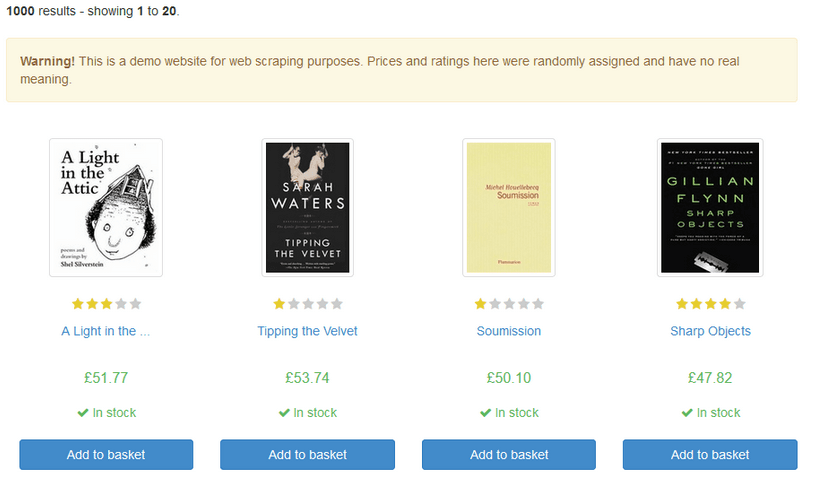
Each book on a listing page is one article element. This is the first one, with the indentation tidied, blank lines removed and the basket form left out:
1<article class="product_pod">
2  <div class="image_container">
3    <a href="catalogue/a-light-in-the-attic_1000/index.html"><img src="media/cache/2c/da/2cdad67c44b002e7ead0cc35693c0e8b.jpg" alt="A Light in the Attic" class="thumbnail"></a>
4  </div>
5  <p class="star-rating Three">
6    <i class="icon-star"></i>
7    <i class="icon-star"></i>
8    <i class="icon-star"></i>
9    <i class="icon-star"></i>
10    <i class="icon-star"></i>
11  </p>
12  <h3><a href="catalogue/a-light-in-the-attic_1000/index.html" title="A Light in the Attic">A Light in the ...</a></h3>
13  <div class="product_price">
14    <p class="price_color">£51.77</p>
15    <p class="instock availability">
16      <i class="icon-ok"></i>
17      In stock
18    </p>
19  </div>
20</article>The link text is cut short, "A Light in the ...", so the full title comes from the link's title attribute. The rating is the second class name on the p element. The words "In stock" come after the i element inside their paragraph.
Why parse response.content and not response.text?
Because Requests may decode the page wrongly before lxml sees it. books.toscrape.com sends Content-Type: text/html with no charset. In that case Requests uses ISO-8859-1: "The only time Requests will not guess the encoding is if no explicit charset is present in the HTTP headers and the Content-Type header contains text. In this situation, RFC 2616 specifies that the default charset must be ISO-8859-1." (Requests, advanced usage). The page itself declares UTF-8 in a meta tag, <meta http-equiv="content-type" content="text/html; charset=UTF-8" />.
The first price on the page:
What you pass to html.fromstring() |
What lxml returns |
|---|---|
response.content, the bytes |
£51.77 |
response.text, decoded by Requests as ISO-8859-1 |
£51.77 |
1print(response.encoding)  # ISO-8859-1
2print(html.fromstring(response.text).xpath('string(//p[@class="price_color"])'))     # £51.77
3print(html.fromstring(response.content).xpath('string(//p[@class="price_color"])')) # £51.77lxml's documentation gives the rule: "You should generally avoid converting XML/HTML data to unicode before passing it into the parsers. It is both slower and error prone." (lxml, parsing XML and HTML)
What does xpath() return?
It depends on the expression. lxml's documentation lists the return types (XPath and XSLT with lxml), and these are the results on the first book:
| The expression gives | xpath() returns |
On the first book |
|---|---|---|
| A node-set | A list | .//p[@class="price_color"]/text() gives ['£51.77'] |
| A string | A string | string(.//p[@class="price_color"]) gives '£51.77' |
| A number | A float | count(//article[@class="product_pod"]) gives 20.0 |
| A boolean | True or False |
boolean(.//h3) gives True |
1book = tree.xpath('//article[@class="product_pod"]')[0]
2
3print(book.xpath('.//p[@class="price_color"]/text()'))           # ['£51.77']
4print(book.xpath('string(.//p[@class="price_color"])'))           # £51.77
5print(tree.xpath('count(//article[@class="product_pod"])'))       # 20.0
6print(repr(book.xpath('string(.//p[@class="no-such-class"])'))) # ''A list is easy to store by mistake: title = book.xpath(".//h3/a/@title") makes title a list holding one string. Wrap the path in string() to get the value itself. When nothing matches, string() gives an empty string, where taking [0] of an empty list raises IndexError.
Strings taken from a node-set keep a link to the element they came from. The documentation says this "means that the tree will be kept alive by the string, which may have a considerable memory impact in the case that the string value is the only thing in the tree that is actually of interest" (XPath and XSLT with lxml). When you keep many strings from many pages, pass smart_strings=False to xpath() and you get plain strings.
For the XPath language itself, see an introduction to XPath with examples.
Why does every book get the same price?
Because the path inside the loop starts with //. On an element, "the XPath expression is evaluated against the element (if relative) or against the root tree (if absolute)" (XPath and XSLT with lxml), so // searches the whole page from every book.
1books = tree.xpath('//article[@class="product_pod"]')
2absolute = [b.xpath('string(//p[@class="price_color"])') for b in books]
3relative = [b.xpath('string(.//p[@class="price_color"])') for b in books]
4print(len(set(absolute)), len(set(relative))) # 1 20The absolute path gives all 20 books the first book's price, £51.77, and the relative path gives 20 different prices. Start every path inside a loop with .. CSS selectors in lxml do not have this problem: cssselect prefixes each translation with descendant-or-self::, which scopes it to the element you call it on (cssselect). In the same check, book.cssselect("p.price_color") also gave 20 different prices.
Why does @class="star-rating" match nothing?
Because the attribute is star-rating Three, and @class="star-rating" compares the whole string. On the first listing page:
| Selector | Elements matched |
|---|---|
tree.xpath('//p[@class="star-rating"]') |
0 |
tree.find_class("star-rating") |
20 |
tree.cssselect("p.star-rating") |
20 |
find_class() comes with lxml.html, which notes that "class names are space separated in HTML" and that "Class names are case sensitive" (lxml.html). A CSS class selector works because cssselect writes the whole-word class test for you:
1from cssselect import HTMLTranslator
2
3print(HTMLTranslator().css_to_xpath("p.star-rating"))It prints descendant-or-self::p[@class and contains(concat(' ', normalize-space(@class), ' '), ' star-rating ')]. The shorter contains(@class, "star-rating") also matches a class name that only contains those letters, such as star-rating-large.
The rating itself is the other class name:
1rating = book.find_class("star-rating")[0]
2print(rating.get("class").split()) # ['star-rating', 'Three']When should you use CSS selectors instead of XPath?
When the selector is about tags, classes and ids. cssselect "translates CSS selectors to XPath 1.0 expressions that can be used with lxml's XPath engine" (lxml, CSS selectors), so anything you select with CSS in lxml you could also select with XPath, and CSS is shorter for classes. XPath does what CSS selectors cannot: "Per W3C standards, CSS selectors do not support selecting text nodes or attribute values." (Scrapy, selectors)
However, it may have a steeper learning curve for those not familiar with its syntax. CSS selectors, on the other hand, are a simpler and more familiar method for selecting elements, especially for those with experience in web development. They are based on CSS rules used to style HTML elements, which makes them more intuitive for web developers.
| You want to | XPath | CSS through cssselect |
|---|---|---|
| Match one class among several | contains(concat(' ', normalize-space(@class), ' '), ' price_color ') |
.price_color |
| Read an attribute's value | @title returns it |
Select the element, then .get("title") |
| Read text | text(), or string() for all of it |
Select the element, then .text_content() |
| Select the parent of a matching element | .. after the path, as in .//p[@class="price_color"]/.. |
:has(), which selects an element by what it contains |
The last row, on the first book and the first listing page: .. returns the div with the class product_price, and with cssselect 1.5.0 article:has(p.star-rating) matches the 20 books. Pseudo-elements such as ::text are not supported, and lxml raises ExpressionError: Pseudo-elements are not supported. (cssselect). What data parsing is compares selector types across libraries.
Ultimately, the choice between XPath and CSS selectors depends on your personal preference, familiarity with each method, and the complexity of your web scraping project.
How do you get clean text out of an element?
Use text_content(). In the ElementTree model that lxml follows, .text is the text between an element's start tag and its first child, and text after a child belongs to that child's tail (Python, xml.etree.ElementTree). On this site the words "In stock" come after an i element:
1availability = book.find_class("availability")[0]
2print(repr(availability.text))            # '\n    '
3print(repr(availability.text_content()))  # '\n    \n    \n        In stock\n    \n'
4print(" ".join(availability.text_content().split())) # In stocktext_content() "Returns the text content of the element, including the text content of its children, with no markup" (lxml.html). The whitespace stays, so split and join it, or use XPath's normalize-space() inside the expression. A practical guide to XML parsing with Python explains the text and tail model behind this.
How do you follow the next page?
Read the next link's href and join it to the address of the page you are on:
1from urllib.parse import urljoin
2
3next_href = tree.xpath('string(//li[@class="next"]/a/@href)')
4next_url = urljoin(response.url, next_href)
5print(next_href, next_url)The link is relative, and it changes form between pages.
| Page | href of the next link |
Joined with urljoin() |
Added to the site's address as text |
|---|---|---|---|
https://books.toscrape.com/ |
catalogue/page-2.html |
https://books.toscrape.com/catalogue/page-2.html |
https://books.toscrape.com/catalogue/page-2.html |
https://books.toscrape.com/catalogue/page-2.html |
page-3.html |
https://books.toscrape.com/catalogue/page-3.html |
https://books.toscrape.com/page-3.html, which answered 404 |
urljoin() builds an absolute address from a base address and a relative one (urllib.parse). lxml can do the same for every link at once: parse with html.fromstring(response.content, base_url=response.url) and call tree.make_links_absolute() (lxml.html). Building a web crawler in Python covers following links across a whole site.
How do you save the results?
Write one dictionary per book with csv.DictWriter. Open the file with newline="": Python's documentation says "If csvfile is a file object, it should be opened with newline=''" (csv). The complete scraper below does this.
You use Scrapy, or want one API for CSS and XPath. Where does parsel fit?
parsel is the selector library inside Scrapy, and it runs on lxml. Scrapy's documentation: "Scrapy Selectors is a thin wrapper around parsel library", and parsel "uses lxml library under the hood, and implements an easy API on top of lxml API" (Scrapy, selectors).
Parsel, a part of the Scrapy framework, can be an excellent addition to your toolkit. It is built on top of the lxml library and provides additional functionality, like handling character encoding and convenient methods for working with CSS and XPath selectors.
It adds what lxml's CSS support leaves out: ::text for text and ::attr(name) for attribute values. parsel's documentation says of them that they "will most probably not work with other libraries like lxml or PyQuery" (parsel usage). The same extraction in parsel:
1from parsel import Selector
2
3page = Selector(body=response.content)
4for book in page.css("article.product_pod"):
5    title = book.css("h3 a::attr(title)").get()
6    price = book.css("p.price_color::text").get()
7 print(title, price)| lxml | parsel | |
|---|---|---|
| Every book | tree.xpath('//article[@class="product_pod"]') |
page.css("article.product_pod") |
| Title | book.xpath("string(.//h3/a/@title)") |
book.css("h3 a::attr(title)").get() |
| Price | book.xpath('string(.//p[@class="price_color"])') |
book.css("p.price_color::text").get() |
| Nothing found | '' |
None |
get() returns the first match, and "if there are no matches, None is returned" (parsel usage). Pass the bytes here too. body is decoded as UTF-8 unless you pass encoding (parsel API reference). Selector(body=response.content) gives £51.77 and Selector(text=response.text) gives £51.77.
It is also possible to use parsel's selectors with regex expressions after the css and xpath extraction: re_first() applies a regular expression to the result, and page.css("p.price_color::text").re_first(r"[\d.]+") gave 51.77, the first price on the page. Write the pattern as a raw string. Since Python 3.12, "Unrecognized escape sequences produce a SyntaxWarning" (Python lexical analysis), and "\d" in a normal string is one.
Meet parsel covers the library in more depth, and Python web scraping tools compares Beautiful Soup, lxml and parsel.
What does the whole scraper look like?
Every lxml step above in one file. It visits all 50 pages, waits a second between them, and writes each book's title, price, rating, availability and address to books.csv. The site lists 1,000 books, so a full run should write 1,000 rows, one for each book. It uses find_class() rather than CSS selectors, so it needs only Requests and lxml.
1"""Scrape every book on books.toscrape.com with Requests and lxml, and save them to books.csv.
2
3Needs Python 3.10 or later and the packages requests and lxml.
4"""
5import csv
6import time
7from urllib.parse import urljoin
8
9import requests
10from lxml import html
11
12START_URL = "https://books.toscrape.com/"
13FIELDS = ["title", "price", "rating", "availability", "url"]
14
15
16def first_text(elements):
17    """The whitespace-normalised text of the first element, or an empty string."""
18    return " ".join(elements[0].text_content().split()) if elements else ""
19
20
21def parse_books(tree, page_url):
22    for book in tree.xpath('//article[@class="product_pod"]'):
23        rating = book.find_class("star-rating")
24        classes = rating[0].get("class", "").split() if rating else []
25        yield {
26            "title": book.xpath("string(.//h3/a/@title)"),
27            "price": book.xpath('string(.//p[@class="price_color"])'),
28            "rating": next((c for c in classes if c != "star-rating"), ""),
29            "availability": first_text(book.find_class("availability")),
30            "url": urljoin(page_url, book.xpath("string(.//h3/a/@href)")),
31        }
32
33
34def scrape(start_url, delay=1.0):
35    url = start_url
36    while url:
37        response = requests.get(url, timeout=30)
38        response.raise_for_status()
39        tree = html.fromstring(response.content)
40        yield from parse_books(tree, response.url)
41        next_href = tree.xpath('string(//li[@class="next"]/a/@href)')
42        url = urljoin(response.url, next_href) if next_href else None
43        if url:
44            time.sleep(delay)
45
46
47def main():
48    count = 0
49    with open("books.csv", "w", newline="", encoding="utf-8") as f:
50        writer = csv.DictWriter(f, fieldnames=FIELDS)
51        writer.writeheader()
52        for book in scrape(START_URL):
53            writer.writerow(book)
54            count += 1
55    print("Saved", count, "books to books.csv")
56
57
58if __name__ == "__main__":
59 main()You can execute your web scraping script from the same python console or terminal where you installed the lxml library. This way, you can run the script and observe the output directly in the console or store the scraped data in a file or a database, depending on your project requirements.
When is lxml the wrong tool?
When the data is added by JavaScript. lxml parses the HTML the server sent. If the values you can see in a browser are not in response.content, the page builds them in the browser. Web scraping dynamic websites with Zyte API covers getting the rendered page, which you can then parse with lxml.
When the page must be parsed the way a browser parses it. Zyte's documentation notes that parsing with "libraries that do not implement HTML5 parsing, such as lxml.html (used by Scrapy by default), results in a different tree structure" (Zyte API HTTP requests). lxml can use html5lib, "a Python package that implements the HTML5 parsing algorithm", through its lxml.html.html5parser module (lxml, html5lib parser).
When your requests are blocked. lxml parses and fetches nothing. Zyte API fetches the page, handling bans, and returns the HTML as httpResponseBody or, after rendering, browserHtml, which you parse with lxml the same way. Its documentation says it "handles banned responses automatically and transparently where possible" (Zyte API error handling). Zyte sells it.
FAQ
Q: Why do my lxml results show £ instead of £?
A: Because lxml parsed text that Requests had already decoded as ISO-8859-1, which Requests does when a page's Content-Type header names no charset. Pass response.content, the bytes, to html.fromstring() instead. On a practice site that declares UTF-8 in a meta tag, the bytes gave £51.77 and the decoded text gave £51.77.
Q: Why does lxml's xpath() return a list instead of a string?
A: Because the expression selects a node-set, and lxml returns node-sets as lists, even when one node matches. Wrap the path in string() to get a single string, which is empty when nothing matches.
Q: Why does my XPath inside a loop give every item the same value?
A: Because the path starts with //, which searches the whole document from any element. Start it with .// so it searches only inside the element you are looping over.
Q: Why does @class="name" match nothing in lxml?
A: Because @class="name" compares the whole attribute, and the element carries more than one class, such as star-rating Three. Use find_class("name"), or a CSS selector such as p.name through cssselect.
Q: Do I need cssselect to use CSS selectors with lxml?
A: Yes. cssselect is a separate package, installed with pip install cssselect. lxml's cssselect() method uses it to translate your CSS selector into XPath 1.0.
Q: What is the difference between lxml.html and lxml.etree for scraping?
A: lxml.html parses with lxml's HTML parser, which recovers from broken markup instead of raising an error, and adds methods for HTML, including text_content(), cssselect(), find_class() and make_links_absolute(). lxml.etree is the general interface, used with its XML parser for sitemaps, feeds and other XML.
Q: How do I make relative links absolute with lxml?
A: Join each one with urllib.parse.urljoin(response.url, href), or parse the page with html.fromstring(response.content, base_url=response.url) and call make_links_absolute() on the tree to rewrite every link at once.
Q: Can lxml scrape a page that loads its content with JavaScript?
A: Not on its own. lxml parses the HTML it is given and runs no JavaScript. Render the page in a browser first, or ask a service such as Zyte API for the rendered HTML, then parse that HTML with lxml.