Cyber Week (Black Friday and Cyber Monday) is one of the busiest weeks for e-commerce pricing teams. Competitors change prices and promotions often, and checking them by hand does not scale. An AI assistant can do the checking, but many store pages block it. With Zyte MCP, Claude and other AI agents can open many of those pages and return a price table for your team.
It’s basically a super-tool for your AI agents and assistants which provides them with Industry's best unblocking and scraping technologies, bundled as an easy to use MCP server for your agents, and you only pay for the successful responses, and not any failed attempt.
| # | Section | What you get |
|---|---|---|
| 1 | Why Claude can't open many competitor pages | The reason stores block AI assistants |
| 2 | Connect Zyte MCP to Claude | Five steps, no code |
| 3 | Three prompts for pricing teams | Prompts you can copy, and what Zyte returned in my test |
| 4 | Cost | What it is for, what it costs, and when to use something bigger |
| 5 | Developers: run it every day | Two commands for Claude Code, Codex, or Copilot CLI |
I asked my AI assistants to get me product information from various ecommerce stores. Many of such stores refused or did not answer. Through Zyte MCP, Claude managed to get the actual prices, crossed-out prices, and stock status from the stores. This article shows the setup, three prompts for common pricing tasks, and what I learned from the results.
Why Claude can't open some competitor pages
Many stores block automated requests, and that often includes your AI assistant.
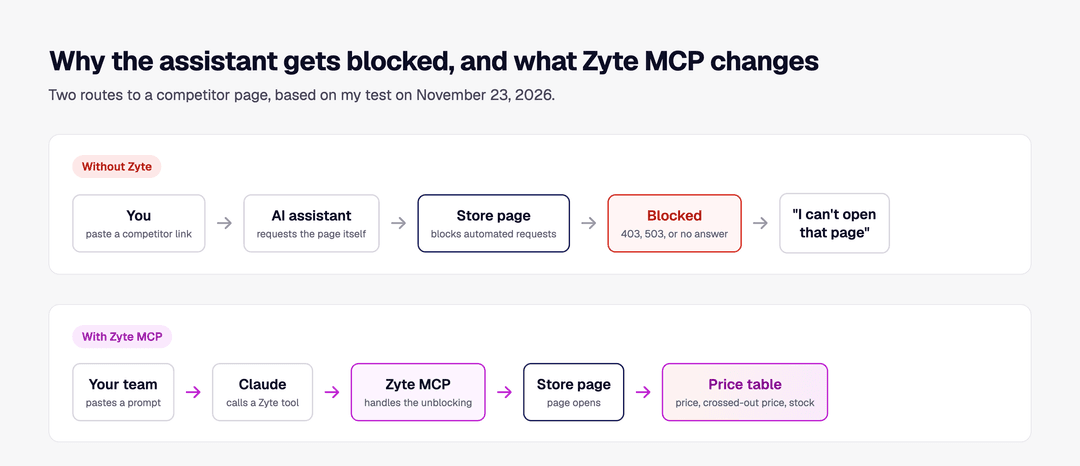
When you paste a competitor's product link into a chat, Claude does not open it in your browser. It requests the page on its own, and many stores block requests like that. The store then sends an error or no page at all.
AI services also send more people to store sites. Adobe's 2026 US holiday shopping forecast expects AI traffic to US retail sites to rise 130% over the 2025 season. Adobe measures this traffic as people clicking on a link from an AI service. Zyte's article on how websites respond to traffic from AI agents gives the store side in more detail.
This is what I recently experienced using my AI Assistant:
| Store | Plain request, like an AI assistant | Through Zyte MCP |
|---|---|---|
| Store A, a big online store | Error 503, No data | Name, price, crossed-out price, stock, and colors |
| Store B, an electronics chain | No answer after 20 seconds | Name, price, and stock |
| Store C, an apparel chain | 403, blocked my agent | Unblocked and got the data |
Connect Zyte MCP to Claude in five steps
You add Zyte to Claude as a custom connector, and everyone on your team can do the same.
Zyte MCP is a server that follows the Model Context Protocol (MCP), an open standard that lets AI assistants use outside tools. Zyte MCP gives Claude tools to fetch a page, read a product, and search the web. The page loads through Zyte API, which handles the unblocking for you.
Do these steps in Claude. The screens are the same on claude.ai and in the Claude desktop app.
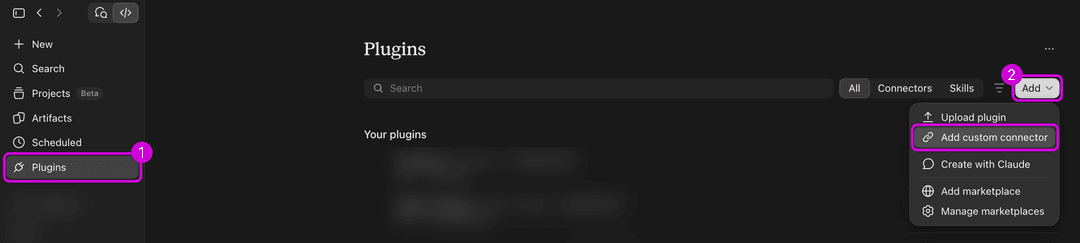
- Open Plugins in the sidebar.
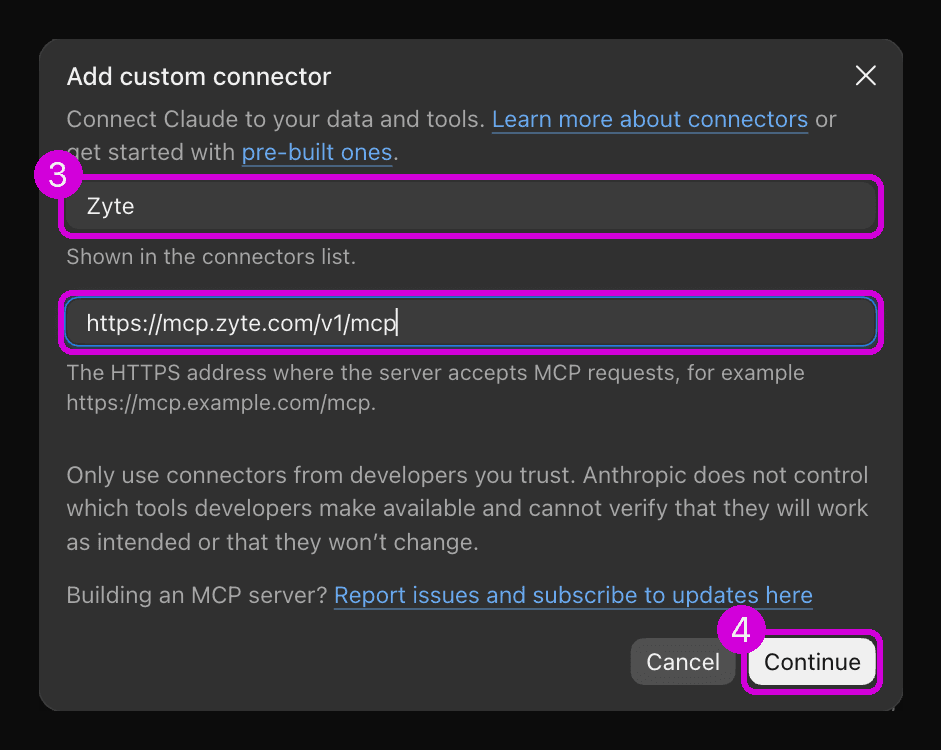
- Select Add > Add custom connector.
- Enter the name Zyte and the URL https://mcp.zyte.com/v1/mcp.
- Select Continue.
- Sign in to Zyte when Claude asks you to.
If you do not have a Zyte account, create one on here, You’ll get $5 free credits which will get you started.
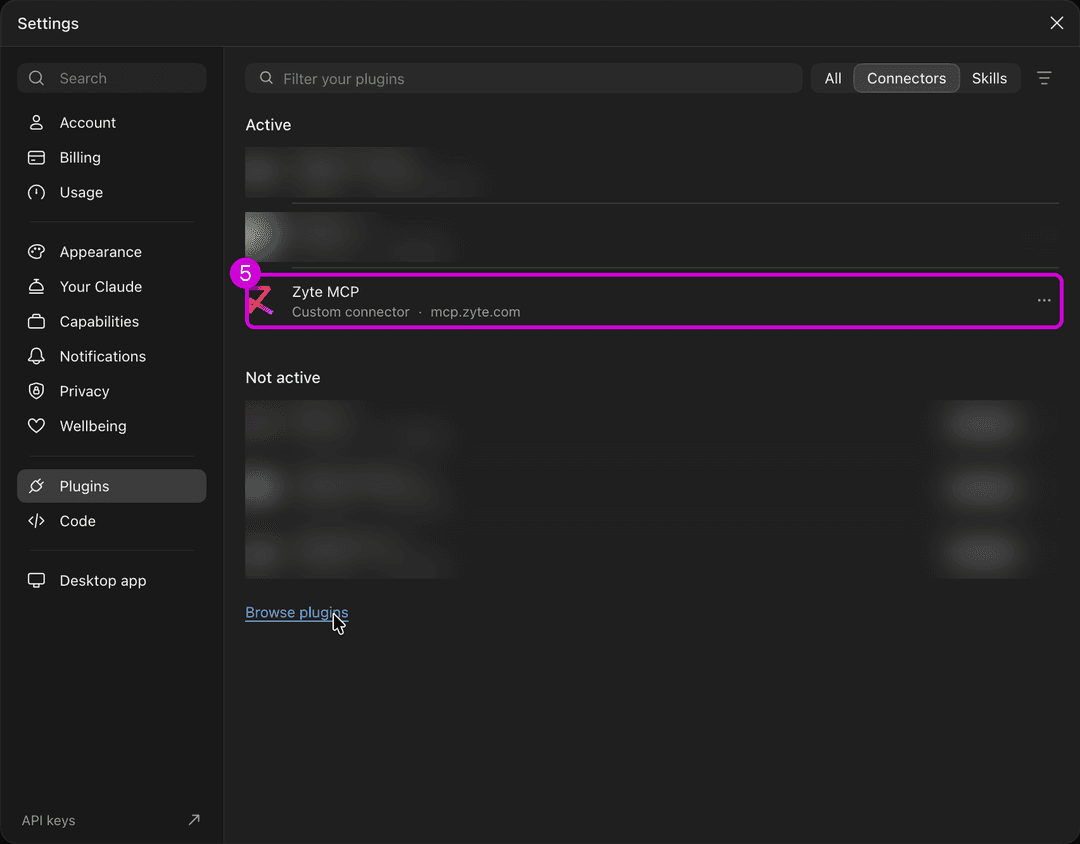
After you sign in, the Zyte connector shows as active in Settings > Plugins > Connectors.
On Team and Enterprise plans, an Owner adds the connector once, and then each member selects Connect. The Claude help article on custom connectors has the plan details.
To check the connection, paste this prompt into a new chat:
1Fetch https://books.toscrape.com with Zyte and tell me the page title.Claude should reply with "All products | Books to Scrape - Sandbox". That page is a practice site for web scraping. If Claude answers without using Zyte, start a new chat and keep the words "with Zyte" in your prompt.
Three prompts for pricing teams
Each prompt names Zyte, asks for a table, and tells Claude not to guess.
1. Take a competitor price snapshot
1Use Zyte to open each of these competitor product pages:
2[link 1]
3[link 2]
4[link 3]
5
6Make a table with these columns: store, product name, price, crossed-out price, in stock, link.
7Tell me if two pages are not the same product, for example a bundle, a refurbished item, or a different model.
8Tell me if a price looks wrong.
9Do not guess a value that is not on the page.Sample result:
| Store | Price | Crossed-out price | In stock | Note |
|---|---|---|---|---|
| Store A | $348.00 | $459.99 | Yes | Has a crossed-out price |
| Store B | $348.00 | None | Yes | Same price, no crossed-out price |
| Store C | $398.00 | $468.00 | Not shown | A bundle with a two-year warranty, not the same item |
Store A showed a crossed-out price, so its $348 looked like a 24% discount. Store B sold the same headphones for the same $348 with no crossed-out price. For a pricing team, that changes the decision. Store A's promotion is not a real price gap in the market, so you may not need to react to it.
Use the full product link from the address bar. In my test, a short link sent the request to the store's home page, and Claude then read the home page, not the product. If the answer is about a home page and not your product, send the full link.
2. Check how your product is listed
1Use Zyte to search for [your product name and model number] on these store websites:
2[store 1 website]
3[store 2 website]
4[store 3 website]
5
6Open each store's search results page.
7Keep only new items that are the exact model.
8Remove bundles, refurbished, open-box, and pre-owned items.
9Make a table with store, product name, price, and link.
10Mark each listing that is below [your price].
11Tell me if a price looks wrong.Brand and channel teams can use this prompt to check how resellers list a product. I ran it for the previous model of the same headphones. The search results mixed new items with refurbished units at $199.99, pre-owned units at $130.00, and bundles at $398.00, so the filter lines matter. On one search page, some extracted prices were 100 times too high, such as 39800 for a $398 item. The product name on the same row said "$398.00". The "Tell me if a price looks wrong" line can help catch this type of value.
3. Track competitor stock
1Use Zyte to open [competitor product link].
2Tell me if the item is in stock.
3List the colors or sizes on the page.
4If the page does not show stock for each color or size, say so.
5Do not guess.When a competitor runs out of stock, you may not need to match its price. For Store A, Zyte returned the black model as in stock and listed six colors. Zyte returned no stock data for each color, so the correct answer for the other colors is "not shown". The "Do not guess" line tells Claude to say that and not invent an answer.
Limits and costs
Claude and Zyte MCP give your team fast spot checks, and your team still makes the pricing decision.
- This is for spot checks, not a pricing system. For daily price feeds across many products, use a scheduled Scrapy spider on Scrapy Cloud, or let Zyte Data deliver the data for you.
- Check odd values before you act on them. In my test, one result had a crossed-out price lower than its sale price. Some prices on one search page were 100 times too high.
- New users get $5 of free credit for 30 days, with no credit card. At pay-as-you-go prices, one browser page load on two of the stores I tested costs about $0.002 to $0.008. That makes $5 worth roughly 600 to 2,500 page loads .
- If a request fails, you are not charged for it, according to the Zyte API pricing documentation.
- After the trial month, your account stops until you set a spending limit.
Developers: run it every day
If your team uses a coding agent, one command adds Zyte MCP and a second command signs you in.
The commands below come from the Zyte MCP documentation.
For Claude Code:
1claude mcp add --transport http zyte https://mcp.zyte.com/v1/mcp
2claude mcp login zyteFor Codex CLI:
1codex mcp add zyte --url https://mcp.zyte.com/v1/mcp
2codex mcp login zyteFor GitHub Copilot CLI:
1copilot mcp add --transport http zyte https://mcp.zyte.com/v1/mcp
2copilot mcp login zyteThe prompts above work the same in a coding agent. A coding agent can also run the first prompt every morning during Cyber Week and save each table to a CSV file. That gives your team a simple price history. To turn that into a scheduled crawl, read how to use Zyte MCP to plan web scrapers. For more ideas, read 12 things I use Zyte MCP for.
Frequently asked questions
Can Claude monitor competitor prices?
Yes, for spot checks. With Zyte MCP connected, Claude can open competitor product pages, read prices, crossed-out prices, and stock status, and compare them in a table. For daily monitoring across many products, use a scheduled spider or Zyte Data.
Is Zyte MCP free?
Zyte MCP itself is free to connect. Zyte bills the pages it loads at Zyte API prices, and you are not charged for failed requests. New users get $5 of free credit for 30 days, with no credit card.
Does it work with ChatGPT?
Zyte documents setup for claude.ai, Claude Code, Codex CLI, GitHub Copilot CLI, and VS Code. Zyte MCP also works with any app that can connect to a remote MCP server by URL. I did not test ChatGPT for this article.